
Most write-ups cheer the rising curve but skip the part that matters: how a small B2B site facing a long sales cycle and modest search volume could pull off the same result.
The overlooked lesson usually lives in the unglamorous work that never makes the headline: the pruned archive, the corrected statistic, the report that finally tied B2B SEO results to revenue.
This list covers twelve scenarios in four groups: subtraction work, ecommerce catalogs, SaaS buyer searches, and trust plus reporting.

TL;DR: The Parts Most Case Studies Crop Out
How These 12 Were Picked (and What Was Left Out on Purpose)
Every entry here is a composite scenario built from common B2B SEO patterns. You won’t find invented brands, numbers or quotes. No external case-study data or statistics were pulled for this piece.
Each scenario had to clear three bars:
- The decision is repeatable on a small B2B team.
- It fits long sales cycles and modest search volume.
- It carries a real caveat.
Left out were wins that leaned on a huge existing domain, one-off viral spikes and anything that couldn’t be described without fabricating data. The same applies to a search engine marketing case study: paid and organic results both hide confounders behind one clean chart.
Below is a vetting tool worth handing any colleague before they copy a B2B SEO case study. It also works as a rough SEO case study template for your own write-ups.
Questions to Ask Any B2B SEO Case Study Before You Copy It
| Question | Why It Matters |
|---|---|
| What got removed or merged? | Deletions and consolidations often explain the lift, and they rarely appear on the results slide. |
| What was the baseline and timeframe? | Growth from a tiny or seasonal starting point can look dramatic and mean little. |
| Which page types drove the result? | You need to know whether blog posts, category pages or product pages carried the gain before copying a tactic. |
| Did leads or pipeline move, or only sessions? | Traffic that never reaches sales won’t justify budget on a long cycle. |
| What else changed at the same time (migration, paid push, rebrand)? | Any of these can move the chart independently of SEO work. |

The Subtraction Files
Removing pages feels dangerous: someone wrote them, someone funded them, and someone expects traffic to sag the moment they vanish. That anxiety is why bloated archives survive for years.
1. The Content Audit That Deleted Its Way Into Rankings
Picture a B2B site carrying years of thin event recaps, outdated news posts and near-duplicate glossary pages. Most of those URLs earn zero impressions, and together they dilute the site’s topical authority on the subjects buyers care about.
The fix is a page-by-page content audit. Score every URL across a full year, to smooth out seasonality, on clicks, impressions, backlinks, conversions and sales usage. Record each URL’s scores and assigned action in a format such as this sample SEO audit report, so sales and stakeholders can review the delete list before anything goes live. Each URL then gets one of five decisions: keep, update, consolidate, rewrite, or remove and redirect (seo.co).
| Action | When It Fits | What Happens to the URL |
|---|---|---|
| Keep | Earns clicks, conversions or regular sales use | Stays live as is |
| Improve | Right topic, but thin or outdated content | Refreshed in place on the same URL |
| Merge | Overlaps a stronger page on the same topic | Unique content folded into the stronger page, old URL 301 redirected |
| Redirect | No unique value left, but holds backlinks | 301 redirected to the closest relevant survivor |
| Remove | No traffic, links, conversions or sales use | Returns a 410 or 404 status |
A typical published B2B SEO case study shows the lift on the surviving pages and leaves the delete list out entirely. That omission hides the real mechanism of content pruning: fewer weak pages can make it easier for strong ones to rank.
A page with a handful of monthly visits may still feed demos or get sent by reps in follow-up emails, so check with sales before removing anything.

Which pages on your site would you be nervous to delete, and why?
2. Two Pages, One Query, and the Merge That Settled It
A blog post and a solution page keep swapping positions for the same commercial query, and neither holds a strong spot. That pattern is keyword cannibalization, and Search Console exposes it fast. Filter the performance report by the query, then check whether multiple URLs collect impressions for it.
Four steps settle it:
- Pick the URL that best matches search intent.
- Fold the other page’s unique content into it.
- Set a 301 redirect from the losing URL.
- Update internal links so they point at the survivor.
A redirect by itself solves nothing unless the surviving page absorbs everything useful from both versions.
Some queries carry mixed intent, where an informational URL and a commercial URL both rank legitimately, so look at the live SERP before merging anything.
3. The Internal Links Hiding Inside the Footer
Crawl reports often show thousands of internal links per page, mostly from menus, footers and sidebars. A typical case is a solution page that sits in the global nav on every URL while not a single article links to it from the body copy.
- Separate template links from in-body links in the crawl export.
- Flag orphan pages that receive no editorial links at all.
- Add descriptive contextual links from cluster articles to the commercial pages they support.
Larger archives benefit from automated internal linking, which can surface in-body link suggestions from cluster articles to commercial pages. An editor should still approve every anchor.
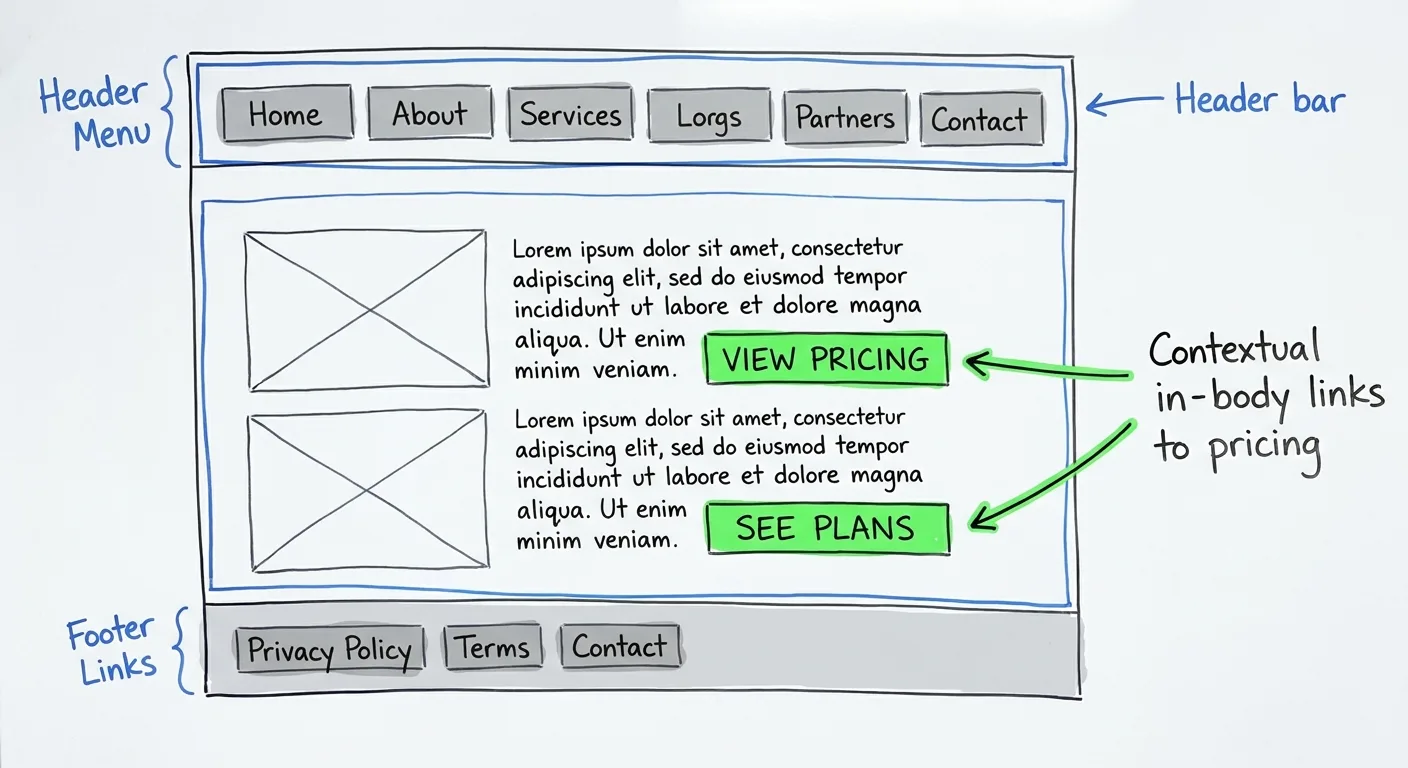
Contextual links carry topical context that navigation links rarely provide. A sentence about procurement workflows linking to the procurement solution page tells search engines what that page covers, and that’s the real payoff of internal linking.
Vary your anchor text so it reads naturally, because repeating exact-match anchors everywhere looks manufactured. Before changing mega-menus, get sign-off from the UX team.
Catalog Lessons From B2B Ecommerce Sites
B2B catalogs carry thousands of SKUs, gate pricing behind logins and serve spec-driven buyers and procurement teams who reorder on a schedule. The wins sit inside category templates and crawl settings, which is why a B2B ecommerce SEO case study rarely gets written up at all.
4. The Distributor That Turned Category Pages Into Buying Guides
This distributor’s category pages were bare product grids. Engineers searched for a valve rated for a specific application or compliant with a named standard, and the site had nothing that could rank for those searches.
Each category grid got a short product selection guide:
- Guidance on material, rating, certification and fit.
- Links to subcategories.
- Answers to two or three questions sales hears on every call.
Layout matters for category page SEO. Place a brief intro above the product grid, keep the grid near the top, and put the fuller guidance underneath. That way, buyers who already know the part can order right away, while everyone else scrolls down for help choosing.
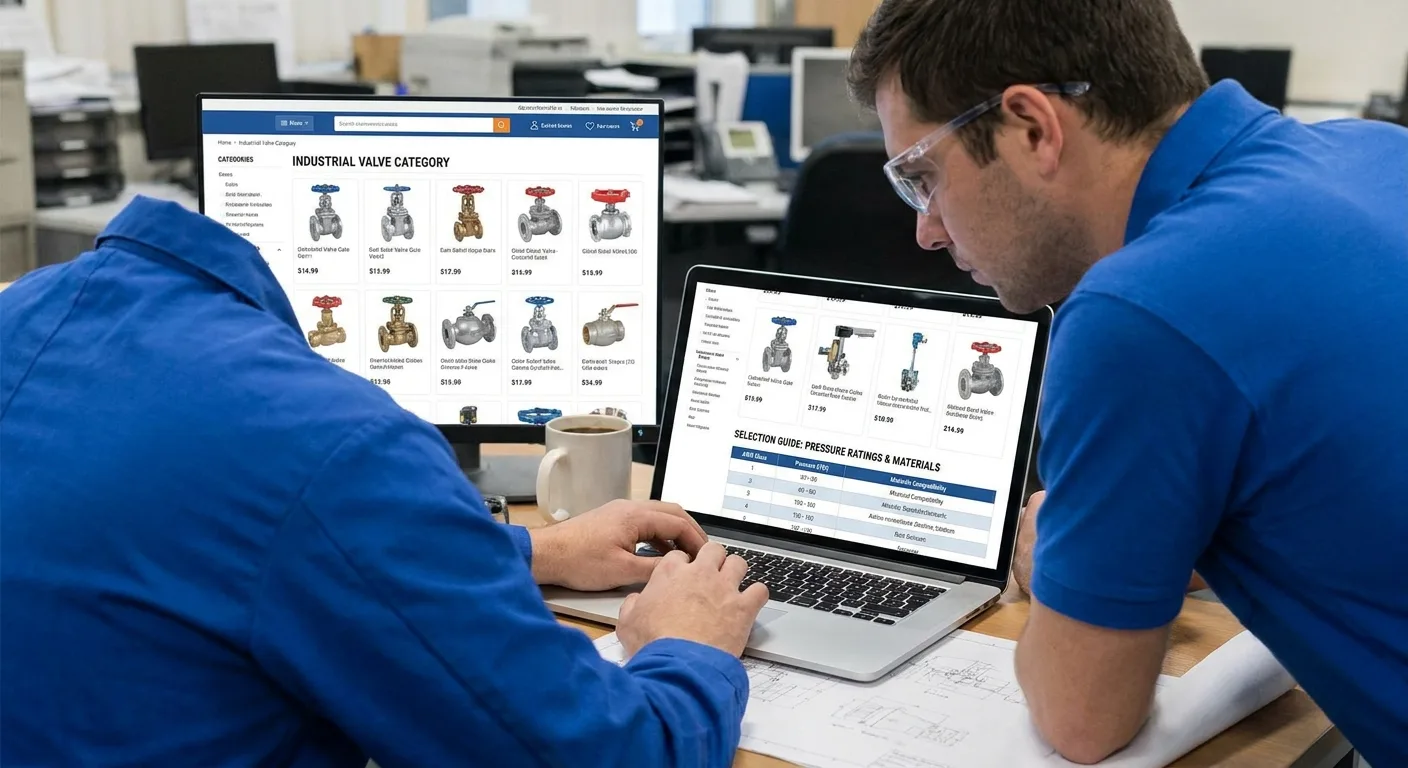
Copying the same boilerplate onto hundreds of categories won’t help, so begin where genuine demand meets healthy margin.
What do your reps explain on every call that your category pages never mention?
5. Faceted Filters That Spawned a Million Useless URLs
Every filter combination on this catalog (voltage, size, brand, finish) produced a crawlable URL. Crawlers spent their crawl budget on near-identical filtered pages while new products sat undiscovered.
Typical symptoms:
- Search Console reports large counts of crawled but not indexed URLs.
- Crawl logs are heavy with parameters.
- New SKUs take a long time to appear in search.
Start by mapping faceted navigation combinations against real keyword demand, then give each group one control:
| Control | What It Does | Use It When |
|---|---|---|
| Indexable landing page | Gives a filter combination its own static URL, title and intro | The combination has real search demand |
| Canonical tag | Points ranking signals to a preferred URL; Google treats it as a hint rather than a directive (Wikipedia). | The filtered page is a near duplicate of its main category |
| Noindex | Keeps the page out of the index, but crawlers must be able to reach the page to see the tag (Google Search Central) | Shoppers use the filter, but nobody searches for it |
| robots.txt disallow | Stops crawling; crawlers then can’t see any noindex tag on the page (Google Search Central) | Low-value parameter combinations where indexing control isn’t needed |
Any combination left over can usually be handled with a canonical tag or noindex.
Platform and ERP constraints often decide what’s feasible, so loop in developers before promising anyone a URL structure.
6. Spec Sheets Trapped in PDFs and Behind Logins
A manufacturer’s most-searched information lived in downloadable PDFs or behind account logins: dimensions, tolerances, part numbers and compatibility. Search engines couldn’t match part number search queries, cross-reference searches or spec-plus-application queries to any product page, even though those searchers were ready to order.
The team’s moves:
- Publish core specs as crawlable HTML tables.
- Keep the PDF as a supporting download.
- Add product schema with accurate identifiers; review how schema markup works before applying structured data across thousands of SKUs.
- Build cross-reference pages for superseded part numbers.
Pricing and account terms stayed gated. That split serves search engines and keeps commercial control with sales:
| Keep Public | Keep Gated |
|---|---|
| Dimensions | Contract pricing |
| Materials | Volume tiers |
| Certifications | Account terms |
| Compatibility | |
| Part numbers |
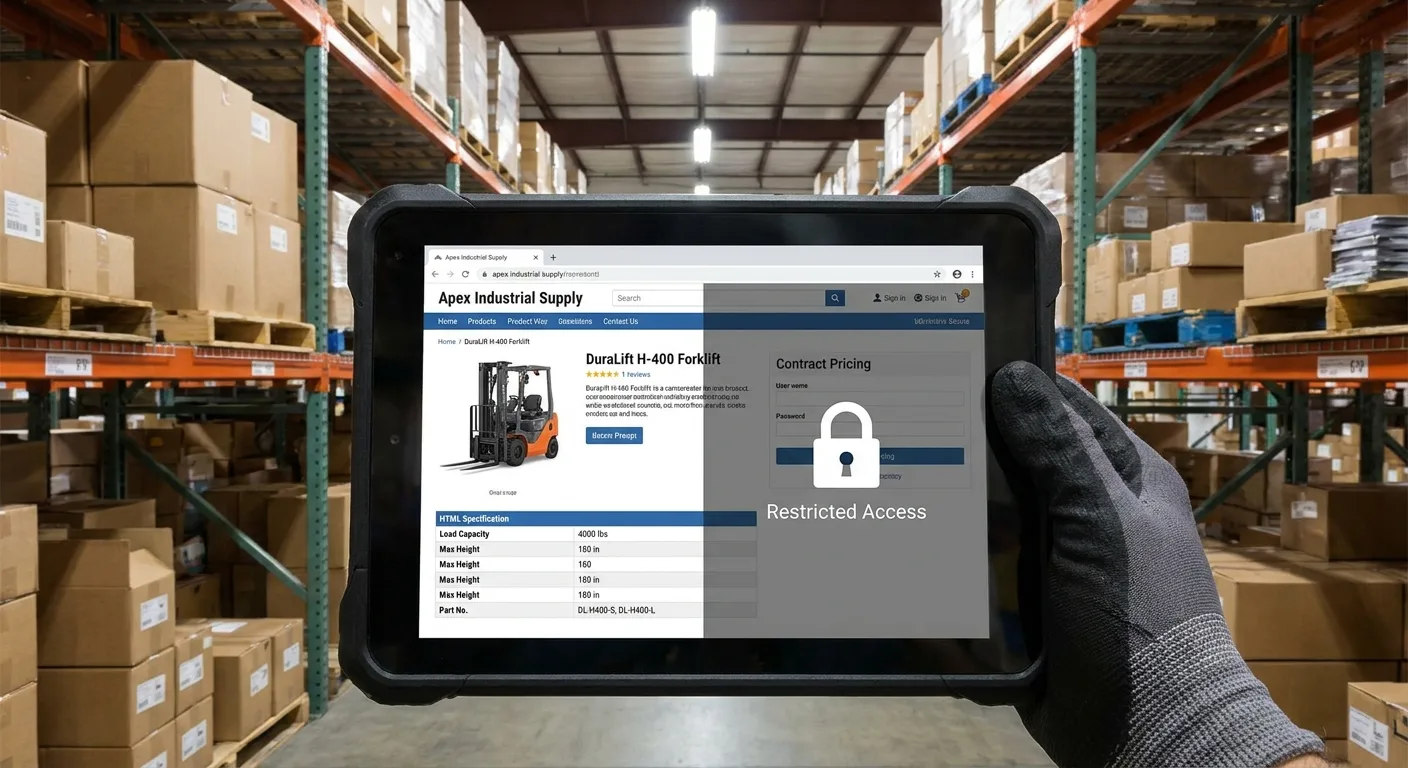
Spec data pulled from an ERP feed carries the feed’s errors onto the page. Validate it before publishing, because a wrong tolerance can send a buyer the wrong part.
Which spec do your customers search for that your site only shares in a PDF?
Where SaaS Buyers Search Before They Ever Book a Demo
Competitive head terms in software tend to attract researchers, students and other vendors, and few of them hold a budget. These entries complement a broader SEO for SaaS playbook by zeroing in on the buyer queries it tends to postpone. Each entry below is a B2B SaaS SEO case study lesson from outside the usual “rank for the category keyword” routine.
7. The Integration Pages Built for Evaluators
Integrations used to live on one logo wall at this SaaS company. Buyers, meanwhile, were typing queries such as:
- “[tool] integration with [tool]”
- “does [tool] connect to [tool]”
- setup and sync questions
The team gave each meaningful integration a dedicated URL. Every page covered the data that syncs, supported workflows, setup steps, limits and a screenshot, with links from relevant feature pages and help docs.
These pages drew modest traffic, but the people arriving were evaluators checking whether the tool fit their existing stack, which makes this genuine bottom-of-funnel content. Judge integration pages on assisted conversions and demo influence, since raw sessions will look small.
Thin templated pages that only swap the logo name won’t hold up. Skip integrations with no real depth or no customer use. Product and support teams usually know which integrations prospects ask about most.
8. One Product, Four Job Titles, Four Landing Pages
One product page attempted to address finance leads, operations managers, IT admins and executives simultaneously, and it convinced none of them. Each role searches in its own vocabulary: “[problem] software for [role]” or “[task] automation for [team].”
Building the persona landing pages took three steps:
- Interview sales on which roles join deals and what each one objects to.
- Build pages around each role’s problem, proof points and security or ROI concerns.
- Cross-link the pages so a champion can forward the right one inside their buying committee.
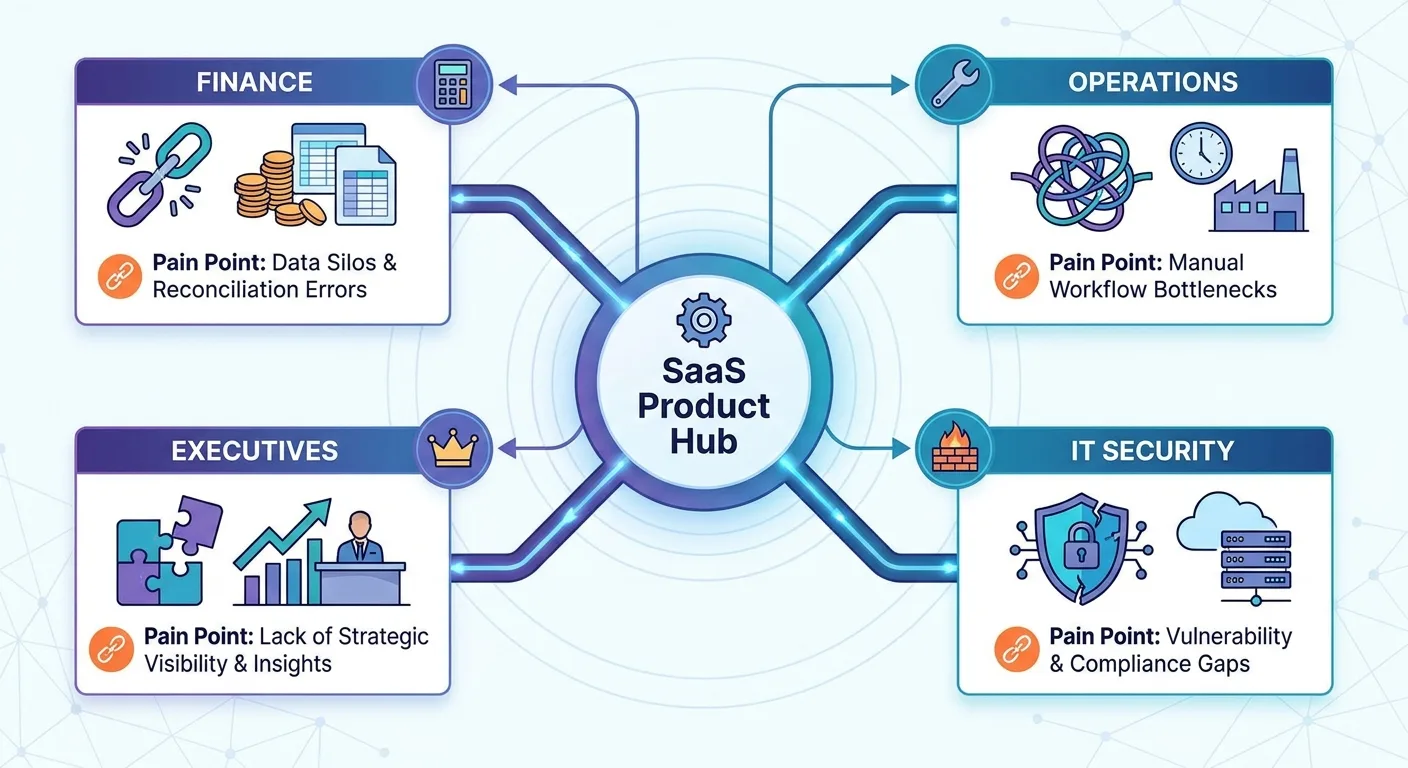
IT and security reviewers search for compliance and data-handling details, so their pages need specifics: where data lives, who can access it and which certifications apply.
If the only difference between role pages is the job title in the H1, they read as duplicates and win over no one. Build fewer pages, each with real differences, and add use case pages where the task defines the search.
Who in your buyer’s company can block a deal without ever visiting your site?
9. The Competitor Nobody in Sales Had Heard Of
A SaaS team benchmarked itself against the three rivals named on sales calls. The domains taking its target queries turned out to be a niche publisher and a smaller vendor nobody in sales had mentioned.
Mapping by keyword overlap surfaced them:
- Export the keywords you target.
- List every domain ranking in the top results.
- Rank those domains by how many of your queries they share.
- Filter out review platforms, marketplaces and giant publishers you can’t realistically displace.
SERP analysis then shows where the openings are: when a weak domain holds a top-ten spot, that query deserves priority.
Search competitors and sales competitors only partly overlap. For the positioning side, see competitor analysis for marketing teams. Overlap shifts, so re-run your competitor analysis quarterly.
Trust, Answers and the Pipeline Report
A 2025 Responsive study found that generative AI has overtaken traditional search for a quarter of B2B buyers, with nearly two-thirds using it as much as or more than search when researching vendors. Buyers and procurement reviewers discount vague or unsupported statements, and answer engines have less reason to quote them. Every budget cycle also brings the same question: what did SEO earn us?
10. The Statistic That Didn’t Say What the Blog Said It Said
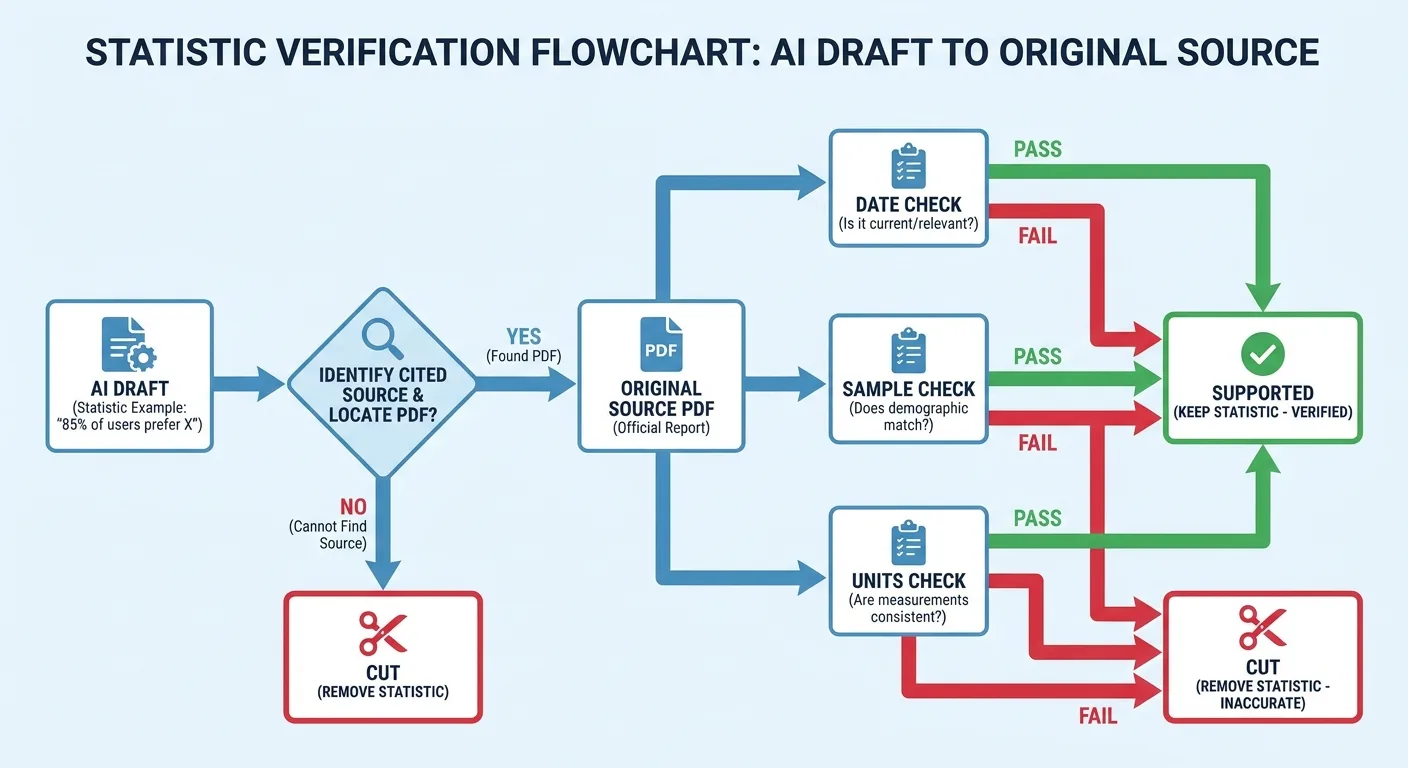
A B2B team published AI-assisted articles packed with statistics. An audit traced each figure to its cited source and found misquoted numbers, outdated studies and links to pages that never contained the claim.
The rebuilt review process:
- Open each cited source.
- Find the exact figure and its context: date, sample and units.
- Mark it supported, unsupported or needing more research.
- Cut anything unsupported instead of softening the wording.
The team turned those four steps into a repeatable fact-checking process that every AI draft passes before editing.
B2B buyers forward content to colleagues, so one wrong number damages credibility with the whole committee. That’s where AI content accuracy meets E-E-A-T: expertise signals mean little once a reviewer spots a misquote.
Finding the same number on the cited website isn’t enough to confirm a claim. What the number measures and its context have to match as well, so an adoption figure can’t back a revenue sentence even if the digits are identical.
Fact-checking takes time, so prioritize money pages and anything sales will reuse.
11. Answer-Ready Blocks for AI Overviews and Chat Answers
Chat assistants and AI-generated search summaries kept citing competitors for questions this B2B site covered in depth. The cause was easy to spot: every answer sat deep inside a long introduction, leaving nothing clean for an engine to quote.
The restructure followed a simple pattern:
- Open with a 40-60 word direct answer.
- Add a 3-6 item key-facts list.
- Include FAQs drawn from sales and support questions, marked up with FAQ schema.
- Generate JSON-LD that matches the visible content.
Treat the FAQ markup as machine-readable structure, not a display guarantee, since structured data does not guarantee display and even supported markup may not appear for every query, device, country, or page (webiano.digital).
Track which prompts cite you versus a competitor and fix competitor-cited pages first. That loop is the core of AI visibility work.
Clear structure makes your content easier to pull into AI Overviews and chat answers, but authority and accuracy still determine who earns the citation. No format promises a mention, and answer behavior shifts often, so handle answer engine optimization as routine maintenance rather than a one-off project.
12. The Report That Saved the SEO Budget
This company’s monthly reports tracked sessions and rankings, yet leadership saw no line from either metric to revenue. In response, the team reorganized its SEO reporting by page type: category, integration, role page and blog.
- Tag every URL by page type and intent.
- Join Search Console clicks and GA4 sessions with form fills and CRM opportunity data.
- Report market capture by page type monthly. Define the view once, then automate your SEO reporting so data pulls stop eating analysis time.
- Report pipeline influence quarterly to respect long cycles.
The finished report takes this shape (placeholders only; swap in your own data):
| Page Type | Clicks Trend | Leads | Pipeline Influence | Next Action |
|---|---|---|---|---|
| Category | [Up / flat / down] | [Form fills this month] | [Opportunities touched this quarter] | [Expand guidance on top categories] |
| Integration | [Up / flat / down] | [Form fills this month] | [Opportunities touched this quarter] | [Build pages for most-requested integrations] |
| Role page | [Up / flat / down] | [Form fills this month] | [Opportunities touched this quarter] | [Add security detail for IT reviewers] |
| Blog | [Up / flat / down] | [Form fills this month] | [Opportunities touched this quarter] | [Prune, merge or add commercial links] |
For B2B companies with sales cycles measured in weeks or months, last-click attribution systematically undervalues SEO (LATT SEO). Show assisted influence and self-reported attribution (“How did you hear about us?”) alongside it, so pipeline attribution reflects how buyers research. CRM hygiene limits accuracy, so flag gaps openly instead of overstating the result.

Could you show which pages would cost you pipeline if your SEO budget were cut tomorrow? A clear view of page type performance answers that, and it’s the B2B SEO case study your leadership will read closely.
Frequently Asked Questions
How long does B2B SEO take to show results?
B2B SEO results usually arrive in stages: search visibility moves first, while pipeline impact takes quarters to judge. Timing still depends on domain authority, competition and the type of change. Technical and consolidation fixes, such as merging cannibalized pages, tend to register sooner, while new content clusters need time to earn trust. Track impressions and query coverage early, because long sales cycles delay revenue impact.
Can a B2B site with tiny search volume still win with SEO?
Yes, provided the site targets queries tied to purchase decisions. When deals are large, even a few qualified visitors searching for exactly what you sell can be worth a great deal. Prioritize by deal value and intent, with volume as one input. Part-number, integration and role queries often fit. Confirm some real demand exists before building a page.
What should a published B2B SEO case study include?
A credible B2B SEO case study shows the baseline, timeframe, decisions and business outcome, including what you removed and any confounding factors. Get client approval for any data you share, link every figure to its source, and run the draft through the scrutiny table above.
When the Audit Lives in Too Many Tools
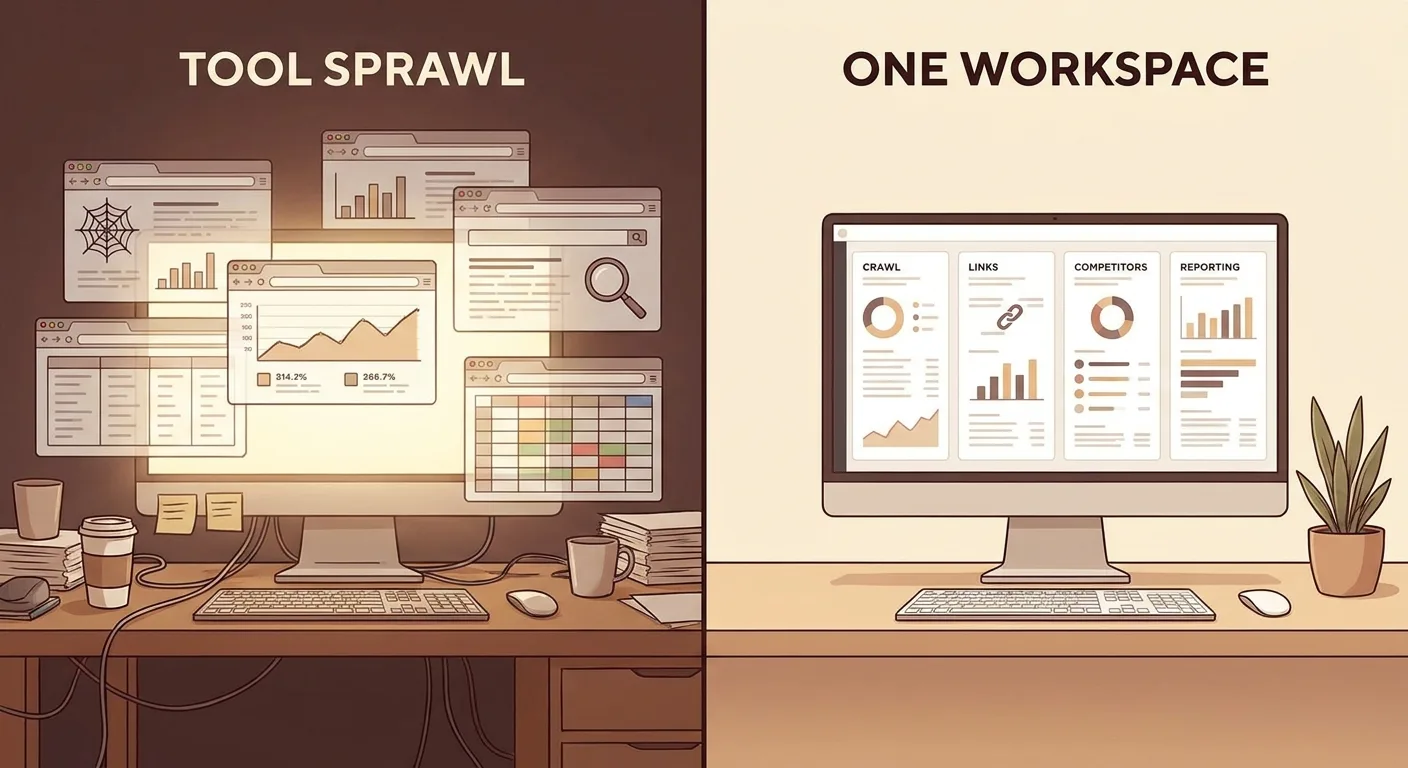
Every lesson above needs data from a different place. Crawls, rankings, Search Console, GA4 and fact-checks each land in their own export. Lining up URLs across those spreadsheets swallows the time you meant to spend deciding what to fix.
We built Vee3.ai to pull those jobs together, offering SEO automation from crawl to rank. It covers crawl, research, planning, writing, fact-checking, publishing and measurement in one workspace, as described in the Vee3.ai platform overview. Mapped to this list, crawling supports entries 1-3, fact-checking supports entry 10 and measurement supports entry 12. The decisions stay with the SEO.
Test it on your hardest site first. Start building free.
Final Thoughts
Pick one symptom and start there this month. A bloated archive calls for the audit, while buried specs need public HTML tables. SaaS traffic that never books a demo points to missing integration and role pages. And if leadership shrugs at your report, rebuild it around page types.
Your first step can be small: run the scrutiny table against your own site’s last twelve months. Document the answers, deletions included, and you’ll have the next B2B SEO case study worth reading.