In-house content teams
Hold a monthly publishing target without a production meeting
Set pages per month and the refresh balance once.
Set one number: pages per month. SEO Autopilot plans, writes, checks and delivers, and shows its reasoning for every page.
Free to start. No account or card needed.
Every new page and refresh comes with a written reason and a confidence score, drawn from your roadmap's demand, rankings and traffic.
SEO Autopilot turns your roadmap into a steady publishing rhythm. Tell it how many pages you want each month, from 1 to 500, and how many months to plan, from 1 to 12. It paces production across the month, picks the pages that qualify, and writes, reviews and delivers them. Every pick comes with a written reason and a confidence score, so you can see why a page was chosen before you read a word of it.
Most autopilot SEO tools generate articles from a keyword list and hope. Vee3.ai works from a content roadmap built on measured search demand, your existing pages and your rankings. That changes what automation can safely do: it knows which pages already exist, which are slipping, which keywords are taken, and which ideas would compete with a live page. The result is SEO on autopilot that still behaves like a strategist, not a content mill.
Autopilot balances two kinds of work. A refresh candidate always needs a live URL and a minimum age, plus evidence that it is worth the effort: a measured decline in traffic or Search Console clicks, a rank between 4 and 20, or enough age to be due. A new page needs measured search volume and a priority score above your minimum, or a place on your shortlist, and no live page of the same type already targeting its keyword.
You set the balance with labeled scales: the share of refreshes (60% by default, or new content only), the minimum confidence, the decline that counts, the page age and the opportunity score. Lock any URL or pattern you never want touched, and exclude topics, categories or page types. Each list takes up to 100 entries. When you care about order, Choose pages for the content calendar gives up to 500 hand-picked pages the first places, in Autopilot's order or your own.
Each page goes through the same pipeline you would run by hand: research, a content brief with internal links from your sitemap, the draft, a cover image, and the two most relevant improvements from the SEO content editor. Turn on Resolve Fact Checker notes before publishing and the fact checker verifies, replaces or softens flagged claims; anything it can't resolve safely stays open for you, and automatic publishing won't go ahead while source findings remain.
Work resumes from checkpoints, so an interruption doesn't restart a page. If you edit a page while Autopilot is drafting its refresh, your newer version is preserved and the draft is held rather than written over it.
Choose Produce content only to keep finished pages in Vee3.ai for review, or Publish live on site to deliver through CMS publishing to WordPress, Webflow or Shopify. Live publishing needs a verified CMS connection and an acknowledgment you accept first. Before any remote write, revision fingerprints are checked; a refresh keeps the existing live URL; and if the outcome of a write is uncertain, it is never replayed automatically. One run is active per brand at a time, and a failed page never fails its siblings.
In one real workspace, Autopilot completed four runs, and three of them published straight to the live WordPress site.
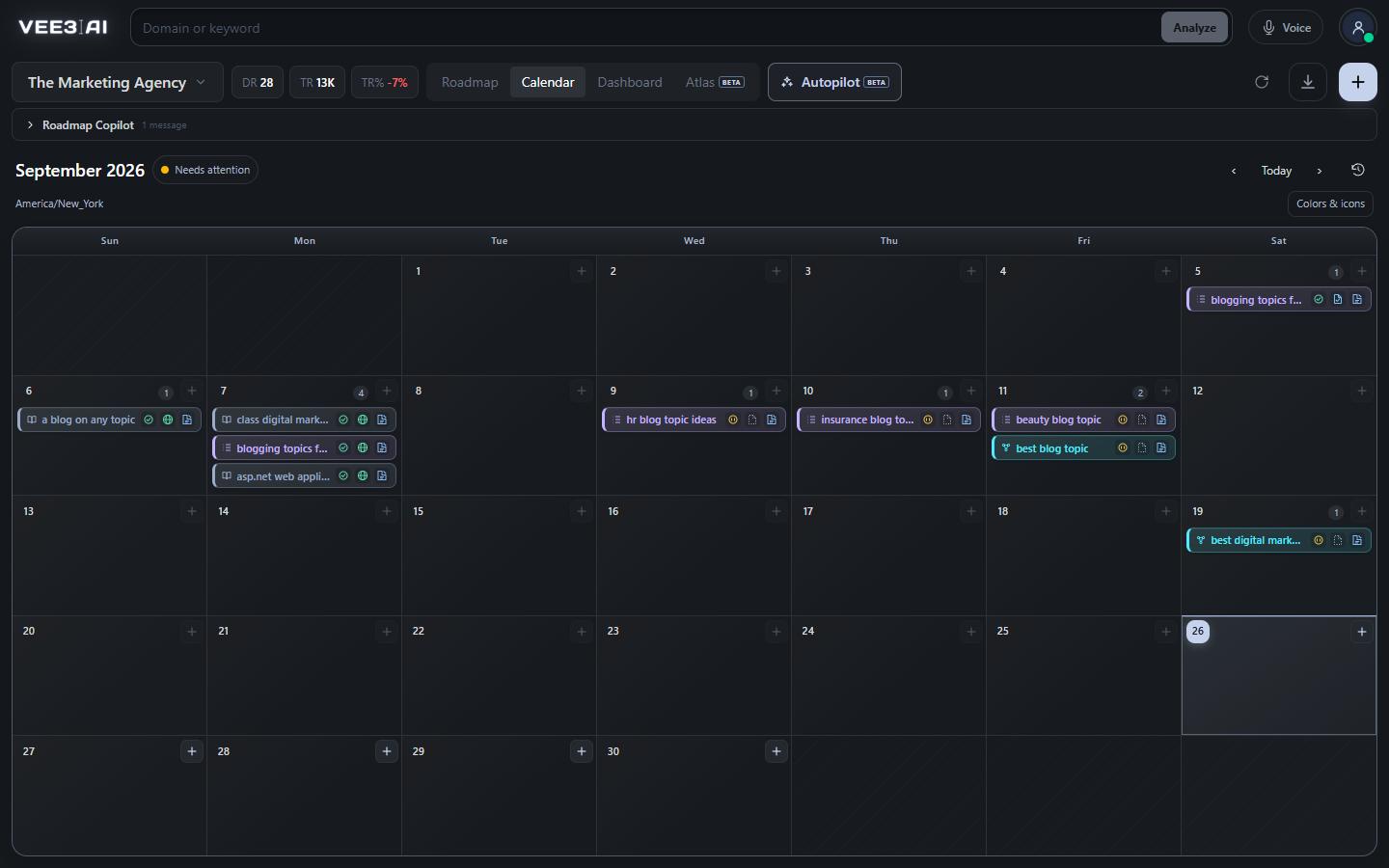
Scheduled work appears on a month calendar colored by page type, with statuses from Scheduled to Completed, Needs attention or Paused. Schedule a single page on any day and choose Brief only, Content only, Site draft or Live, then move or cancel it, without turning recurring Autopilot on. Run history shows what each run did, and Export calendar downloads the schedule as CSV.
Because Autopilot selects from the same roadmap you plan in, it never goes off-brief. Pages it creates move through the same statuses as pages you make yourself, and anything it can't do safely is left for you with a clear reason. That is the difference between automating the output and automating the judgment behind it.
Put your roadmap on a publishing schedule
Start in a guest workspace with no account or card; Autopilot keeps content in Vee3.ai until you choose to publish live.
Pages per month (1 to 500) and months to plan (1 to 12).
Qualifying refreshes and new pages, each with a reason, a confidence score and your safeguards applied.
Research, brief, content, AI Editor review and optional Fact Checker, resuming from checkpoints.
Saved in Vee3.ai for review, or published live after reviews pass.
In-house content teams
Set pages per month and the refresh balance once.
Agencies
Each brand has its own roadmap, calendar and run, with locks for pages a client has signed off.
Site owners
Pages that lost clicks or sit between rank 4 and 20 qualify for a refresh automatically.
It is automation that keeps SEO content moving without you starting each page. In Vee3.ai, SEO Autopilot selects new pages and refreshes from your roadmap, produces and reviews them, and delivers them on a monthly calendar, with a reason and confidence score for every choice.
Only if you choose Publish live on site, which publishes after reviews pass and updates the existing live page for refreshes. Produce content only saves reviewed content in Vee3.ai for you to publish later. To switch to live, disable Autopilot first, then review the publishing acknowledgment when you enable it again.
Yes. In Advanced settings, Choose pages for the content calendar gives up to 500 selected roadmap pages the first available places, in Autopilot's order or a manual order you drag into place. Remaining places go to other qualified pages, and your locks, exclusions and qualification rules still apply.
No. When you schedule a single page with Save as a site draft, a refresh becomes a separate unpublished draft on your connected site and the live page stays as it is. Only Publish live to the site replaces the existing page, and it needs your explicit authorization in the schedule dialog.
Resolve Fact Checker notes before publishing is off by default; turn it on in Advanced settings to let Autopilot verify, replace or reframe flagged claims. Notes it can't safely resolve stay open for your review, and automatic publishing won't go ahead while source findings remain.
Open the saved Autopilot draft to compare it with your current editor, then choose Apply draft to editor. That replaces the editor's content, metadata, URL slug and cover image, while publishing stays your decision. Only completed, unpublished drafts can be applied.
Yes. An active run has a Stop unstarted pages button. Disabling Autopilot also holds individually scheduled pages, and rescheduling a paused page explicitly resumes that one appointment.
Start a workspace without an account and watch the roadmap build itself. Save it to an account whenever you are ready.