In-house SEOs
Revenue next to rank, per page
See which pages earn Organic Search revenue alongside their rank, clicks and backlinks on one roadmap row.
Search Console, GA4, your sitemap, SEO data providers and your CMS, joined on every page of your roadmap.
Free to start. No account or card needed.
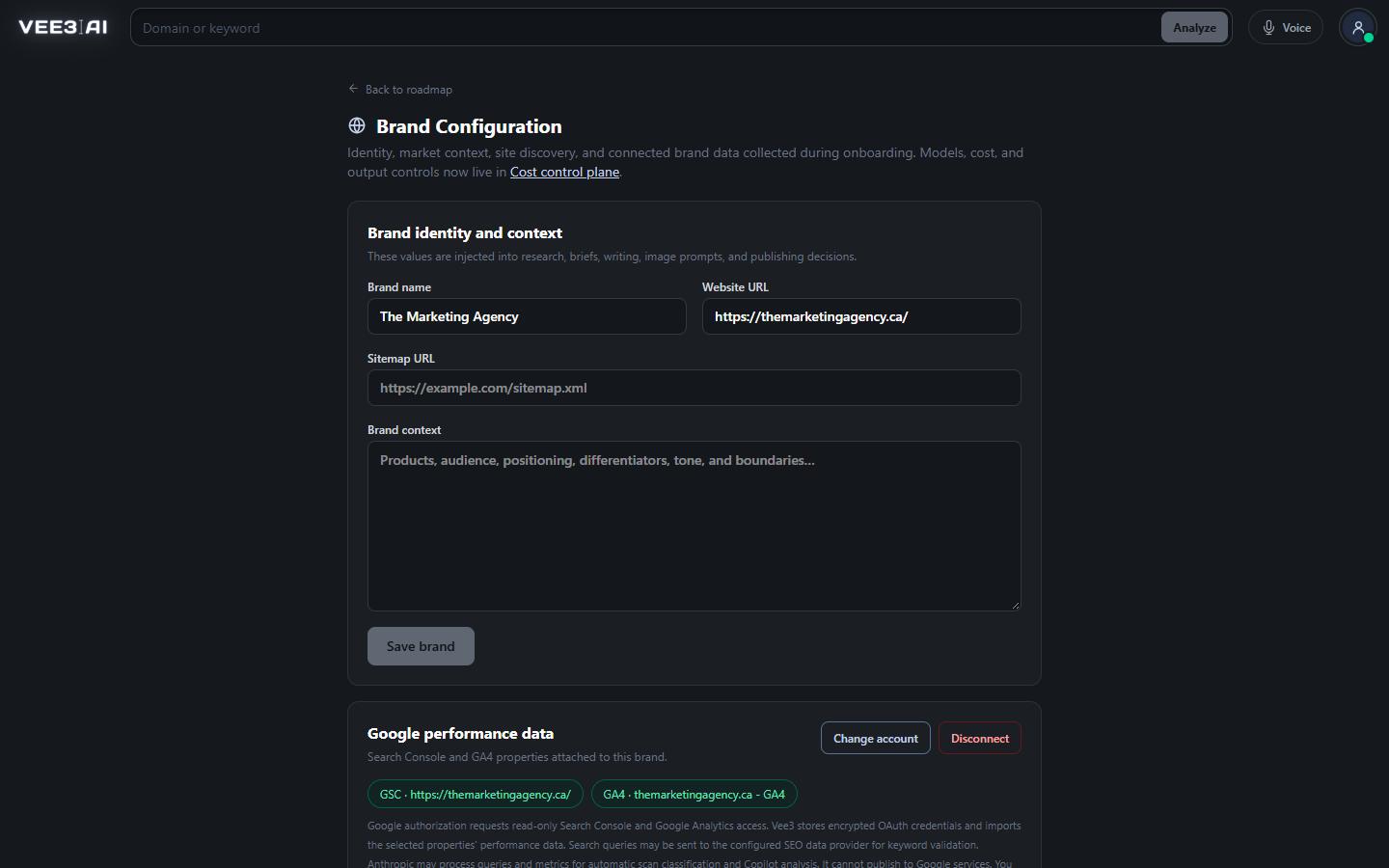
Search Console and Analytics read scopes only. Nothing in your Google properties can be changed.
An SEO answer usually needs four tabs: Search Console for clicks, GA4 for conversions, a keyword tool for volume and a crawler for the page itself. Vee3.ai does the join for you. Connect Google once per brand, run a site scan, and every page on your roadmap carries its own clicks, impressions, sessions, revenue, rank, backlinks and internal links, with a column that names the sources behind each number.
Most SEO integrations stop at a chart. Vee3.ai joins the data on the unit you actually work with, the page. During a site scan it reads your Search Console page and query rows, GA4 organic metrics and the keywords SEO data providers see your site ranking for, together. Where Search Console and a provider both report the same page and query, Search Console's first-party evidence wins and the provider keeps what Google does not report, such as monthly search volume.
Units stay honest: Search Console clicks are never presented as estimated traffic, and GA4 metrics are Organic Search only. Tracking parameters such as utm_ tags are stripped before the join, so one page stays one row, and the Performance Sources column names what contributed.
Vee3.ai asks Google for two read-only scopes, Search Console and Analytics, and nothing that can change your Google properties. Properties are matched to your domain, not their names. A Search Console domain property can cover your subdomains; a URL-prefix property must match the protocol, host and path. Unverified properties are left out. For GA4, Vee3.ai reads each property's web streams and picks the one whose URL matches your site, preferring an exact origin. If nothing matches, or several do, you choose from the list, and GA4 can come from a different Google account than Search Console.
Before a long scan starts, the GA4 connection is tested with a real reporting request, so a disabled API or a missing Viewer permission shows up while you are connecting, not halfway through a crawl. Tokens are encrypted with AES-256-GCM. Disconnecting deletes the stored credentials and revokes access at Google, and the data already imported to your roadmap stays.
Search Console gives the scan clicks, impressions, CTR and average position for each page and query over a 30-day window ending two days ago, plus the 30 days before it for the change columns. GA4 adds Organic Search sessions, key events, key event rate and revenue for each page, in your property's currency. On the SEO dashboard the same connections are queried directly for the last 30 days, 3, 6 or 12 months, with an optional previous-period comparison and query, page and country detail. Dashboard reads are cached for 15 minutes, and the stored scan snapshot stays on screen while a refresh runs.
The scan finds pages from the sitemaps listed in robots.txt and the usual sitemap locations, following sitemap indexes to up to 10,000 URLs. The homepage is always read. When a site has no useful sitemap, a bounded internal-link crawl finds up to 500 pages instead. Each page is read for its status, title, meta description, canonical, robots directives, headings, schema types and links, which feed internal link counts and the technical checklist without a second crawl.
SEO data providers fill in what a crawl cannot see: search volume and difficulty, the organic keywords a domain ranks for, the live top 10 for a keyword, backlinks and referring domains per page, domain authority and traffic estimates for competitors you monitor, and which ChatGPT and Google AI Overview answers mention a keyword or cite a domain in the AI visibility tool. None of it needs a key from you.
Each brand holds one CMS connection to WordPress, Webflow or Shopify. Vee3.ai reads only what publishing needs: a check that the credentials work, existing entries with the same slug so a refresh updates the right page, categories and your media library. It writes the page, its SEO plugin fields, its featured image and, where needed, a category. The full picture, including drafts, refreshes and duplicate safety, is on CMS publishing.
Bring an existing plan with you. The roadmap import takes keywords, page URLs, mixed lists or CSV, up to 1,000 rows per import. Recognised headers such as Keyword, Page URL, Status, Volume, KD or GSC Clicks map to roadmap columns, and the rest are listed as ignored. Values you supply win, saved roadmap and scan evidence fill the blanks, and providers are asked only for what is still missing. Drafts come into the editor by paste, by URL or as a plain text, Markdown or HTML file.
Going the other way, the roadmap, the crawl, the technical checklist and the publishing calendar export to CSV built for Excel, with accented keywords intact and formula-like cells kept as text, and keyword and domain comparisons download as CSV too. The dashboard and the Atlas export to PDF, and a public, read-only link to the topical authority map lets a client explore the result without an account.
See every page with its numbers attached
Start free with no account or card, run a scan on your sitemap, and connect Google or your CMS only when you want their data in the rows.
Grant read-only Search Console and Analytics access; properties are matched to your domain.
WordPress, Webflow or Shopify, verified and encrypted; or connect it later.
Sitemap, crawl, Search Console, GA4 and SEO data providers are read together.
Every page carries its performance, rank and links, ready to filter, export or share.
In-house SEOs
See which pages earn Organic Search revenue alongside their rank, clicks and backlinks on one roadmap row.
Agencies
Connect a client's Search Console, GA4 and CMS during onboarding, or skip Google and start from the sitemap.
Content leads
Export the dashboard as a PDF and the roadmap as a CSV straight from Vee3.ai.
It means bringing the sources an SEO relies on, such as Search Console, GA4, keyword and backlink data, the crawl and the CMS, into one place and joining them on the same page. In Vee3.ai that join happens on each roadmap row, so a page's clicks, revenue, rank and links sit together and can be filtered, sorted and exported.
Google Search Console for clicks, impressions, CTR and position by page and query, and GA4 for Organic Search sessions, key events, key event rate and revenue by page. SEO data providers add search volume, rankings and backlinks. The scan joins them per page, and the dashboard reads Search Console and GA4 directly for ranges up to 12 months.
No. It requests only the read-only Search Console and Analytics scopes. Disconnecting deletes the stored credentials and revokes the access at Google, while the data already imported to your roadmap stays.
Vee3.ai matches properties to your site's URL, so a property for another domain or path is not offered automatically. If nothing matches, pick the right property from the list of ones your account can query, sign in with another Google account, or continue without it. GA4 can use a different Google account from Search Console.
No. You can skip Search Console and GA4 during setup; the scan then uses your sitemap, the crawl and SEO data providers. Connect Google later and run a fresh scan to add first-party clicks, sessions and revenue to every page.
Yes. Paste keywords or page URLs, or upload a CSV of up to 1,000 rows. Recognised columns map to the roadmap, the values you supply are kept, and Vee3.ai fills only the fields that are still empty.
Start a workspace without an account and watch the roadmap build itself. Save it to an account whenever you are ready.