In-house SEO leads
Quick wins before the Monday meeting
Ask for pages ranking 4 to 15 with more than 500 monthly searches.
An SEO copilot that reads your crawl, roadmap and dashboard, then filters, enriches and acts on them from one plain request.
Free to start. No account or card needed.
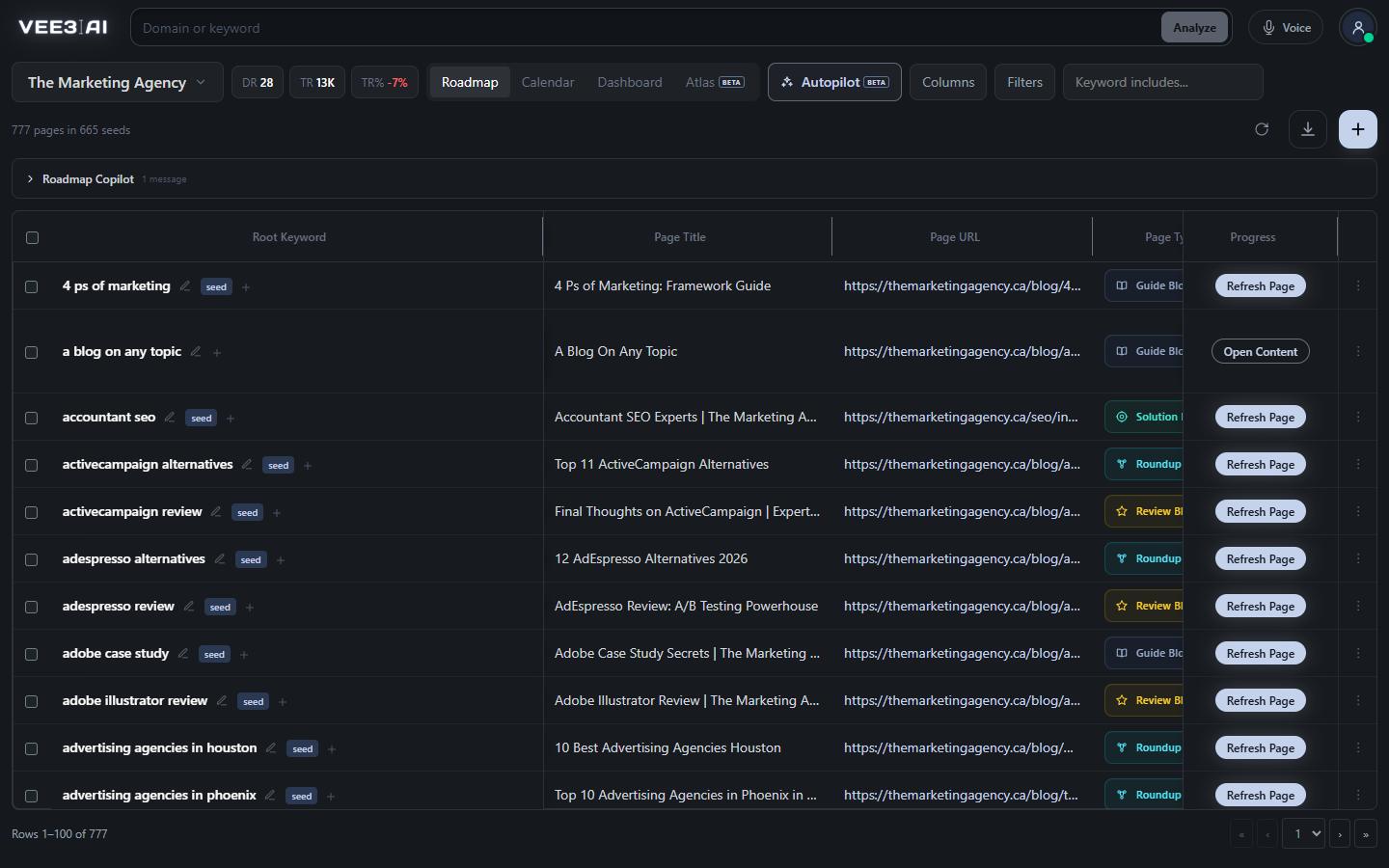
Replies use your ranks, volumes, links and statuses, with tables when a list is clearer than prose. It says when a conclusion covers rows your filters are hiding.
Vee3.ai's SEO copilot, called Roadmap Copilot inside the app, is a chat panel that works on your actual site data instead of general advice. It reads the brand's latest crawl, its roadmap of live and planned pages, and the work running right now. Ask "which pages are in striking distance?" and the Roadmap table filters itself. Ask it to "add search intent across all pages" and a new column fills in row by row. Anything that generates, restructures or deletes work stops at a confirmation card first.
Most AI chat tools answer SEO questions from what they were trained on. A useful copilot answers from your site: which URLs rank 4 to 15 with real demand behind them, which pages have no editorial links pointing in, which planned pages would compete with each other. The Roadmap Copilot works from the same crawl, roadmap and performance evidence you see in the roadmap builder, so a question about quick wins becomes a filter you can check, not a paragraph you have to trust. In one real workspace, a single sentence narrowed 777 roadmap pages to the 11 quick wins worth briefing first.
The Copilot works on the Crawl, Topics, Roadmap, Calendar, Dashboard and Atlas views and knows which one is open. "This view" means the screen you are on; name another screen and it answers about that one instead. On the Dashboard it also reads the 15-point technical checklist and your monitored competitors. On the Calendar it reads that month's schedule. On the topical authority map it can fly the camera to a cluster, switch lenses, highlight up to 200 pages or start the guided assessment. When it tells you where to look, a pulsing outline marks the exact control.
Behind every reply is one planning call that returns a strict list of actions, and code carries them out. Filters, column changes, shortlists, Atlas moves and keyword or domain reports apply straight away, because they change what you see, not your roadmap. Creating topics, generating a brief or content, re-clustering, scheduling a page, re-scanning the site and every kind of delete open a confirmation card that names the pages or keywords involved. At most one generation or research action runs per turn, and a delete is dropped unless your message actually asked to delete.
When the answer needs data you do not have yet, the Copilot fetches it. It runs Vee3.ai's keyword and domain analyzers for the US, UK, Canada or Australia, up to two reports per turn, and answers from the returned report. Metrics a provider does not return are shown as unavailable, never as zero. Ask for new data on the table and it adds up to three columns per turn: provider metrics such as volume, difficulty, traffic potential, parent topic or CPC, or judgement columns such as funnel stage or audience, filled by AI for each row. Columns are saved with the brand, so they are still there next week.
The Copilot hands work to the rest of Vee3.ai rather than describing it. A confirmed brief request runs the same content brief generator you would start by hand, and keyword questions use the same data as the keyword analyzer. Buttons inside replies open the pages, reviews or imports it recommends. Prefer to talk? Voice Mode continues the same conversation out loud, and every reply already carries a short spoken version.
Ask your roadmap what to do next
Open a guest workspace with no account or card, run a first scan, and put your first question to the Copilot.
Type anything, or tap a suggestion tailored to the view you are on.
One planning call returns strict actions; code carries them out the same way every time.
Generation, re-clustering, scheduling and deletes wait for your click.
Buttons inside replies open the pages, reviews or imports it recommends.
In-house SEO leads
Ask for pages ranking 4 to 15 with more than 500 monthly searches.
Agencies
After the first scan, ask which pages have no internal links pointing in, what the closest competitor domain ranks for, and which planned pages score highest.
Content strategists
Ask what to write next and the Copilot filters and shortlists by priority and intent without generating anything.
By working on your data instead of general advice. The Roadmap Copilot turns a question like "what should we write next?" into filters, a shortlist and a priority-sorted view of your own pages, and fetches keyword or domain reports when data is missing. You keep the decisions; it removes the spreadsheet work between the question and the answer.
Your roadmap, your newest site scan compared against it, and the work running for the brand right now. On the Dashboard and Atlas it also reads the technical checklist and your monitored competitors, and on the Calendar it reads that month's schedule.
No. Filters, columns, shortlists and map moves apply instantly because they only change the view. Creating topics, briefs or content, re-clustering, scheduling, re-scanning and any delete show a confirmation card first, and a delete is ignored unless your message asked for one.
Yes. Each reply uses AI credits from your workspace, and keyword or domain reports you ask for use their own. Briefs, content and re-clustering only start after you confirm the card, so you see what is about to run first.
Anyone with Edit access to the screen they are asking from. Crawl questions need Edit on Crawl and Dashboard questions need Edit on Dashboard. Topics, Roadmap, Calendar and Atlas use Roadmap access.
Yes, in this browser. Each brand keeps its own conversation and unsent draft, so switching brands never mixes them. Columns it adds are saved with the brand, not just in your browser. If a conversation grows too long, clear it to start fresh.
Yes. Each time you ask, it reads the brand's live jobs, such as brief and content runs. If there are too many to read in full, it tells you the count is partial instead of guessing.
Start a workspace without an account and watch the roadmap build itself. Save it to an account whenever you are ready.