Agencies
Show a client where their link equity stops
Run the audit, filter to orphans, and share the map as a public read-only link or a PDF.
An internal linking tool that counts the links written into your content, finds orphans, and shows which pages should link to them.
Free to start. No account or card needed.
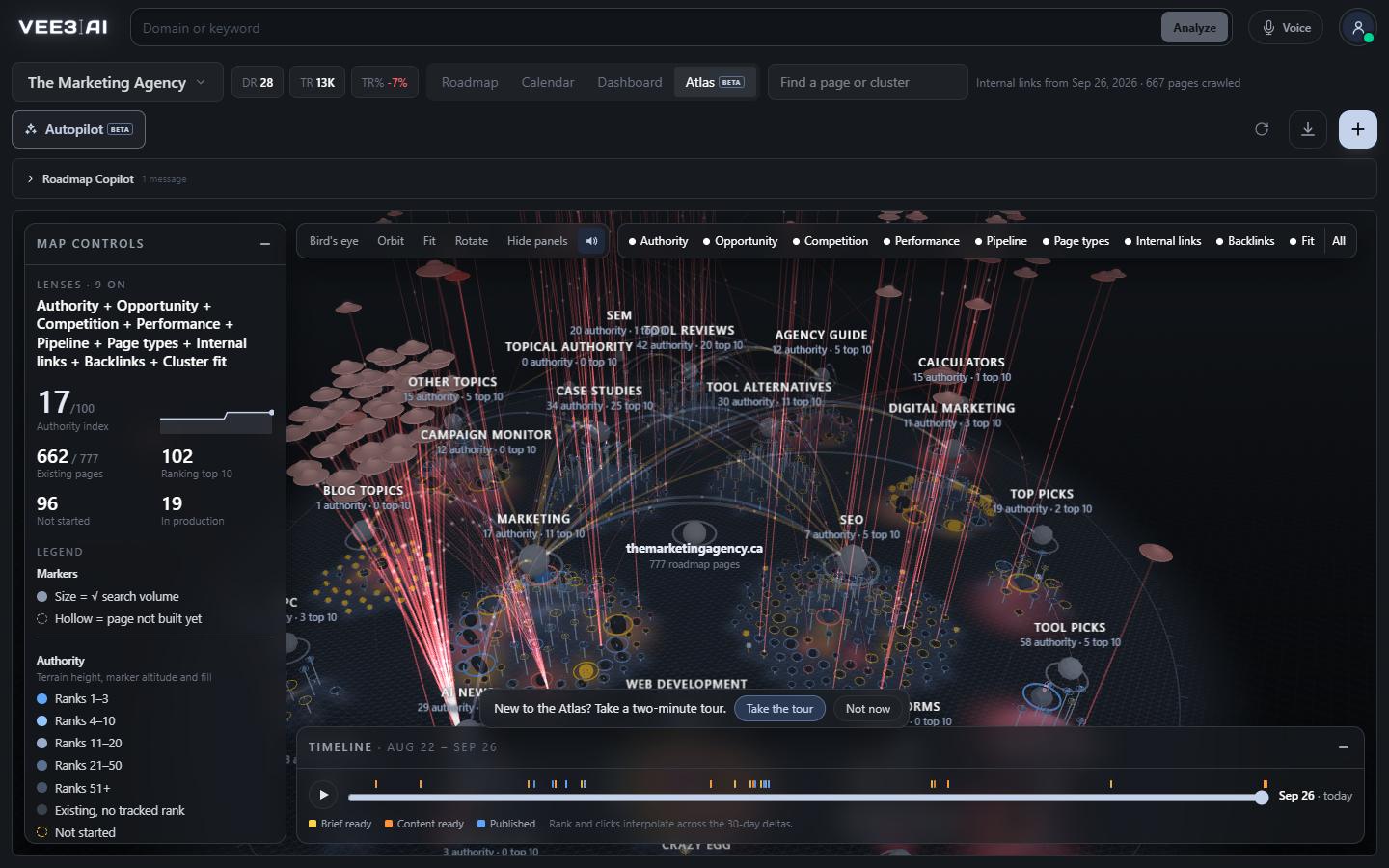
Unique inlinks and outlinks per page, read from the main content zone. Header, nav, footer, aside, cookie banners and page-builder chrome are skipped.
Menus, headers, footers and sidebars link to everything, so they tell you nothing. A report that counts them makes almost every page look well linked. Vee3.ai's internal linking tool reads only the main content of each page and separates editorial links from related-post widgets and previous/next navigation. Any target linked from 20% or more of pages is treated as site chrome and dropped, so the counts you see are the links a writer actually chose.
Internal links are how a search engine finds a page, how it reads what the page is about, and how authority moves from pages that earn backlinks to pages that need them. A page with no contextual inlinks is hard to discover and easy to undervalue, however good it is. A cluster whose pages never link to each other reads as a set of unrelated posts rather than topical coverage. An internal linking strategy fixes both, but only if you can see the real link graph first.
A live page that no other roadmap page links to from its content is an orphan. On a 777-page roadmap in one real workspace (The Marketing Agency, September 2026), the audit found 330 pages with no editorial link pointing at them, across 667 crawled pages. Orphans surface in the Dashboard's Technical checklist, in the Roadmap and Crawl columns, and as red pulsing rings on the topical authority map, where the Orphans only filter isolates them in one click.
Open any live page on the Atlas and its details list link opportunities: up to three strong live pages in the same cluster that don't link to it yet, ranked by how well they rank and how much demand they carry. Because the clusters come from the keyword clustering tool, every suggestion is topically related by construction, not by a loose keyword match. Add the links in your CMS, press refresh, and the counts update.
For every scanned URL, Vee3.ai pulls backlinks, referring domains, nofollow domains and broken backlinks from a live backlink index, 1,000 URLs per request, and keeps a sample of the 1,000 strongest links to your site. On the Atlas, each referring domain becomes a saucer in the sky that dives into the pages it links to, so you can see where outside authority enters the site and whether your internal links pass it on. The Link gaps only filter shows live pages ranking 4 to 30, or high on your priority list, with two or fewer referring domains.
The same link graph shapes what you publish next. Every content brief plans internal links from your sitemap with exact URLs and natural 3 to 6 word anchors, and the writer keeps them in place. Link counts come from the same crawl as the SEO crawler, so you never reconcile two tools that disagree.
See every orphan on your site, and who should link to it
Start in a guest workspace with no account or card; the scan measures your internal links as it reads the site.
A lightweight tag scanner reads each page's main content zone, skipping header, nav, footer, aside, cookie banners and page-builder chrome.
Each link is tagged editorial, related-posts widget, or previous/next and breadcrumb, so you can see equity with or without automation.
Targets linked from 20% or more of crawled pages are treated as chrome and removed.
Backlinks, referring domains and broken links are attached per URL, and the strongest live backlinks are sampled for the map.
Filter to orphans or link gaps, open a page's link opportunities, add the links in your CMS, then refresh.
Agencies
Run the audit, filter to orphans, and share the map as a public read-only link or a PDF.
In-house content teams
New posts rarely get linked from older ones. After each batch, open the Orphans only filter, work through the link opportunities for each page, then refresh to confirm the counts moved.
Founders and solo SEOs
Link gaps only shows pages ranking 4 to 30 with two or fewer referring domains.
It maps which pages on your site link to which, so you can find pages that are cut off, pages that hoard links, and pages that should link to each other. Vee3.ai counts only links in the main content, flags orphans, and suggests linking pages from the same topic cluster.
Yes. On the Atlas, Include automated links switches the counts from editorial links only to every content-area link, including related-post widgets and previous/next or breadcrumb links. The orphan flag and link opportunities both follow that setting.
Open the page’s details on the Atlas. Under link opportunities you get up to three strong live pages in the same cluster that don’t link to it yet, ranked by their position and demand. Each one opens with a click so you can add the link.
No. It shows where links are missing and which pages should carry them; you add them in your CMS, which keeps you in control of every anchor. New pages written in Vee3.ai already carry planned internal links with 3 to 6 word anchors.
Use the refresh control on the Atlas. It re-crawls the links between your roadmap pages, then refreshes their backlinks and referring domains. Backlink data refreshes at most once every ten minutes per brand, and a repeat inside that window keeps the current values.
Live pages ranking in positions 4 to 30, or in roughly the top third of your roadmap by priority, that have two or fewer referring domains. It sits with the Atlas’s other backlink filters: minimum referring domains, minimum backlinks and Broken backlinks only.
Link data covers pages on your brand’s own host. Other subdomains with pages of their own, such as a blog subdomain, aren’t measured, and the Atlas names them in the Backlinks lens note. A page the scan didn’t fetch shows no outlink count, because its links are unknown.
Start a workspace without an account and watch the roadmap build itself. Save it to an account whenever you are ready.