In-house content teams
Descriptions that match the finished article
Read the article, then tighten its description in Publish to site before it reaches WordPress.
A meta description generator that works inside the page: written with every brief, checked by code, and yours to edit before it reaches your CMS.
Free to start. No account or card needed.
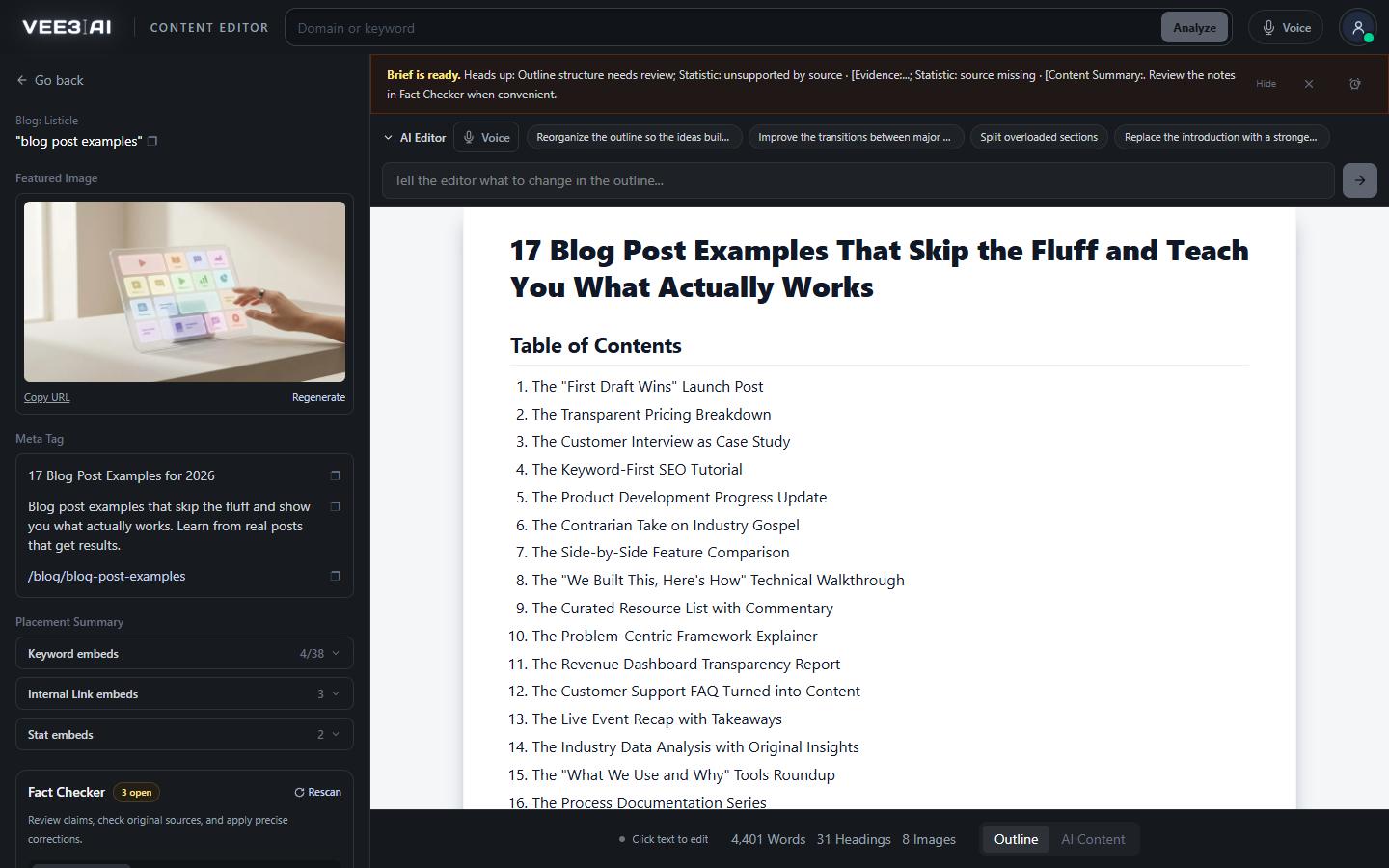
Every description starts with the primary keyword or a close variation, so question keywords still read naturally.
Vee3.ai's meta description generator works inside the page, not in a separate tab. Every brief ends with one: at most 125 characters, opening with your primary keyword and never dated with a year, checked by code before it is saved. When the article is finished, read it and adjust the description in Publish to site. Vee3.ai then writes it to your WordPress SEO plugin, Shopify or Webflow field, so nothing is copied between a generator and your CMS.
The description is written in the last step of every brief, the same way for all nine page types and for both Brief only and Brief + Content runs. That step reads the finished outline's H1 and the page's primary keyword, then writes the URL slug, the title tag and the description together, so all three describe the same page. The meta title generator covers the title half of that step. You find the result in the Meta Tag box in the editor sidebar, with a copy button beside it.
An SEO meta description generator is only as good as what it refuses to accept. Vee3.ai asks the model for a description, then code checks it:
There is one model attempt. If the description breaks a rule, no second call is made: code writes one from the keyword and the page type, for example a roundup description that promises a comparison by features, pricing, strengths, drawbacks and best use case. The page is saved with an SEO metadata needs review note, so you know which descriptions to rewrite by hand.
A meta description is a promise in the results page. Google may show different text when a description doesn't fit the query, and a description that opens with the keyword the page targets gives it less reason to. The passage an answer engine quotes usually comes from the body, which is why the content writer puts a direct answer near the top of the page. The description does its own job: it tells the searcher what they get. It also becomes the description in the page's JSON-LD, so the head and the structured data say the same thing.
The description is written when the outline is done, before the draft exists, so the finished article can move past it. Publish to site shows it in an editable field with a live character counter, up to 320 characters, and your edit is what gets written. It is a plain-text field, so it can't carry a source link. If it states a statistic, a quote, a review or a current event, an Autopilot publish stops until someone reviews the page in the fact checker.
On WordPress it goes into the description field of the SEO plugin Vee3.ai detects from your site's REST API, or into custom meta keys you name, and into the post excerpt. With no writable SEO plugin, the excerpt is still saved and Vee3.ai tells you the plugin fields were not set. On Shopify it becomes the article summary and the SEO description. On Webflow it goes to the meta description field you map. The rest of the connection, from drafts to refreshes, is covered on CMS publishing.
Import a page by URL into the editor and its existing meta description comes with it, up to 320 characters. If the page has none, code builds a keyword-first one. Pages imported from your site show Refresh Page on the roadmap: the refresh reads the live page, current description included, and then writes a new one to the same rules. When SEO Autopilot refreshes a page, its review screen puts the current editor version beside the Autopilot draft and marks whether the meta description changed.
Give every page a description worth clicking
Start in a guest workspace with no account or card, and edit your first description in Publish to site before anything goes live.
The outline is finished and its H1 fixed.
One keyword-first description of 125 characters or fewer, with the title tag and slug.
Code tests length, opening and year, or writes a fallback with a review note.
Adjust it in Publish to site; it goes to your SEO plugin, Shopify or Webflow field.
In-house content teams
Read the article, then tighten its description in Publish to site before it reaches WordPress.
Agencies
Autopilot's review puts the current description beside the new draft and marks whether it changed.
Technical SEOs
Import a page by URL and its existing meta description comes with it, up to 320 characters.
It writes the short summary that can appear under your title in search results. Most tools take a URL or topic and return a few options. Vee3.ai writes one with every brief, checks it against its rules, and sends it to your CMS when you publish.
Create a page on the roadmap. When its brief finishes, the description appears in the Meta Tag box in the editor sidebar, ready to copy. When the article is done, open Publish to site to adjust it and send it to WordPress, Shopify or Webflow.
Not in a standalone box. Import a page by URL into the editor and its existing description comes with it, or code builds a keyword-first one if it has none. Pages imported from your site can use Refresh Page, which reads the live page and writes a new description to the same rules.
Yes. A model writes it from the outline's H1 and the primary keyword, and code accepts it only if it opens with the keyword, stays within 125 characters and carries no year. If it fails, code writes the description instead and flags the page for review.
A short description usually shows in full on phones as well as desktop, so the promise isn't cut off. Leaving out the year stops a description looking dated months after publishing, when the page itself may still be current.
Yes, in Publish to site, where it sits in an editable field with a live character counter up to 320 characters. The AI Editor rewrites the document but doesn't change the description, and Rerun Brief writes a fresh one along with the outline.
No. Google may show text from the page instead when it matches a query better. A description that opens with the page's keyword and states what the reader gets gives it the best chance of being used as written.
Start a workspace without an account and watch the roadmap build itself. Save it to an account whenever you are ready.