Agencies
Onboard a client site with evidence, not guesses
Run the scan when the client signs. You get the technical checklist, a keyword for every page and a list of pages worth working on, each with a written reason.
An SEO crawler that reads every indexable page, finds the crawlability issues, and tells you which pages deserve a place on your roadmap.
Free to start. No account or card needed.
HTTP status, redirects, noindex, canonical targets and crawl coverage against your sitemap, so you see which pages search engines can actually index.
Most SEO crawler tools stop at status codes and a spreadsheet of missing tags. The Vee3.ai scan keeps going. It reads each page the way a search engine would, checks it for crawlability issues, attaches the traffic and links it already earns, and assigns it a type, a category and a primary keyword. Then a second, stronger model answers the question an audit usually leaves to you: should this page be on your roadmap at all?
A crawl is only useful if it ends in a decision. Knowing that 40 pages lack a meta description is a task list. Knowing which of those 40 pages already get impressions, which rank on page two, and which have no internal links pointing at them is a plan. Vee3.ai stores every fetched page with its status, canonical, robots directive, title, H1, meta description, H2 and H3 headings, JSON-LD types and main-content text, then joins that record to Search Console, GA4, provider rankings and backlinks for the same URL.
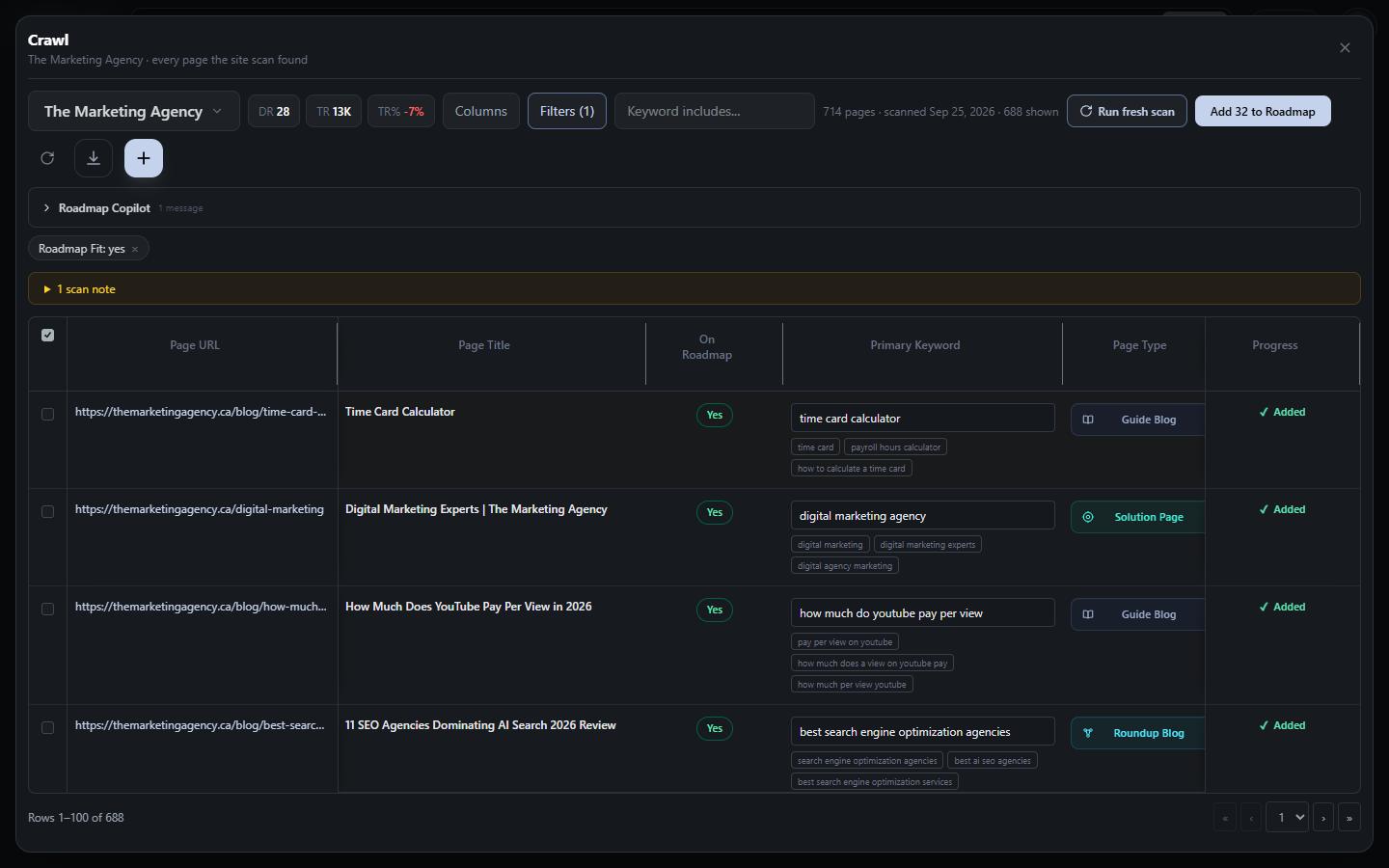
In one real workspace (The Marketing Agency, September 2026), a single scan read and judged 714 pages and found 32 that belonged on the roadmap but were not on it yet.
The Dashboard's Technical checklist reads the stored crawl evidence, so opening it never starts a new crawl. Each check reports issues, warnings or a pass, how many pages are affected, a priority, and example URLs you can open:
Orphans and link counts come from the same crawl. For link-level detail, editorial versus automated links and pages that should link to each other, see the internal linking tool.
Every keyword assignment arrives with a plain-English reason and a confidence score. Strong Search Console evidence scores 0.94, a top-10 provider ranking 0.88, validated demand 0.78. Anything under 0.68 is flagged for review instead of quietly guessed. Pages that are not search targets, such as legal, recruiting, blog index and archive pages, stay visible but are labeled with the reason, so they never pollute your plan.
Requests run six at a time, 150 ms apart. If a server starts refusing with 403, 429 or 5xx responses, pacing drops to 700 ms with 20-second pauses, and the scan stops at a checkpoint rather than hammering the host. The crawler learns whether direct HTML, the WordPress REST API or Shopify JSON reads your site best, retries slow pages in two follow-up rounds, and checkpoints every step, so a scan of thousands of pages survives restarts.
When the scan finishes, qualifying pages go straight onto the SEO roadmap with their keyword, type and metrics. Because every page now owns one primary keyword, the keyword cannibalization checker can catch two pages chasing the same search before you write a third. The same crawl feeds the SEO dashboard and the topical authority map, so you crawl once and read the result everywhere.
While it works, a live insight stream narrates what the evidence already shows: how many URLs are real search targets, which competitor overlaps you most, which page has impressions but no clicks. By the time the table fills, you already know where to look.
Crawl your site and see which pages deserve the work
Start in a guest workspace with no account or card, and connect Search Console later if you want click data on every row.
Discovers up to 10,000 URLs across up to 1,000 sitemaps, or crawls from the homepage when there is no usable sitemap. Search Console, GA4 and provider rankings load in parallel.
Fetches every page in polite batches, records its content links and on-page signals, and retries slow pages in two follow-up rounds.
An AI proposes 2 to 4 candidate searches per page; a scoring formula ranks them on relevance, URL/title/H1 agreement, clicks, impressions and demand.
A specialist model picks only from the shortlist and rules on roadmap fit: approved, changed, not qualified or needs review.
Internal link counts and backlink data are attached, the technical checklist is built, and qualifying pages move to the roadmap.
Agencies
Run the scan when the client signs. You get the technical checklist, a keyword for every page and a list of pages worth working on, each with a written reason.
In-house teams
Before a redesign, migration or content prune, see clicks, sessions, conversions, revenue, inlinks and referring domains for every URL in one table.
Founders and solo SEOs
Start in a guest workspace with no account, skip the Google connection if you like, and point Vee3.ai at your domain.
A crawler is a program that fetches pages and follows their links, the way a search engine bot discovers a site. An SEO crawler records what that bot would see: status codes, indexability, canonicals, titles, headings and links. Vee3.ai records all of that, then adds search performance and a keyword for each page so the crawl ends in decisions.
No. Without it, the scan still uses third-party ranking data and on-page evidence. To add Search Console and GA4 page metrics, use Connect Google data in Edit Brand; access is read-only. If several properties match your domain, the Crawl asks you to choose one.
Up to 10,000 URLs from up to 1,000 sitemaps. With no usable sitemap it crawls from the homepage, up to 500 URLs. Every step is checkpointed, so a long scan resumes where it stopped instead of starting over.
No. It reads the HTML your server returns, and falls back to the WordPress REST API or Shopify JSON when those read a site better. Pages whose content only appears after client-side rendering will show little main content, and the Thin page content check will flag them.
The scan flags pages that aren’t keyword targets, such as the homepage, brand, legal, navigation and recruiting pages, blog indexes, and taxonomy, author or date archives. They stay visible, labeled Brand page or Blog index with the reason on hover, but you can’t add them to the roadmap.
Run fresh scan crawls the site again and replaces the scan measurements in the Crawl. If a scan fails, your existing roadmap isn’t changed and you can use Retry scan. You can Cancel scan while it runs, up until it starts adding pages to the roadmap.
Yes. The Export button downloads the Crawl as a CSV with your visible columns, current filters and sort. You can also edit a row’s primary keyword, page type, category and intent before it is added to the roadmap.
Start a workspace without an account and watch the roadmap build itself. Save it to an account whenever you are ready.