Agencies
Walk a client through next quarter’s pages
Sort by Priority Score, star the pages you recommend and share the Roadmap with View access.
An SEO roadmap builder: every page you have and every page you need, in one table, ranked by a score you can tune.
Free to start. No account or card needed.
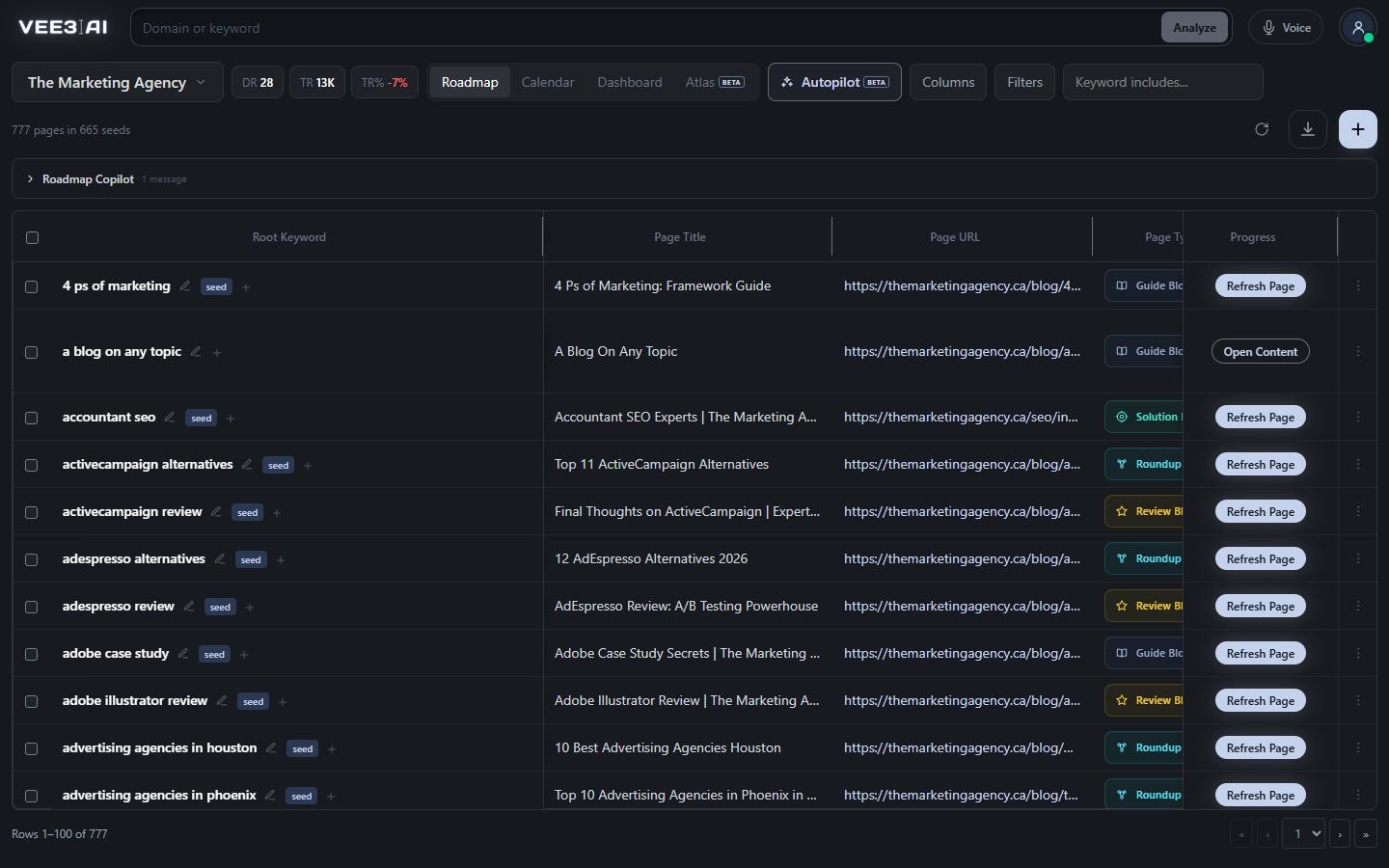
Scanned pages and planned pages share one table, each with its keyword, metrics and progress.
This roadmap builder plans SEO content, not product features. Vee3.ai puts every page on your site and every page you still need into one table: existing pages from your scan and planned pages from clustering, each with its keyword, demand, difficulty, ranking, Search Console and GA4 data. Then it ranks them by a Priority Score you can tune, so the next page worth writing sits at the top.
Product roadmapping software tracks features and releases. An SEO content roadmap tracks pages: which keyword each one targets, whether it exists yet, what the results page looks like and whether it earns anything once live. Every row here is one page with one primary keyword, and a keyword can belong to only one page, so the plan can’t compete with itself. Each row carries its progress, from Create Page through Building Brief and Writing Content to Content Live.
The default score adds search volume and the traffic the results page earns, and subtracts keyword difficulty and the average DR of the sites ranking. Two partial marks sit beside it: a Traffic Mark for the demand side and an Authority Mark for the competition side. Open the gear on the column to give each metric a weight from 0 to 2, or switch it off. Missing data is never punished; the metric is simply left out for that page. Save up to 12 named setups and apply one to another brand in a click.
Start with what you have. A scan by the SEO crawler brings your live pages onto the roadmap with their primary keywords. Add what you need with the keyword clustering tool, which turns one seed keyword into a cluster of planned pages, or bring a spreadsheet through Import List. Sort by Priority Score, star a shortlist, and click Create Page to start keyword research, a content brief and the draft on that row. Rankings, Search Console and GA4 columns fill in as pages go live.
In our own workspace, the roadmap holds 777 pages in one table, 96 of them planned and not started yet.
Unknown demand says “No volume data”, not zero. Unranked keywords say “Not Ranked”. Planned pages show the URL they will live at, greyed out until they go live. Rankings refresh automatically when they are older than seven days. Three column presets, Beginner, Intermediate and Advanced, decide how many of the fifty-plus columns you see, from core planning fields to every SEO, Search Console, GA4 and diagnostic field.
Import List takes keywords, URLs or a CSV. It recognizes around sixty roadmap fields under the headings people actually use, such as Keyword, Target Keyword, Topic or Live URL, and lists the headings it matched. Values you supply stay authoritative; Vee3.ai fills only what is missing and sorts rows into ready, already covered, cannibalization risk and no demand before anything is applied.
Type to the SEO Copilot and the table answers. In our workspace, “find quick wins: pages ranking 4 to 15 with over 500 monthly searches” filtered 777 pages down to 11. The Copilot sets filters, columns and shortlists right away; creating topics, generating briefs or content, deleting pages and re-clustering wait for your confirmation.
Know which page to write next
Open a guest workspace with no account or card, scan your site and see your pages ranked by opportunity before you commit to anything.
Scan your site, cluster a topic, import a list or add pages one at a time.
Sort by Priority Score, tune its weights, filter by any column and shortlist with a star.
Create Page starts research, brief and content; progress updates in place.
Rank, Search Console and GA4 columns fill in as pages go live.
Agencies
Sort by Priority Score, star the pages you recommend and share the Roadmap with View access.
In-house SEO leads
Filter to pages ranking 4 to 15 with real demand, check their Search Console trend, and refresh those before writing anything new.
Content managers
Assign pages, start briefs and drafts from the row, and track workflow status from Unassigned through Brief Complete and Content Complete to Content Live.
No. It is a roadmap builder for SEO content: every row is a page with a target keyword, search demand, competition and performance data. If you plan software features or releases, a product roadmapping tool is the better fit.
Both show the same pages. Topics groups them under the seed keyword they belong to, while Roadmap lists every page in one table with a Seed Keyword column. A page you create in either view appears in both.
Yes, edit the root keyword right in the table. Volume, difficulty, results-page metrics and rank refresh in the same save, and if keyword data is unavailable nothing changes. Edits wait while a keyword, brief or content job is running, and a keyword another page already uses is refused.
Your weights are kept per brand in this browser, and the stored score isn’t changed. Name a setup to save it. You can keep up to 12 and apply any of them on another brand in one click. Reset to default brings back the standard score.
No. It always writes one row per page, even from the Topics tab, with the seed keyword in its own column. It uses your visible columns, filters and sort, includes columns the Copilot added, and exports numbers unrounded so they add up.
You can select up to 1,000 rows and preview the impact before confirming. If the selection holds generated or in-progress work, you have to confirm that loss. When a seed page is removed, the highest-volume page left becomes the seed, and clusters left empty are removed.
It sets filters, chooses columns and shortlists pages right away. Creating topics, generating briefs or content, deleting pages and re-clustering all wait for your confirmation. It also runs at most one generation or research action per turn.
Start a workspace without an account and watch the roadmap build itself. Save it to an account whenever you are ready.