Agencies
Show a client their topical authority in one link
Send the public Atlas instead of a slide deck.
Your topical authority map as a world you can fly through: clusters, pages, links and backlinks, shaped by real rankings and demand.
Free to start. No account or card needed.
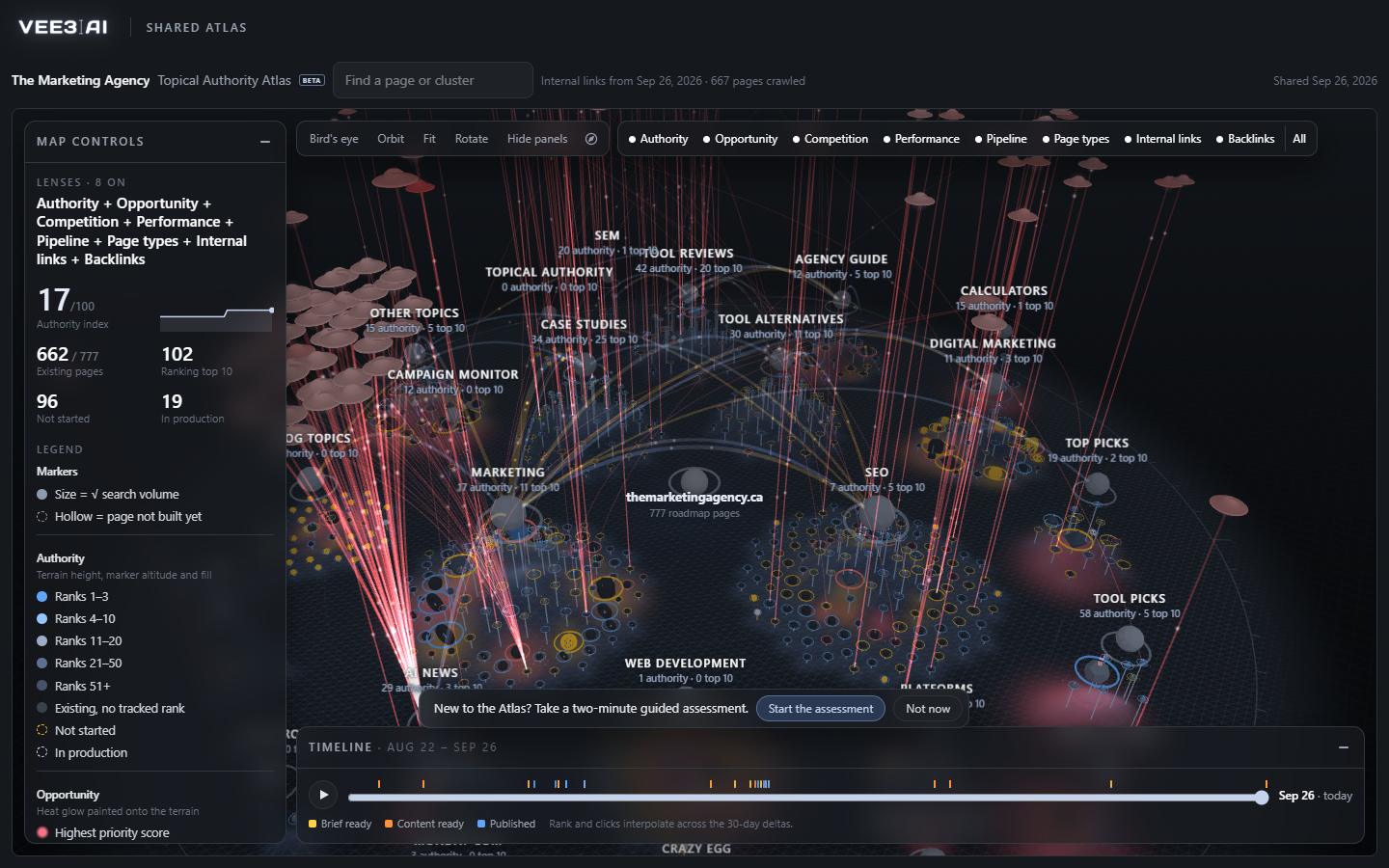
Land height, marker altitude and fill come from rankings weighted by search demand, summed into a 0 to 100 authority index.
The Atlas is Vee3.ai's topical authority map. It turns your whole roadmap into terrain: clusters rise around your brand, each page is a marker sized by its search volume and raised by its rank, and pages you haven't built yet are hollow. The height of the land is authority itself, rankings weighted by demand. One look tells you which topics you own, which are half-built and where the gaps are. The map on this page is a real shared Atlas from a live workspace, so try it before you read further.
A topical map lists the topics and pages a site needs to cover a subject completely. Topical authority is how much search engines trust the site on that subject, earned by covering it well, linking it together and ranking for it. A topical authority map shows both at once: the planned structure and how much authority each part has actually earned. Most topical maps stop at a spreadsheet of clusters. The Atlas measures the clusters against your real rankings, traffic and links, and keeps measuring as you publish.
The Atlas is built from the same rows as your content roadmap, so priority, progress and status always match. Each category with two or more pages becomes a cluster, placed on a spiral with the largest first; pages inside a cluster sit on a sunflower pattern, strongest at the center. Its pages come from the keyword clustering tool, so every marker traces back to a search people actually make. The authority index runs from 0 to 100 and comes with a 35-day sparkline, so you can see whether the whole site is gaining ground.
Authority, Opportunity, Competition, Performance, Pipeline, Page types, Internal links and Backlinks each add one visual channel, and you can stack as many as you like. Opportunity paints heat where the work is. Competition rings each page as beatable, contested or locked by comparing your DR with the weakest site that ranks. Performance raises light beams from impressions. Internal links send particles along the paths between pages, blue as a link leaves and amber as it arrives. Backlinks become saucers, one per referring domain, redder with higher DR, each diving into the pages it links to.
Completing a topical map means finding what is missing and fixing what is weak, and the Atlas shows both. Hollow markers are planned pages that don't exist yet. Orphans only shows live pages that no other page links to, counting editorial links unless you include automated ones. Each page panel lists link opportunities: up to three strong pages in the same cluster that don't link to it yet, calculated from your own data. Link gaps flag ranking pages with two or fewer referring domains. Fix the links with the internal linking tool, then replay the last 35 days and watch pages rise and turn solid.
In the workspace shown on this page, 662 of 777 roadmap pages are live, 102 rank in the top 10, and the authority index reads 17 out of 100. That is the honest picture of a site mid-build, and exactly what the map is for.
Type into Find a page or cluster and the camera flies there. Open a cluster to see its authority, top-10 count, monthly demand, existing pages and gaps, clicks, internal links and backlinks. Or ask the SEO Copilot, in text or out loud, to take you to a cluster, switch lenses, highlight up to 200 pages or run the two-minute guided assessment, narrated from your own numbers.
Workspace owners and admins can publish a read-only public link. It is noindex, updates itself a few seconds after the map changes while you work, and shows the map with its lenses without opening anything else in your workspace. Turn it off and it stops working at once; sharing again creates a new address. Any workspace member can export a PDF with the rendered map, the legend and a table of every cluster.
See your topical authority map in minutes
Start in a guest workspace with no account or card; the map builds from your roadmap as soon as you have one.
Clusters are placed on a spiral, largest first; pages inside them on a sunflower pattern, strongest at the center.
Terrain rises from cluster authority and ranked pages, weighted by demand.
Turn lenses on to add data channels; filters dim everything else.
Orbit, fly to search results, replay the timeline or take the guided assessment.
Agencies
Send the public Atlas instead of a slide deck.
Content strategists
Turn on Opportunity and Pipeline together to see where demand is high and pages are still hollow, then open the cluster for its gaps and link opportunities.
Technical SEOs
Internal links and Backlinks lenses show orphans, link gaps and the pages external links land on, from main-content links only, with navigation and footers removed.
Start from real search demand: research keywords, group them into clusters by topic and intent, and give each cluster a pillar and supporting pages. Then measure it against what you rank for. In Vee3.ai the roadmap does the first part and the Atlas draws the result, including pages you rank for and pages you haven't built.
A topical map is the plan: the clusters and pages a site needs to cover a subject. Topical authority is the result: how much search engines trust the site on that subject, shown in rankings. The Atlas puts both on one map by weighting each page's ranking by its search demand.
Each roadmap page gets a rank weight, from 1 for positions 1 to 3 down to 0.06 beyond 50, and zero if it doesn't rank. That weight is multiplied by a demand weight based on search volume, summed, and divided by the total demand weight, giving a score from 0 to 100.
Internal links come from your newest site scan, or from the Atlas's own crawl of your live roadmap pages when the scan doesn't have them. Only main-content links count; navigation, footer and sidebar links are removed. Backlinks come from the scan's backlink sample.
A live page with a URL that no other page links to. Turn on Orphans only to see just those. Related-post widgets and previous or next links don't count by default; switch on Include automated links if you want them to.
It's built from the same rows as your Roadmap table, so priority, progress and status match what you see there. Each category with two or more pages becomes its own cluster, and single pages are grouped by their keyword instead.
Workspace owners and admins. Everyone else can still export the PDF. Turning a public link off stops it working immediately, and sharing again creates a new address, so the old link never comes back.
Start a workspace without an account and watch the roadmap build itself. Save it to an account whenever you are ready.