Agencies
Brief a client roadmap without a research day per page
Pick the next rows on the roadmap, confirm keywords on each, and hand writers outlines with sources and link placements already set.
A content brief generator that measures keyword targets from the live SERP and hands your writer a sourced, linked outline.
Free to start. No account or card needed.
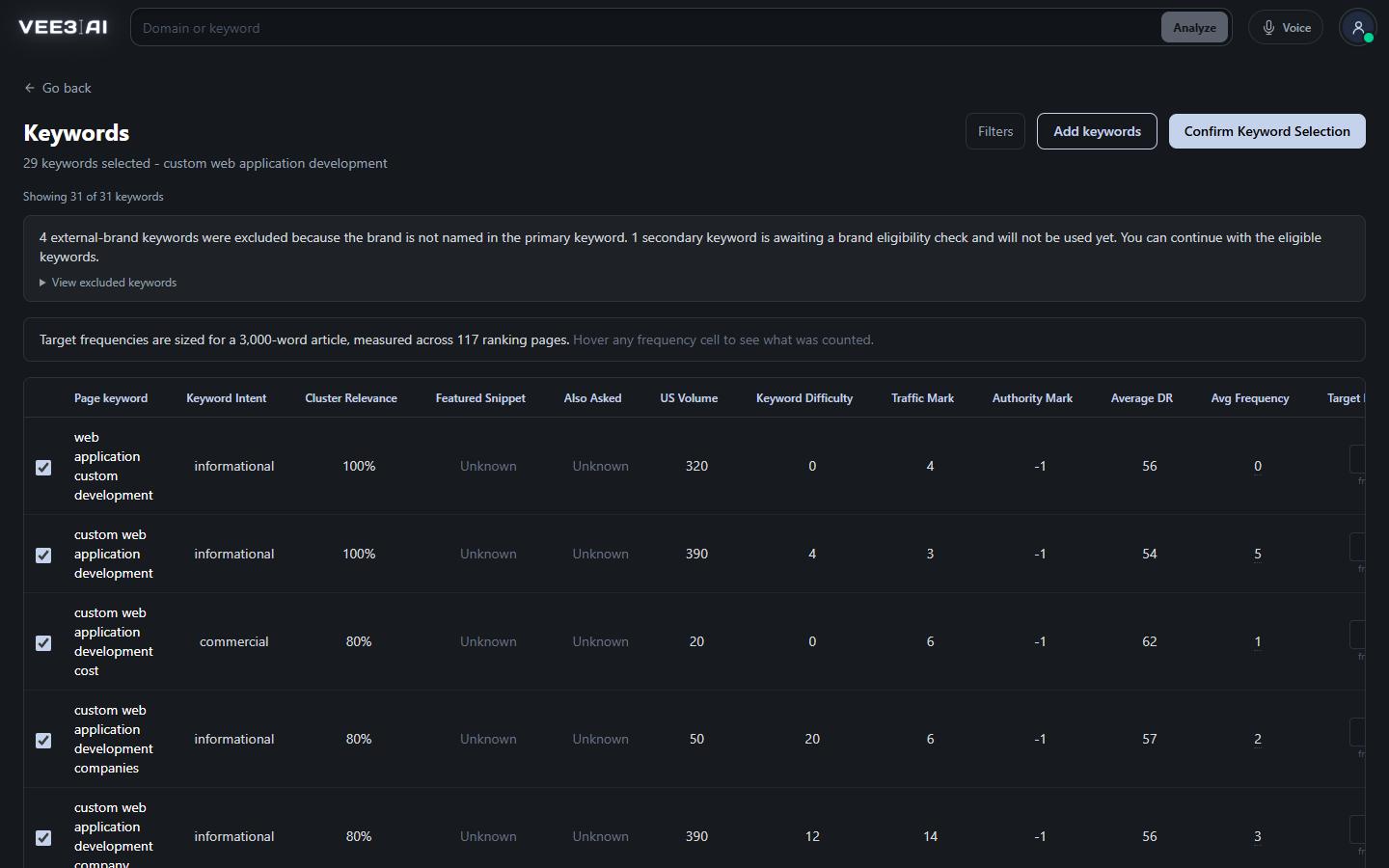
Twenty-five candidates, clustered and scored, each with a target frequency measured from the pages that rank for it.
Vee3.ai's content brief generator turns one topic into a brief a writer can finish without redoing the research. It measures branch keywords against the pages that already rank, fetches the sources the outline needs and logs each one, and plans internal links from your own sitemap. You get a sectioned outline with a title tag, meta description and slug, ready for your own team or for the AI content writer.
A good SEO brief answers the questions a writer would otherwise research twice: which keywords belong on this page and how often the ranking pages use them, what each section is for, which sources back the claims, and where the internal links go. Most AI brief generators stop at headings lifted from the top ten results. That gives the writer a shape, but no evidence and no targets, and the gaps come back at review.
The brief starts from your primary keyword. Vee3.ai expands it to 25 candidates, clusters and scores them, and drops anything with no recorded search volume. Each candidate carries Cluster Relevance, Featured Snippet and Also Asked flags, plus a Target Frequency measured from the pages that rank: how many of them use the phrase, and how often per thousand words. In one real brief, for custom web application development, 31 keywords were researched, 29 survived the brand and relevance checks, and 117 ranking pages were measured to set the targets.
Let it choose and it keeps every candidate at 25% Cluster Relevance or higher. Or pause on the Keywords screen, untick what doesn't fit, set any target from 0 to 100 and add your own. Briefs usually start from a row on the SEO roadmap, where the keyword cannibalization checker has already made sure no other page owns the primary keyword.
Each outline step runs as its own model call. When a step needs research, the server runs the search and fetches the pages itself, up to 6,000 characters per source and 60,000 per step. Every source goes into an evidence ledger with its URL, title, retrieval time and the numbers, dates and quotes that actually appear on it. A URL is never evidence just because a model printed it. The page gets at most two sourced statistics, each from a different publisher, so one study can't carry the whole argument.
Research is checkpointed before each model call. If a step fails and retries, the sources already fetched are reused rather than paid for again.
A guide and a product page need different briefs, so there is no single SEO brief template. Guides and listicles plan images and internal links. Roundups research 8 to 12 picks and include your brand only when it is a comparable option. VS pages name exactly two alternatives and give both equal depth. Product, Solution, Collection and Tool pages each follow their own evidence map, with conversion and trust passes where the page has to sell.
The brief ranks up to 80 of your own URLs by relevance and places each link as a natural 3 to 6 word anchor at an exact spot in the outline. The writer has to keep every one. To find pages nothing links to yet, open the internal linking tool.
Stop at the brief and hand the outline to your own writers, or choose Brief + content to have Vee3.ai draft the page from it. The Page Condition box takes up to 5,000 characters of instructions, such as angle, audience or claims to avoid, and they travel with the brief to the writer. Rerun Brief rebuilds the outline from the selected keywords and never deletes an article that already exists.
Brief your next page from real SERP evidence
Start in a guest workspace with no account or card, and confirm the keywords before a single section is written.
Twenty-five candidates are clustered, enriched and scored with Cluster Relevance, Featured Snippet, Also Asked and Target Frequency.
Every section gets a purpose, reader intent, directional copy, target depth and a transition.
Live results pages, statistics and reviews are fetched and logged in the evidence ledger.
Up to 80 of your own URLs are ranked as link candidates, and image placements are planned.
The slug equals the primary keyword; the title tag and meta description are written to length.
Agencies
Pick the next rows on the roadmap, confirm keywords on each, and hand writers outlines with sources and link placements already set.
In-house content leads
Targets, sources, sections and anchors are spelled out, and Page Condition carries your house rules.
Solo SEOs and founders
Choose Brief + content and the outline and article sit side by side in the editor.
It researches a topic and produces the plan a writer works from: target keywords, a sectioned outline, sources, internal links and metadata. Vee3.ai measures keyword targets from the pages that rank and logs every source it fetches, so the brief carries its evidence with it.
The one whose briefs your writers can finish without redoing the research. Check three things: whether keyword targets come from pages that actually rank, whether sources are fetched and logged rather than suggested, and whether internal links come from your own sitemap. Run one brief on a keyword you know well and judge the output.
A page topic, a country and a page type. The countries are the United States, Canada, the United Kingdom and Australia. If you start from Create Page on a roadmap row, the topic and country come from that row and stay locked.
Vee3.ai keeps your primary keyword, selects every candidate with a Cluster Relevance of at least 25%, then starts the brief on its own. To decide yourself, tick Page Keyword Selection in Select Your Mode and the run pauses on the Keywords screen.
Yes. On the Keywords screen you can tick or untick any keyword, set a Target Frequency from 0 to 100, and add your own with Add keywords, separated by commas. Hover a frequency cell to see how many ranking pages it was measured from, then press Confirm Keyword Selection.
Yes. Use the Page Condition box in Select Your Mode for up to 5,000 characters of notes. They go to the brief and, if you continue to content, to the writer as well.
Rerun Brief, in the page's roadmap row menu, rebuilds the outline from scratch using the keywords already selected. You confirm before it starts, and any article already written is kept, not deleted.
Start a workspace without an account and watch the roadmap build itself. Save it to an account whenever you are ready.