Agencies
Scope a new client’s topic in one run
Type the category seed, pick the country and language, and start clustering.
A keyword clustering tool that turns one seed into a cluster of pages people actually search for, checked against your roadmap.
Free to start. No account or card needed.
Matching terms and the keywords that ranking pages also rank for, collected around your seed with volume attached.
Most keyword clustering starts with a spreadsheet you already built. Vee3.ai’s keyword clustering tool starts with one seed keyword. It mines searches people really type: keywords that contain your seed’s words, and keywords the pages already ranking for it also rank for. AI ideas are only added when fewer than 60 real searches come back, and even then each one has to show search volume to stay. What survives becomes pages on your roadmap, not rows in an export.
Before anything is grouped, every candidate is priced and checked. Keywords with no search demand go. So do keywords carrying a year, which dates the page, and anything with “near me”, which is local intent. Keywords already on your roadmap, or a variant of a page on it, are removed, and so are keywords that are not your territory, such as a competitor’s branded product queries. A same-intent check then compares the survivors with each other and with your roadmap. The seed itself is always kept, because it is your wording.
The model’s only job is to name what each keyword is about. Deterministic code does the grouping, so two different subjects can’t be merged by a creative model, and country and language are hard boundaries. A breadth setting is applied on top of the result, which keeps it predictable:
A keyword clustering example: under Balanced, “best anti fatigue mat for standing desk” carries every word of “standing desk mat”, so it becomes an angle on that subject instead of a cluster of its own. When you re-cluster the whole roadmap through the SEO Copilot, you can ask for fewer, broader clusters or tighter ones for that run, preview every move, then apply or discard it. Undo restores the previous grouping.
Each surviving keyword gets the top ten results pulled to measure DR and traffic, then one of nine page types, from Guide Blog and VS Blog to Collection, Product and Tool/Calculator pages, chosen with a prompt grounded in your brand context. It is written to the roadmap builder under its seed with volume, difficulty, intent and a Priority Score. Duplicates are checked again against the roadmap at the moment of writing, the same rule the keyword cannibalization checker applies everywhere else.
In our own workspace, 777 pages sit under 665 seed keywords, and one seed, “topical authority”, produced 16 of them. Every page traces back to a search people make. You can see the same clusters as territory on the topical authority map.
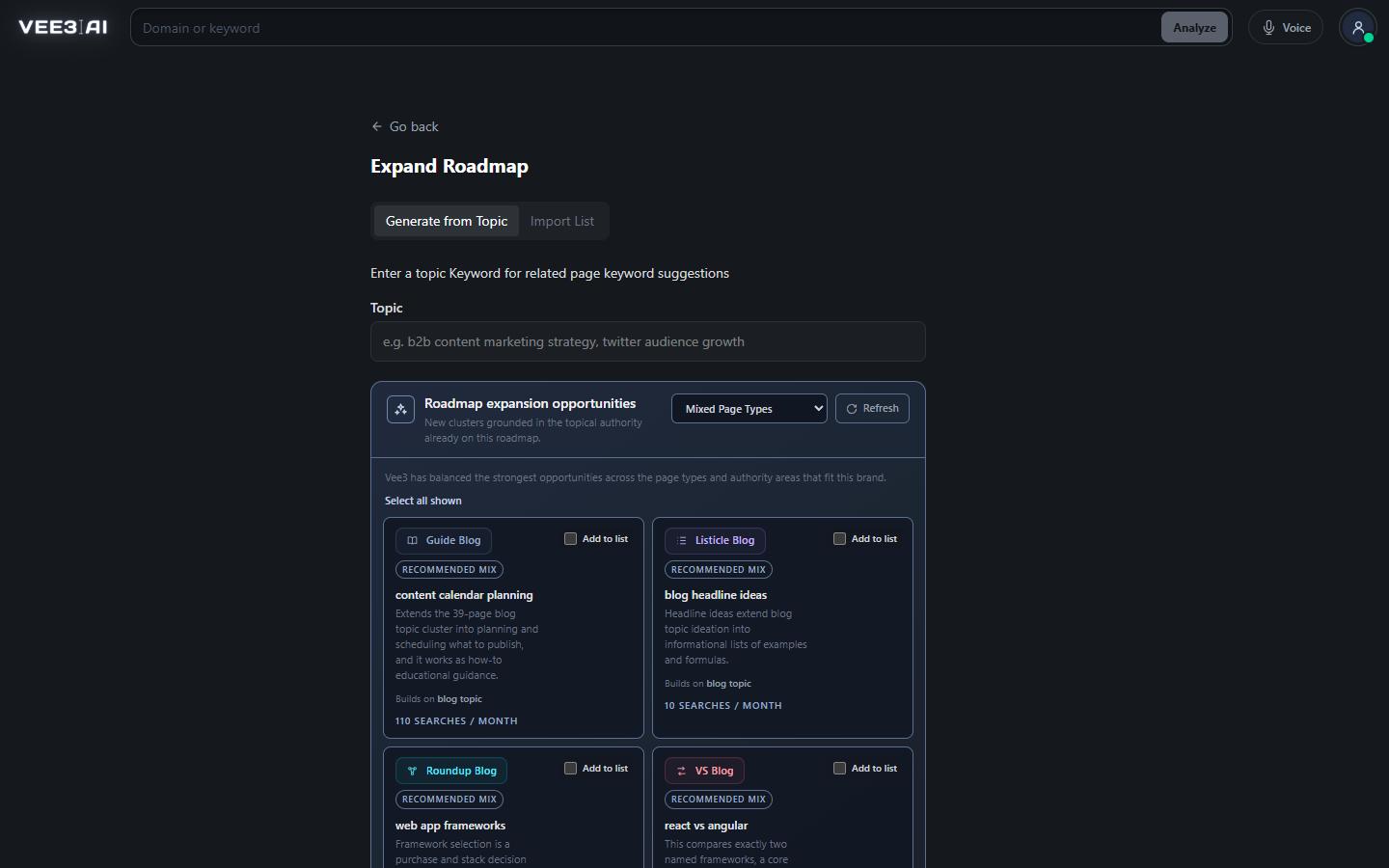
Every seed group on the roadmap ends with an Expand the cluster row. It mines related queries and adds only those that don’t cannibalize anything already there, up to 50 pages per run; run it again for the rest. The + beside any root keyword expands from that one page. If nothing qualifies, you are told why and no run starts. Roadmap expansion opportunities go further: new clusters, each required to name the existing seed it builds on, with demand measured when available and never guessed.
Import List takes keywords, URLs or a CSV up to 2 MB and 1,000 rows. Before anything is applied it sorts the rows into high risk of cannibalization, already covered on the roadmap, ready to import, and not recommended by house rules or for having no search volume. Values you supplied stay authoritative; Vee3.ai fills in only what is missing.
Turn one seed into a clean cluster
Start in a guest workspace with no account or card; your first cluster lands on a roadmap you can edit, expand or throw away.
Collect real searches around the seed, all with volume above zero; AI ideas join only when fewer than 60 exist.
Drop zero demand, years and near me, anything already on the roadmap, other brands’ queries and same-intent twins.
Pull the top ten results for every survivor to measure DR and traffic.
Assign page type, intent and category with a prompt grounded in your brand context.
Save the pages under the seed, re-checking duplicates against the roadmap as it stands at that moment.
Agencies
Type the category seed, pick the country and language, and start clustering.
Content leads
Expand a seed or a single page. Only keywords that don’t compete with anything already planned or published are added, and when nothing qualifies you get the reason instead of a pile of near-duplicates.
SEO consultants
Import the spreadsheet from your last audit. Your values stay, missing metrics are filled, and conflicts with the roadmap are shown for review before a single page is created.
Grouping keywords so that each group is served by one page instead of several competing ones. In Vee3.ai a cluster is a seed keyword with the pages under it, and each page targets one distinct meaning under its most-searched wording.
On Expand Roadmap, choose Generate from Topic, type a topic keyword, and pick a country and a language. Click Start clustering and the new pages are added to your roadmap under that seed.
No. The seed is your own wording, so it is always kept, even with no measured demand or when it overlaps a page already on your roadmap. Only the related keywords around it go through the demand and duplicate checks.
A belonging check removes keywords that aren’t your brand’s territory, such as competitors’ branded queries and parent topics. People do search them, but they wouldn’t be your pages.
Yes. Choose Import List on Expand Roadmap and paste keywords or upload a TXT or CSV file up to 2 MB and 1,000 rows. You review cannibalization risks, already-covered keywords and no-demand rows before anything is imported.
Yes. Click the + beside any root keyword to find keywords related to that page. Only the ones that don’t cannibalize anything on your roadmap are added. If nothing qualifies, you’re told why and no run starts.
Yes. Ask the Roadmap Copilot to re-cluster, and ask for fewer, broader clusters or tighter ones if you like. You review a preview of the moves, then choose Apply changes or Discard. Undo restores the previous grouping unless the roadmap has changed since.
Start a workspace without an account and watch the roadmap build itself. Save it to an account whenever you are ready.