SEO leads
A review without hunting through tabs
Say "show me the quick wins and explain the top three".
Talk to Vee3.ai. It navigates, filters, fills and explains your SEO data while you watch, and waits for your yes before anything big.
Free to start. No account or card needed.
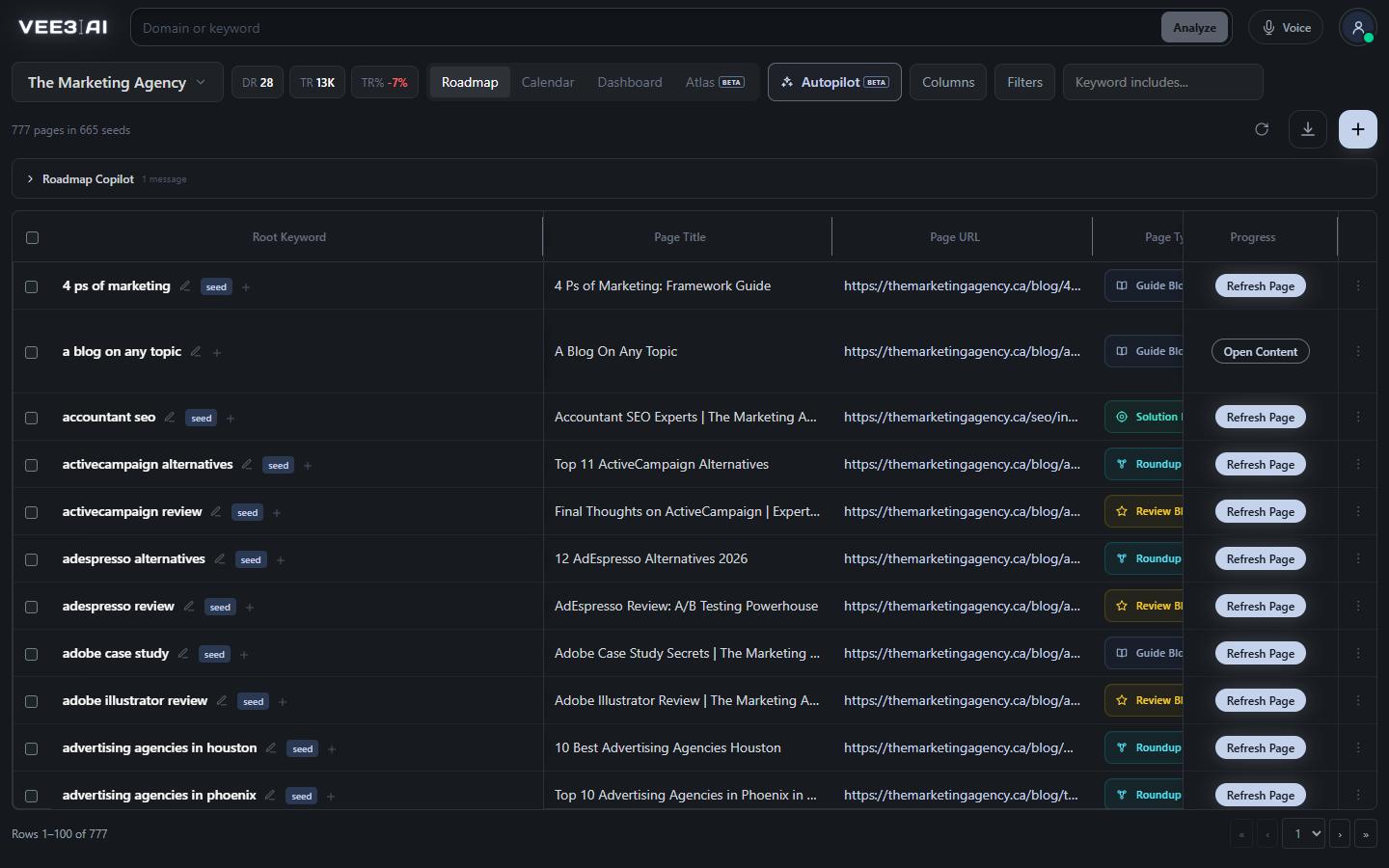
Opens screens, applies filters, fills fields, reorders columns and works notifications through the app's real controls.
Voice Mode is the spoken side of the Vee3.ai Copilot. Press Voice in the header, allow the microphone, and say "open the roadmap and show my shortlisted pages". Vee3.ai navigates, waits for the screen to update, scrolls to the evidence and draws a focus ring around it before explaining what you are looking at. It is the same assistant you type to, in the same conversation, so you can switch between talking and typing without repeating yourself.
Most AI SEO assistants answer from general knowledge. Voice answers from the brand in front of you: its crawl, SEO roadmap, Search Console and Analytics data, content, calendar and running jobs. Roadmap questions go to the SEO Copilot, which filters the table or adds columns while you watch. Keyword and domain questions run the real analyzers and open the report on screen. It is told to separate what it observed from what it infers, and never to invent a metric, a forecast or finished work.
Voice can operate any labelled control you can: buttons, links, filters, form fields, menus, notifications, the scheduling form and drag-to-reorder columns. On brief and content screens it speaks through the AI Editor, so edits keep the editor's revision and fact-check protections, and it verifies the exact new passage before telling you a change is done. On the topical authority map it pans, zooms and tilts the camera, switches lenses and runs the guided assessment one stop at a time. Follow screen is always on: scroll or zoom by hand and the highlight clears so you can look around without interrupting.
Voice never skips a confirmation. Topics, briefs, content, re-clustering, scheduling, deletes and publishing go through the same confirmation card or form a click would open, and you can answer it out loud or with the mouse. A planning or strategy question authorizes investigation and recommendations, not publishing or a schedule. When a consequence such as live publication is unclear, it asks instead of guessing, and earlier messages never count as approval for something new. Google sign-in, passwords, API keys, file uploads and browser permission prompts always stay with you. Clicking a button or typing in a field yourself stops the pending spoken work and pauses its plan.
Voice says what it is about to do in one short sentence, then does it. If work is still pending after eight seconds, it tells you where things stand rather than going quiet. Longer requests become a visible plan of up to eight steps that ticks off as each one is checked, with blocked steps marked as blocked, not done. A click alone is not proof: it inspects the saved result before it says something worked. Copilot, Voice and the AI Editor share one ordered queue, so a request made by voice waits its turn behind typed ones.
Audio streams from your browser straight to the speech model over WebRTC, using a credential that expires after 60 seconds, and Vee3.ai does not store it. Password fields and fields marked private are never read or filled. Hiding the tab mutes the microphone and coming back restores it. Voice needs a signed-in workspace and understands English; silence, background talk and unclear fragments are ignored rather than turned into actions.
Ask your roadmap a question out loud
Start building in a free guest workspace, then sign in when you want Voice; nothing it does skips the confirmation you would see with a click.
Sign in, press Voice in the header and allow voice processing and the microphone.
Speak naturally; turn detection knows when you are done, and you can type in the Voice panel too.
Voice navigates, highlights the evidence on screen and explains it.
You approve anything that generates, deletes, schedules or publishes.
SEO leads
Say "show me the quick wins and explain the top three".
Agencies
On a call, ask Voice to fly the Atlas to a cluster, switch to the internal links lens and point out the orphans.
New users
Tell Voice your domain and it steps through brand setup one choice at a time.
Yes, one that works on your own data. It is the spoken side of the Vee3.ai Copilot: it reads the brand's crawl, roadmap, analytics, calendar and live jobs, runs real keyword and domain reports, and operates the app's controls while it explains what it finds.
Yes. Guest workspaces can use the rest of Vee3.ai, but Voice only connects once you are signed in to your workspace.
No. Publishing, deleting, scheduling and generation stop at the same confirmation a click would open, and Voice asks when a consequence such as going live is unclear. Earlier messages never count as approval for a new action.
English. Brand and page names in other languages are fine inside an English request. Silence, background noise and speech it cannot make out with confidence are ignored rather than turned into actions.
Yes. Clicking a button or typing into a field yourself stops the pending spoken work and pauses its plan. Scrolling by hand only clears the highlight, so you can look around without interrupting.
Yes. The Voice panel has a text box for typed requests, and you can mute the microphone from the Voice menu without ending the session.
Yes. It reads the recent conversation in the Copilot or AI Editor you have open and can pick up unfinished work. Earlier messages are context only, so they never count as approval for a new action.
Start a workspace without an account and watch the roadmap build itself. Save it to an account whenever you are ready.