
The report landed on time. The charts looked clean. Then the client replied with one line: “So what does this mean for us?”

Pulling the numbers is the easy part. Automation tools are good at piping data from one place to another. What they rarely capture is why a page changed, who made that call, and which work still hasn’t happened. (That missing context is what fuels the Monday-morning dread of explaining a dip you didn’t cause.)
TL;DR
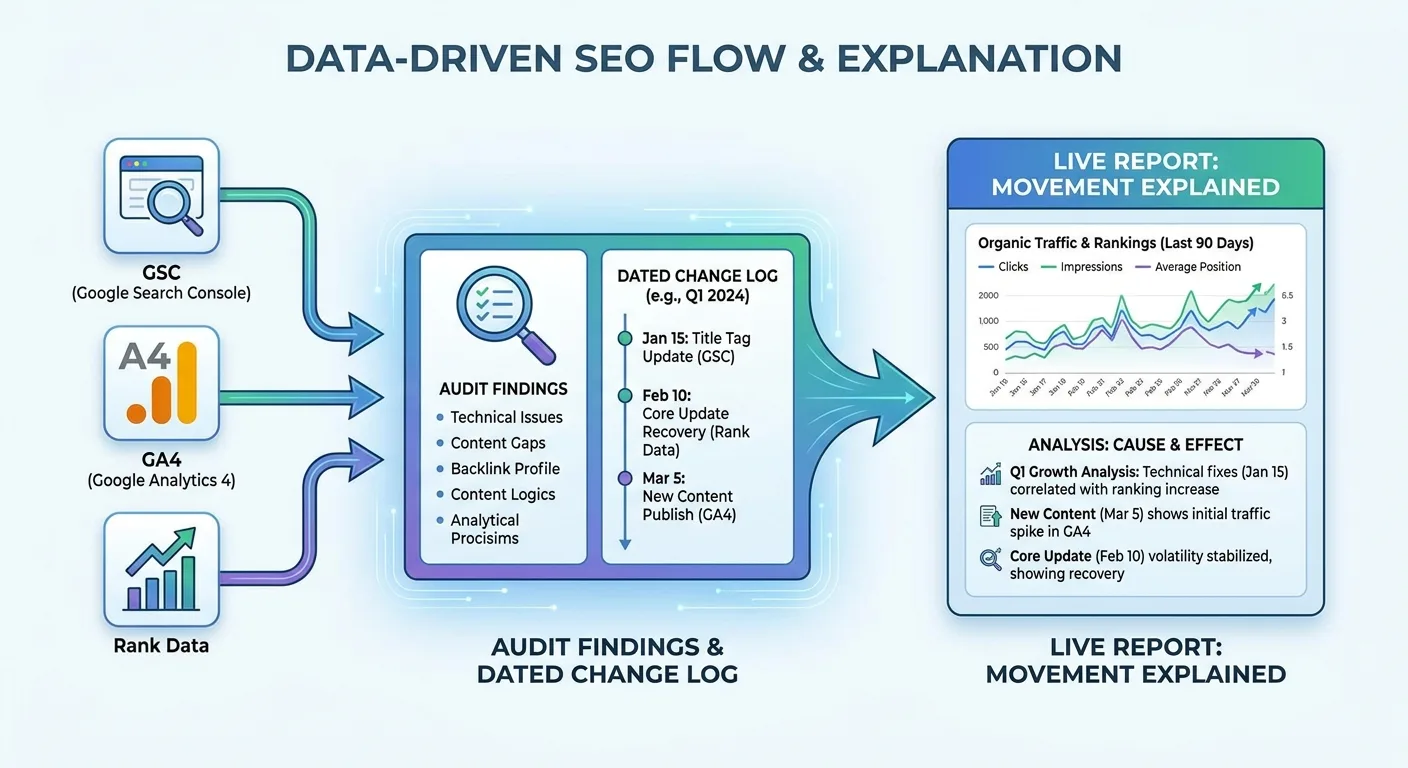
From SEO checker flags to a report that explains itself
The Report Everyone Opens and Nobody Acts On
A typical setup wires your usual SEO tool stack into connectors, a report template and a scheduled send, then stops there. Connectors pull SEO checker flags and traffic charts into slides, and the email goes out on the first of the month.
That pipeline moves numbers reliably. It can’t tell anyone three things:
- What changed on the site
- Who decided to change it
- What the change was expected to do

Picture a hypothetical month where clicks drop 12%. The chart shows the dip clearly. It says nothing about whether a migration, a content refresh or plain seasonality caused it, so someone reconstructs the context by hand. Every month. That reconstruction is the exact work automation was supposed to remove.
When did your last report prompt a decision instead of a follow-up email? (Clients rarely say “I didn’t read it” out loud. The silence says it for them.)
Dashboards still earn their place for monitoring. Trouble starts once monitoring gets passed off as reporting. The real deliverable, and the whole reason to automate SEO reporting, is a record of decisions and outcomes that travels with the data.
That record can’t begin at the dashboard. It begins upstream, at the SEO audit.
Wire Your SEO Audit Straight Into the Report
Audit output and report input should be the same data. Three tools feed that pipeline, and each has one job.
An on-page SEO checker produces pass/fail flags on technical items like titles, headings and indexability, and nothing more. An SEO analyzer adds context such as competitor overlap, search intent and page type. The SEO audit is the structured process that ties both to a list of fixes with named owners.
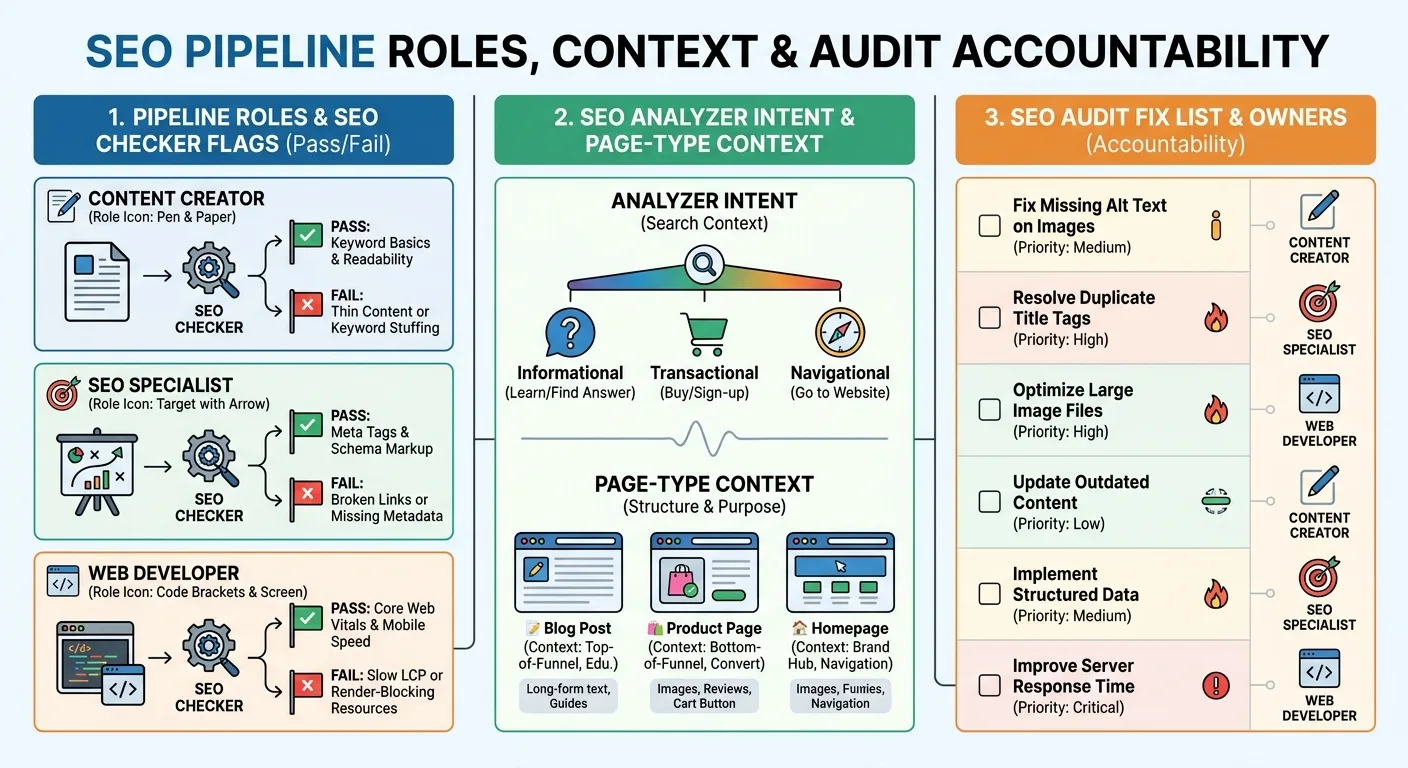
A finding is report-ready only when it carries the fields in the checklist below. An SEO audit missing those fields produces a to-do list your report can’t read.
Input hygiene comes next, because bad data becomes confident-looking garbage once a template formats it:
- Template links. Sitewide navigation inflates internal link totals.
- Polluted competitor sets. Directories and giant publishers rank for everything and bury your real rivals. An SEO analyzer that scores competitors on keyword-footprint overlap and excludes platforms and directories, the approach behind competitor scoring by search overlap, keeps the set honest.
- Padded keyword lists. Zero-volume and duplicate terms bloat rank tracking, so prune them before anything gets counted.
Automated audits also miss business context. An SEO checker can’t know a page is deliberately short.
Take an online furniture retailer whose scheduled crawl flags its returns-policy page as thin content. The SEO checker raises it every single month. The team tags that audit row “intentional, legal page, no action,” and the automated report drops it from the open-issues count. No more reporting the same false problem each cycle.
Run each finding through this checklist before it reaches the report:
- Tag each finding with the exact page URL and issue type
- Assign one owner who is accountable for the fix
- Record the fix date the moment the change ships
- Map the finding to the metric it should move
Give Every Number a Paper Trail
This is the layer that gives each metric its context. Each SEO audit finding from the previous step becomes the first entry in a change log, and that log should live as structured data your reporting pipeline reads automatically. A forgotten spreadsheet on someone’s drive doesn’t count. A shared table or form that feeds the same data source as your dashboards is enough, provided every SEO audit fix gets its own row.
The log is what lets you automate SEO reporting that explains itself. Every entry, from content rewrites to technical SEO changes like redirects, gets the same six fields, so the report can read them.
| Log field | What it captures | Why the report needs it |
|---|---|---|
| Page URL | The exact page or template that changed | Joins the entry to that page’s clicks, sessions and rankings |
| Change made | What shipped: title rewrite, template edit, redirect, rollback | Names the likely cause right beside the metric |
| Reason | The audit finding or goal behind the change | Keeps the decision visible months later |
| Date shipped | The publish or deploy date | Lines the change up with the trend so nobody guesses |
| Expected metric | Which number should move, and in which direction | Sets a test the next report can confirm or reject |
| Review date | When someone checks the outcome | Triggers a follow-up instead of letting it drift |
Of the six, Reason pays off most. Six months from now, it still names the SEO audit finding that justified the change.
Patterns appear once the log meets performance joined to page type, which Vee3.ai builds by joining GSC and GA4 data to page type and intent. The page type and intent tags an SEO analyzer assigns make that join possible. Picture a SaaS team that shortens the intros on its comparison-page template. The segmented report shows comparison pages dipping a few weeks later while feature pages and blog posts hold steady. The log entry for that template edit sits right beside the dip, so the team reviews that change first.
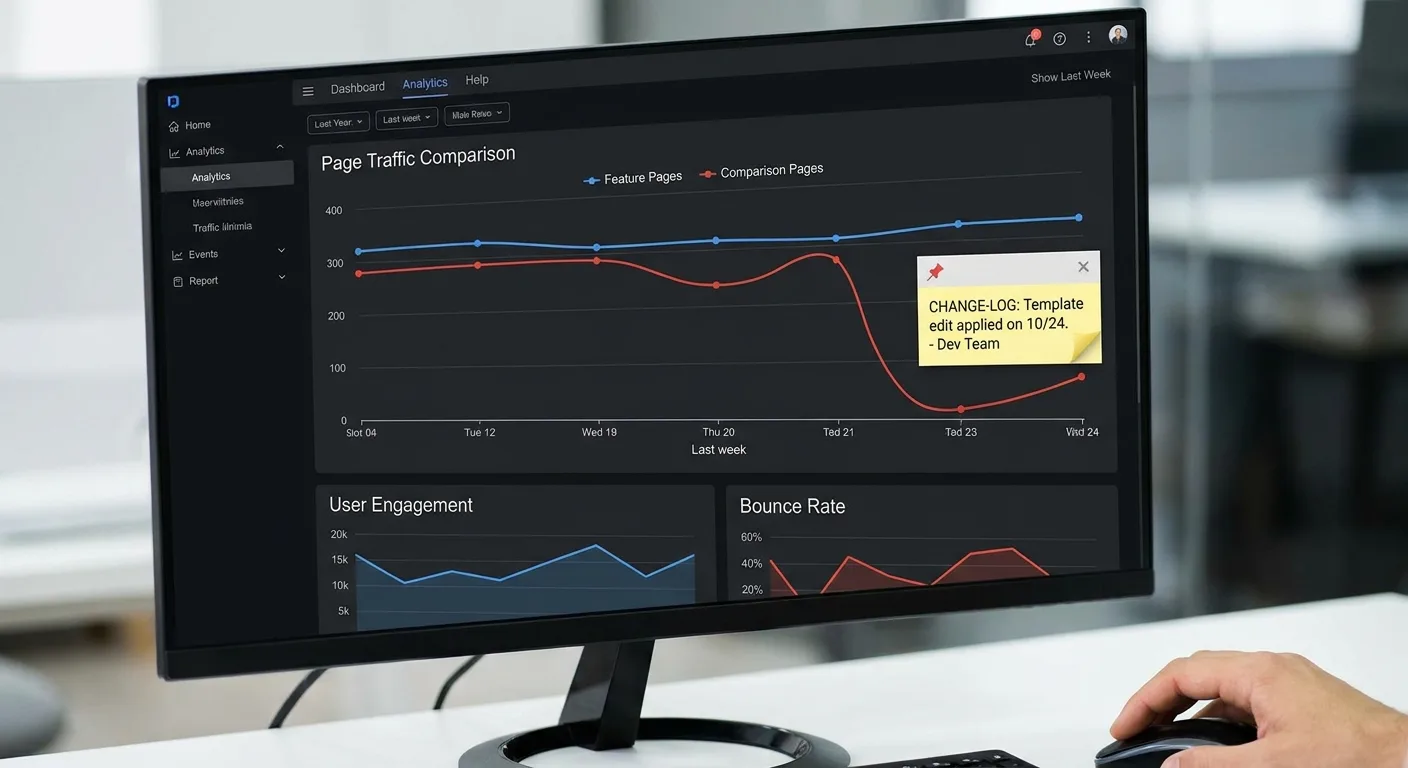
A log entry next to a dip is a lead, not proof. Algorithm updates, seasonality and tracking changes all move numbers too. Check for them and rerun the relevant audit checks before reverting anything. (Rollbacks deserve their own log entries, by the way. Undoing a change is still a change.)
Logging feels like overhead right up until the first time it saves a client call. Keep the template light and log at the moment of publishing, while the reason is still fresh in someone’s head.
Quick test: how many of last quarter’s site changes could your team date from memory?
Count the Pages You Haven’t Built Yet
A report can show steady growth while a competitor quietly owns the rest of the topic. Take a hypothetical B2B payroll software site that reports healthy blog growth every month. Only a portion of its planned payroll-compliance pages are live, and Google AI Overviews cite a rival’s checklist for the cluster’s core question. Add the unbuilt pages with their target demand, plus that missing citation, and the next client meeting turns into a build plan.
Three additions expose what standard automation leaves out.
Market capture is the share of a topic’s real search demand your site covers. An SEO analyzer that compares your keyword footprint with competitors shows which demand sits uncovered. Measure coverage once you group keywords into clusters by topic, so each gap reads as a line on a to-do list.
Unbuilt pages belong in the report by name. Log each one as an SEO audit finding with an owner and its target demand, and the report doubles as a roadmap status check. A topical authority map makes this visible by showing ranked pages next to hollow, unbuilt ones.
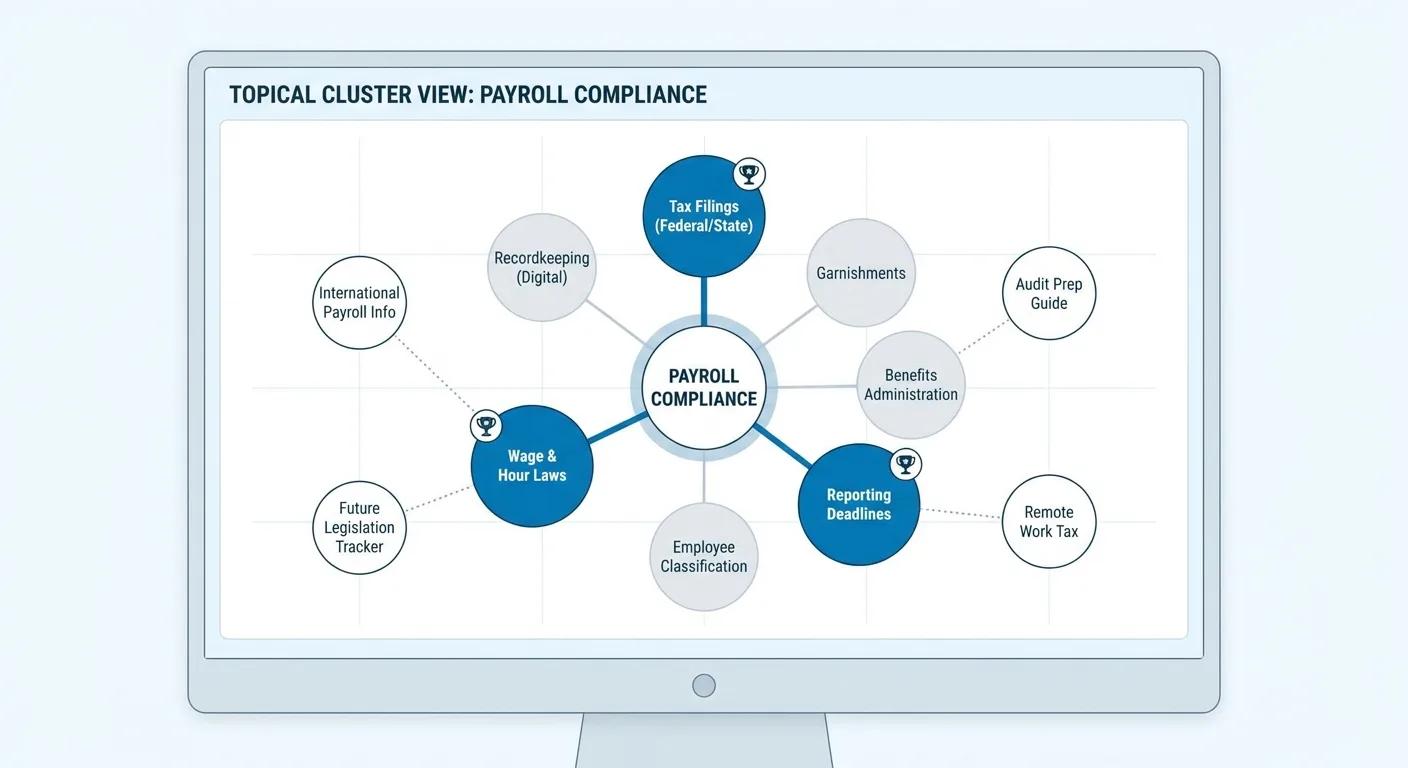
Ranked pages hold traffic, unranked pages need work, unbuilt pages are open demand.
AI visibility needs its own line item. Traditional SEO tools track keyword rankings and clicks, but they don’t show whether Google AI Overviews or ChatGPT cite or quote you (wrodium.com). AI citation tracking in Vee3.ai shows where those answers cite you or cite a competitor instead. Treat the results as directional. AI citation data is volatile and sampled, so skip precise share figures unless the tool’s method is clear.
Reporting gaps can feel like admitting weakness. Framed as a roadmap, a gap list reads as foresight, and it is the forward-looking half of any audit anyway.
Ship Reports That Stay Accurate After You Hit Send
Exported files start aging the moment they’re saved, and anyone working from them works from stale figures. Match format and access to the audience:
| Audience | Format | What to show | Access caveat |
|---|---|---|---|
| Executives | One-page summary | Headline trend, biggest gaps, decisions needed | Keep page-level detail out |
| Practitioners | Live screens they work in daily | Page-level data, audit status, change log | Full access within the team |
| Clients | Live shareable link | Agreed screens only, with source labels | Set permissions per screen before sharing |
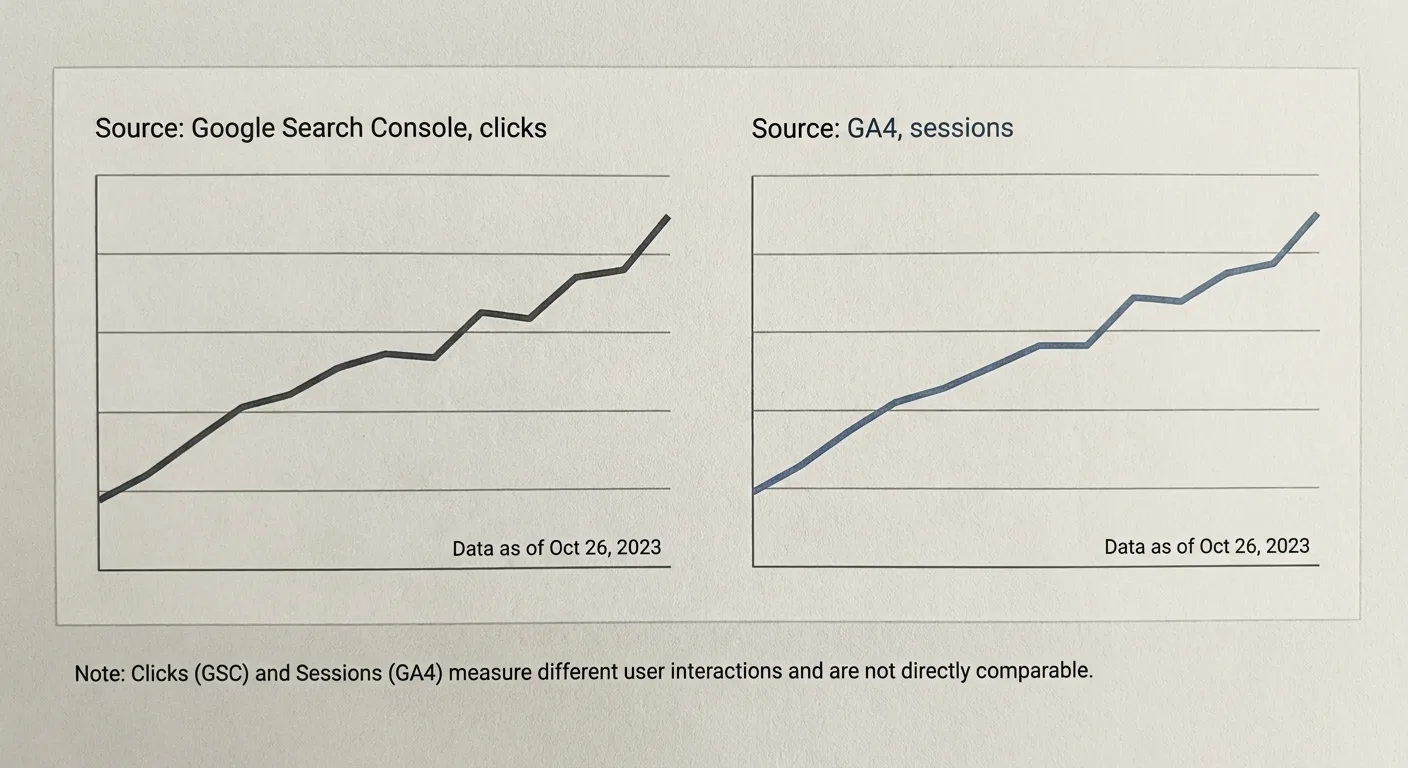
“Live” doesn’t mean instant. Google Search Console data arrives with a short processing delay, a limitation Data Bloo’s guide to automated SEO reports covers (as of April 2025). Put a visible “data as of” label on every chart and hold off explaining the most recent days until they settle. SEO checker flags refresh only on your crawl schedule, so label those as well.

Data can refresh continuously while written takeaways follow a slower rhythm.
The Parts You Should Still Write Yourself
An SEO checker flags issues. People decide which ones matter. Three areas need a human voice:
- Ambiguous drops. SEO analyzer output describes a decline during algorithm volatility but can’t interpret it.
- Trade-offs. Budget and strategy calls need someone who knows the business.
- Next quarter’s priorities. Choosing which SEO audit fixes ship first stays a human call.
The decision log supplies the facts. A person supplies the judgment, and clients trust a sentence written by someone accountable for it.

Use this block each month; the FAQ below covers where AI drafts fit.
Monthly commentary block (fill in by hand, 4 lines max)
- What moved: the one or two metrics that changed meaningfully
- Linked log entries: the change-log rows dated nearest to that movement
- Our read: what we think caused it and how confident we are
- Decision needed: the trade-off or priority the reader should approve
When Screenshots and Slides Eat Your Week
Screenshot SEO checker results, paste them into slides, re-explain last month’s context, send, repeat. The deck goes stale the moment it leaves your outbox.

We built Vee3.ai as SEO automation from crawl to rank, one workspace where you automate SEO reporting without stitching five tools together. GSC and GA4 data joins to page type and intent, and SEO audit findings live in the same place as the reporting. Shareable views keep clients on current data instead of last month’s deck. It won’t replace the judgment from the previous section. It removes the busywork around it.
Put your toughest client report in Vee3.ai and see whether it holds up. Click Start building free.
Frequently Asked Questions
How often should an automated SEO report run?
Refresh data daily, but write commentary monthly. When you automate SEO reporting, SEO checker crawls and traffic data can update every day. Written takeaways work best monthly, plus after major releases or algorithm updates, since weekly commentary often reports noise as signal. Smaller, low-traffic sites need longer windows before any change becomes meaningful.
Should AI write the commentary in my SEO reports?
AI can draft descriptive summaries of what changed in SEO checker results, but a person should verify the figures and own every recommendation. Models can state numbers confidently without support, so run fact-checkers for AI drafts and tie every figure back to the SEO analyzer or analytics data it came from.
Why do GSC and GA4 show different numbers in my report?
GSC and GA4 show different numbers because they measure different things. GSC focuses on activity that happens before someone arrives at your site from Google Search, and Google Analytics covers what visitors do once they arrive, such as which pages they visit, how long they stay and what actions they take (Google Search Central). GA4 depends on the site tag, consent, session rules and attribution, so a small gap is expected, but a large or sudden one deserves a controlled comparison before you call it an SEO loss or a tracking failure (Barlo Digital). Label sources on every chart and explain the difference once, in a footnote.
Start With a Change Log
Pick one thing this week: set up a change log before you touch report design. It’s the foundation everything else in this guide reads from. Start each entry from your latest SEO audit finding, with a reason and a date, before you automate SEO reporting any further or add another connector, dashboard or SEO checker.
Got room for one more line? List your unbuilt pages or track your AI visibility in the next report.
Polish can wait until the trail exists, because a report that prompts a decision is the one your clients will read.