
Rank tracking produces tidy numbers. That tidiness is exactly why a lopsided report feels trustworthy, even though most rank tracking problems are baked in well before anyone logs into the tool.
Maybe you’ve seen it: a dashboard full of rising lines, and a business that hasn’t moved.

The first thing worth auditing is the keyword list itself.
Key Facts About Rank Tracking
Your Tracked List Is a Sample, So Build It Like One
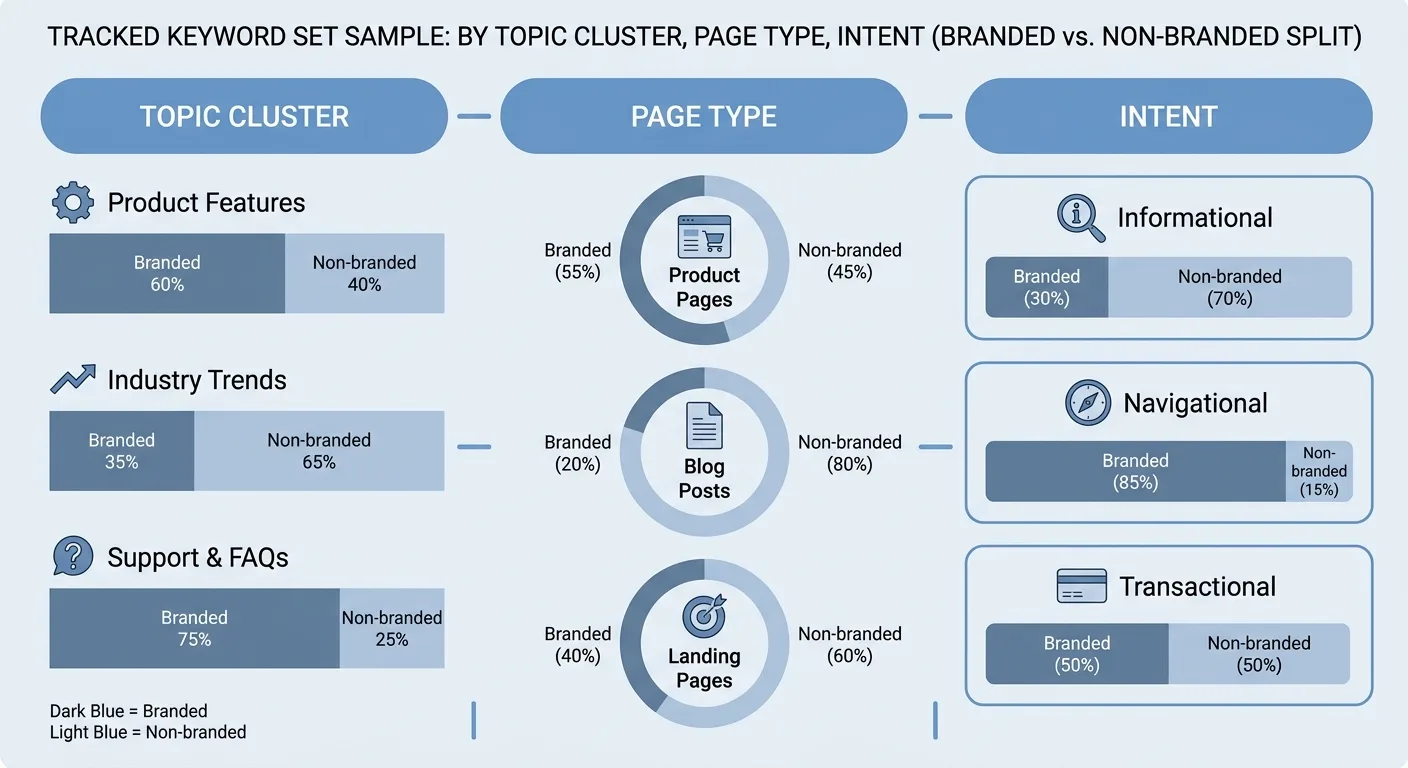
Plenty of tracked lists lean almost entirely on head terms and brand queries. Reports built on that mix look healthy or alarming for reasons unrelated to growth. A brand campaign lifts the line, one volatile head term drags it down, and neither tells you whether the site earns more search demand.
Keyword rank tracking is really a sampling exercise. Since no one can monitor every query, the terms you choose have to represent the site as a whole.
Sound rank tracking for SEO covers three dimensions: every topic cluster, every page type (product, category, guide, comparison) and every intent (informational, commercial, transactional). Before tracking anything, group terms into clusters so each theme on the site earns its place on purpose.
Don’t discard terms sitting just beyond page one. Progress tends to register there well before a page breaks into the top results.
Here’s the build order I’d follow:
- Start from pages that already earn clicks.
- Add each cluster’s supporting queries.
- Tag every term by intent and page type.
- Split branded from non-branded.
- Review the list quarterly.
For example, a query like waterproof hiking boots might carry four tags: cluster hiking footwear, page type category, intent commercial, and non-branded. Those same tags later decide its refresh cadence and how its clicks are grouped.
A lopsided list doesn’t get fixed by adding hundreds more keywords, since volume dilutes your focus and usually repeats what you already know.
Pruning matters as much as adding. Retire terms whose pages were merged, redirected or never built. Two pages that keep swapping positions for the same term deserve a closer look, so check for cannibalization signals before you drop either one from the list.
One Keyword, Many Positions: Location, Device and SERP Features
Search results shift by country, city and sometimes postcode. A business serving a physical area needs local rank tracking at city or neighborhood level. Otherwise, a national average can hide the areas where customers live. Agency Dashboard on desktop vs mobile and local rankings describes how a local business can rank well in one neighborhood and vanish a short distance away. Where your tool allows it, set checks by postcode or coordinates rather than one citywide check.

Devices split results again. Mobile rank tracking deserves its own series once most visits come from phones. BrightEdge research reported in Agency Dashboard’s desktop vs mobile rankings analysis (September 2026) found that 79% of listings hold a different rank on mobile than on desktop.
Run a quick keyword analysis to shortlist the terms in question. Then check their device split in Google Search Console and your mobile session share in Google Analytics 4 (GA4) before deciding which terms need a separate mobile series.
A page at position 3 can sit beneath an AI answer, a map pack, a video carousel or a shopping block. SERP rank tracking should record which features appear and whether you hold any of them, along with the organic position. The Visualping Blog noted, as of January 2026, that SERP layouts change with intent, location and device, plus time of day and Google experiments, so two people in the same city can see different configurations.
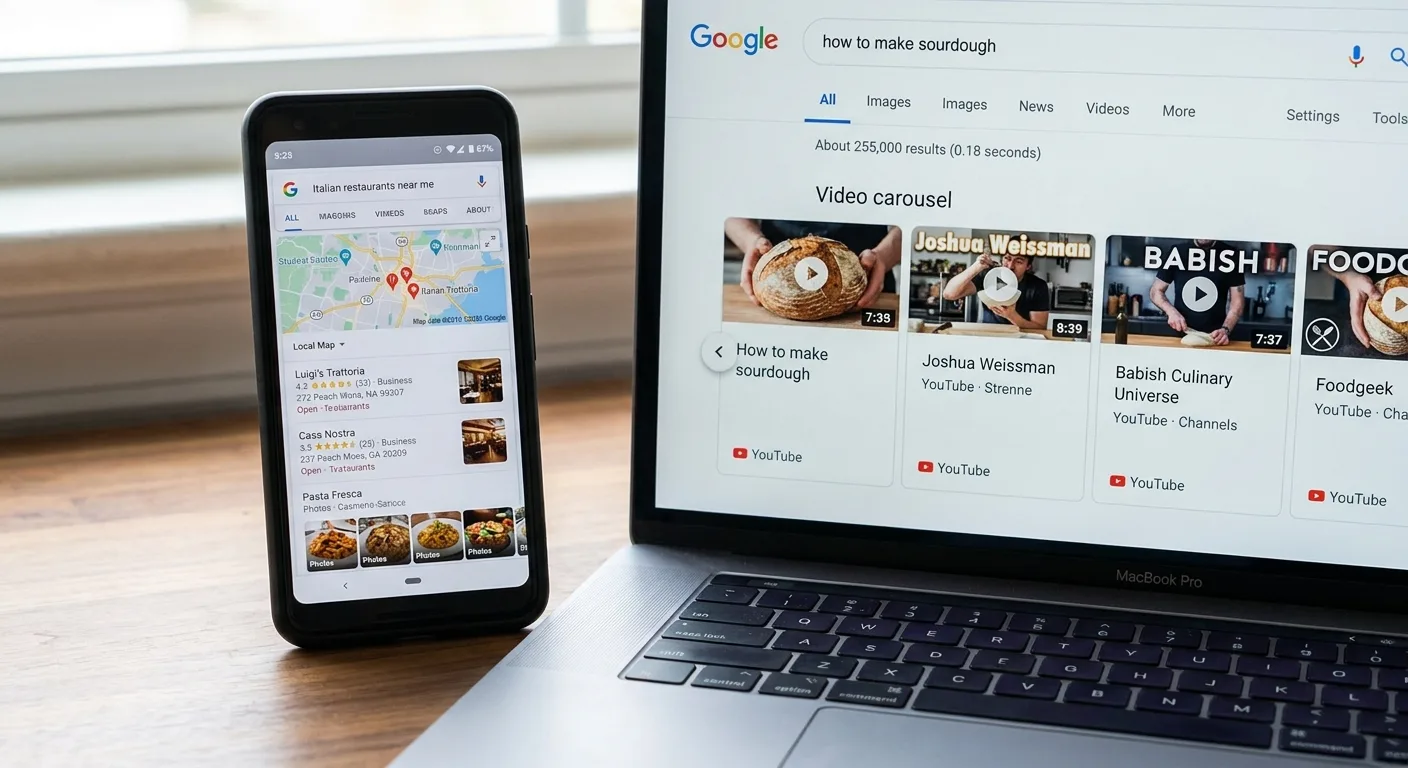
Because results vary so much, a rank tracker checks from a standardized, logged-out view. Expect it to differ from what you or your client see. It is built for consistency, not for mirroring any one screen.
Lock these rank tracker settings before the first check:
- Country, plus city or postcode for local terms
- Device type, with mobile and desktop as separate series
- Language
- Search engine variant, such as the country-specific domain
- Tracking view recorded as standardized and logged-out
If even one of these settings differs between two readings, treat them as separate series rather than a trend.
How Often Is Often Enough? Matching Refresh Rate to Volatility
Daily rank tracking earns its keep whenever a decision depends on fast feedback.
| Situation | Suggested cadence | Why |
|---|---|---|
| Launch or site migration | Daily | Problems surface quickly and need fast diagnosis |
| Algorithm-update window | Daily | Movement is expected, so compare against a pre-update baseline |
| Highly competitive or seasonal-peak terms | Daily | Short windows carry the most revenue |
| Supporting and long-tail queries | Weekly | The trend matters more than any single reading |
| Stable evergreen pages | Weekly or longer | Daily swings add noise without new information |
A shift of a position or two between days is usually fluctuation. Judge any change over a window, such as a rolling seven-day average, before you act on it.
Annotate the chart whenever something changes on your side, such as a migration, a template update or new internal links. Without those notes, a later dip is hard to attribute.

Few lists need a single refresh rate across the board, so let the tags you added earlier set each term’s cadence. Keeping fast-moving and slow-moving tags in a single SEO dashboard makes a mixed cadence easy to read at a glance.
Daily checks also tend to eat into plan allowances faster, so save them for the high-stakes cases listed above.
Matching the Setup to Your Situation
The best rank tracking setup is whichever one supports the settings and tags you’ve already chosen, at a cost you can sustain. Shortlisting rank tracking software starts from that list of needs. Does your workflow also need to compare competitor visibility for the same terms? Make that a requirement up front.
The table below maps common situations, from a solo site to agency rank tracking across many clients, to what each should require and verify before committing.
| Situation | What to require | What to verify before committing |
|---|---|---|
| Solo site owner | Clear free tier limits, easy tagging | Caps on keywords, locations and refresh frequency, plus whether history exports |
| Local business | City-level checks, map pack visibility | Whether location is set by city, postcode or coordinates, and whether map and organic positions are reported separately |
| Agency | Client separation, white-label or shareable reporting, bulk location handling | Per-client limits and how branded reports are produced |
| Enterprise | User permissions, large keyword volumes, audit trails, SLAs | Whether permissions scope to team, market or campaign, and what the SLA commits to on data freshness |
| Developer-led team | Documented rate limits, consistent data schema | How location and device are specified in requests, and who owns storage and normalization |
Free rank tracking suits small sites and anyone learning the ropes, within the caps the solo site owner row asks you to verify.
Online rank tracking in the browser raises a separate question: does the tool retain history, and can that data leave it? Ask how data integration works in practice, because retained history is worth little once it’s trapped.
One due-diligence step applies to rank tracking tools at every tier. HubSpot’s enterprise rank tracking software guide advises requesting a methodology document on how a vendor collects ranking data and handles personalization and localization. The same guide lists single sign-on (SSO), role-based access control (RBAC), SLAs and audit logs as governance features. Smaller teams can borrow the methodology half of that advice without the enterprise budget. Where a trial is available, load a slice of your real tracked set at your fixed settings and compare a few readings before you commit.

Questions to put to any SEO rank tracking tool provider:
- Can I tag by intent and page type?
- How is location set?
- Can I export raw history?
- How are SERP features recorded?
- What happens to my history if I cancel?
Positions Mean Little Until They’re Joined to Clicks, Revenue and AI Citations
Pair each tracked position with impressions, clicks, sessions and revenue for the same page and period. Group the results by page type, category and intent, so a win on informational pages never gets mistaken for a win on revenue pages.
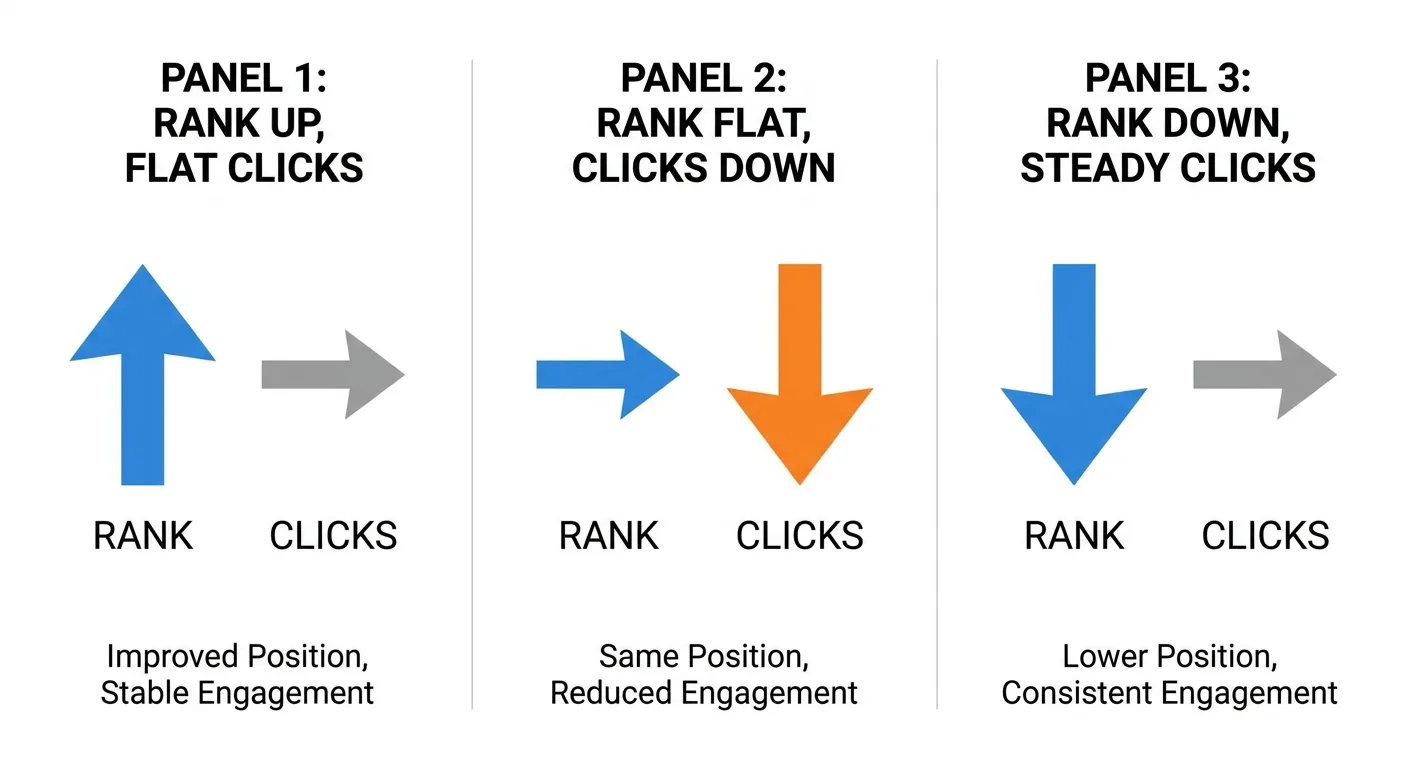
Read the pairing through three common patterns:
- Rank up, clicks flat: a SERP feature pushed results down, or the query carries little volume.
- Rank flat, clicks down: a feature absorbed the clicks, a pattern the Visualping Blog’s analysis of rank position data describes, as of January 2026.
- Rank down, clicks steady: the lost terms carried little demand.
Website rank tracking can also summarize performance at site level as a share of tracked demand captured. I’m defining that as the portion of searches in your tracked set where you hold a top-10 organic position (or whichever threshold you choose and keep fixed).
Hypothetical example: if the terms in your tracked set total 10,000 estimated monthly searches, and the terms where you rank in the top 10 account for 3,500 of them, your share of tracked demand is 35%. The search volumes are your tool’s estimates, not measured traffic. Tools calculate it differently, so check the definition yours uses.
AI answers need their own lens. Classic position tracking can’t show whether ChatGPT or Google AI Overviews cite you or a competitor. Treat an AI visibility check as a separate measurement, never something a position column can imply. Omnia’s guide to tracking Google AI Overviews (September 2026) explains that a page can hold position one in organic results and still be absent from the AI Overview above it for the same query.

Frequently Asked Questions
Is free rank tracking accurate enough to rely on?
It can be, for a small, well-chosen set of terms tracked at fixed settings. Free tiers often cap keywords, locations and refresh frequency, so a free rank tracker suits a modest list. Verify each cap before building a workflow around it, and confirm whether your history can be exported, since lost history is hard to rebuild.
Can I use a rank tracking API instead of a dashboard?
Yes, provided you want rankings inside your own reports or data warehouse. The trade-off is ownership: your team takes on storage, scheduling and normalization of rank tracking data. Check the documented rate limits and how location and device are specified in each request, because inconsistent parameters produce readings nobody can compare.

What does it mean when rankings drop but clicks hold steady?
Usually the lost positions sat on low-demand terms, or your clicks come from queries outside the tracked set. Compare the affected queries in Search Console against your tracked list. If whole query groups are missing, broader keyword research guidance will help you rebuild the set. Wait for a few weeks of data before concluding anything.
How many keywords should I track?
There’s no fixed number. Track enough terms that every topic cluster, page type and intent on the site has some coverage, and stop there. If a candidate term wouldn’t change a decision or reveal a gap your current list misses, it adds noise rather than coverage, and it uses up your plan’s allowance.
When Your Rankings Live in One Tab and Everything Else in Another
Manually merging rank exports with Search Console and GA4 drags out every decision, and slicing that combined data by page type or intent quickly becomes a chore.
That specific task is what we built Vee3.ai to handle. The Vee3.ai product page describes, as of October 2026, SEO automation from crawl to rank in one workspace: crawl, research, plan, write, fact-check, publish and measure. The judgment stays yours: you can share the workspace with stakeholders and still keep every call about what to change in your own hands.

When you’re ready, start building and keep your rank tracker data in the same workspace as the rest of your SEO work.
Your Next Step: Audit the Tracked Set
Open your current tracked set today. Audit it for branded skew, missing page types and stale terms, and do that before touching a single tool setting.
Once the list is sound, judge each ranking by what it actually delivers in clicks, revenue and AI citations.