

Ask most SEOs to name the most accurate keyword tool and many will point to Google Keyword Planner, a pay-per-click tool whose data comes straight from Google, the world’s largest search engine (12 Best Keyword Research Tools for SEO in 2026). That reasoning makes sense. Google Search Console, though, already holds a list of phrases you never chose. Google matched them to your pages anyway. If another sprawling export that goes nowhere sounds exhausting, this approach asks far less of you.

We treat keyword work as inventory first and discovery second. Every page you’ve published counts (yes, even that blog post from three years ago). Because the results page decides what each phrase means, we start with meaning.
TL;DR {#tldr}
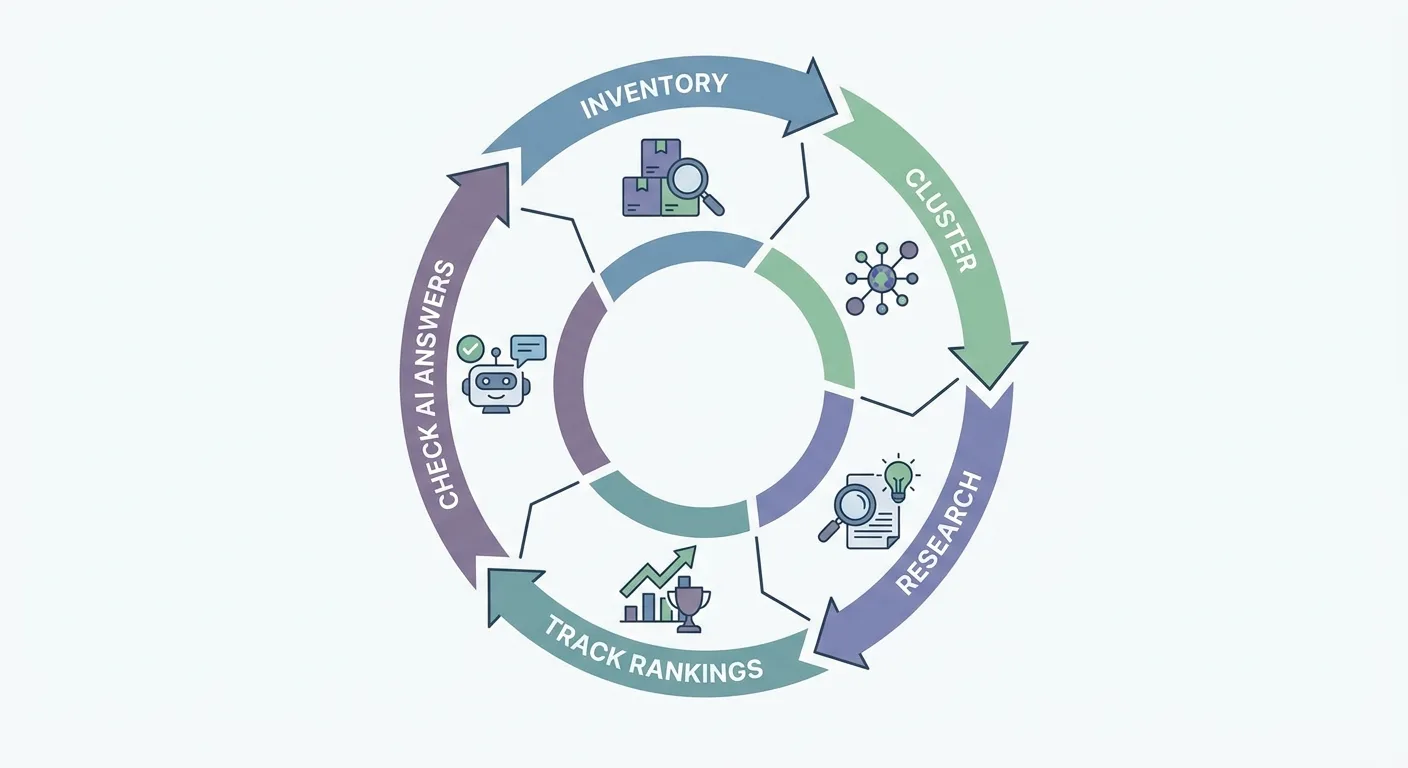
What Keywords Mean Once a Results Page Gets a Vote {#what-keywords-mean}
The typed phrase tells you only part of what matters, since the intent comes from the searcher and the results page reveals what that intent is. So what are keywords once Google weighs in? They’re signals of need, and the same string of letters can point at completely unrelated needs.
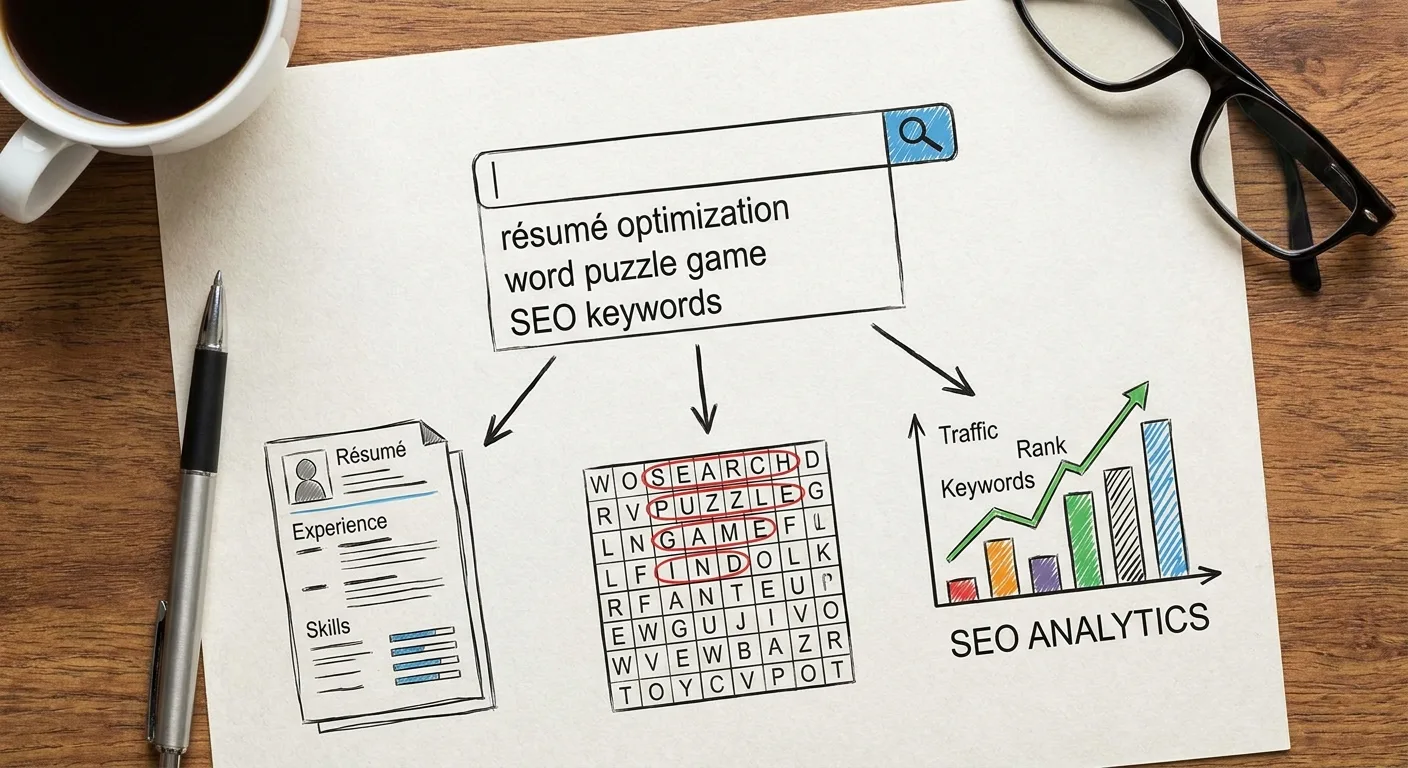
Take the word “keywords” itself. Searches for it pull in:
- People wanting an SEO definition
- Job seekers searching “keywords to describe yourself” for a résumé or interview
- Players looking up a keywords game they saw online, sometimes hunting for answers to a specific puzzle
Results shift by location, device and time, so check live results in a clean or location-set session instead of trusting someone else’s screenshot.
Spelling complicates things further, because some people write a term as one word while others split it in two. Try comparing the search engine results pages (SERPs) for each spelling, and when they largely show the same pages, you can usually treat them as one target.
In practice, keywords meaning starts with the phrase and ends with the page type ranking for it. Take a project management software company: “project management software” tends to surface product pages and comparison roundups, while “how to manage a project” tends to surface step-by-step guides. Same topic words, different intent. Knowing which meaning you serve lets you generate keyword ideas by intent and drop the variants that belong to another crowd.
Which of those meanings is your page answering? (The word game crowd isn’t reading your SEO post, and that’s fine.)
Your Site Already Ranks for Phrases You Never Picked {#your-site-already-ranks}
We start every keyword project with the pages that already exist, and only then research keywords for SEO from scratch. Google has already told you which queries it associates with each URL, and that data costs nothing while often pointing at the quickest wins.
Crawl every published page before exporting queries, so no forgotten URL slips out of the inventory. Then:
- Open the Search Console performance report filtered by page.
- Export the queries for each URL.
- Flag queries sitting on page two or below that match the page’s intent. These are the queries a stronger section might lift.
- Flag queries the page never targeted but could serve with a new section. Gaps found here scope any new keyword research.
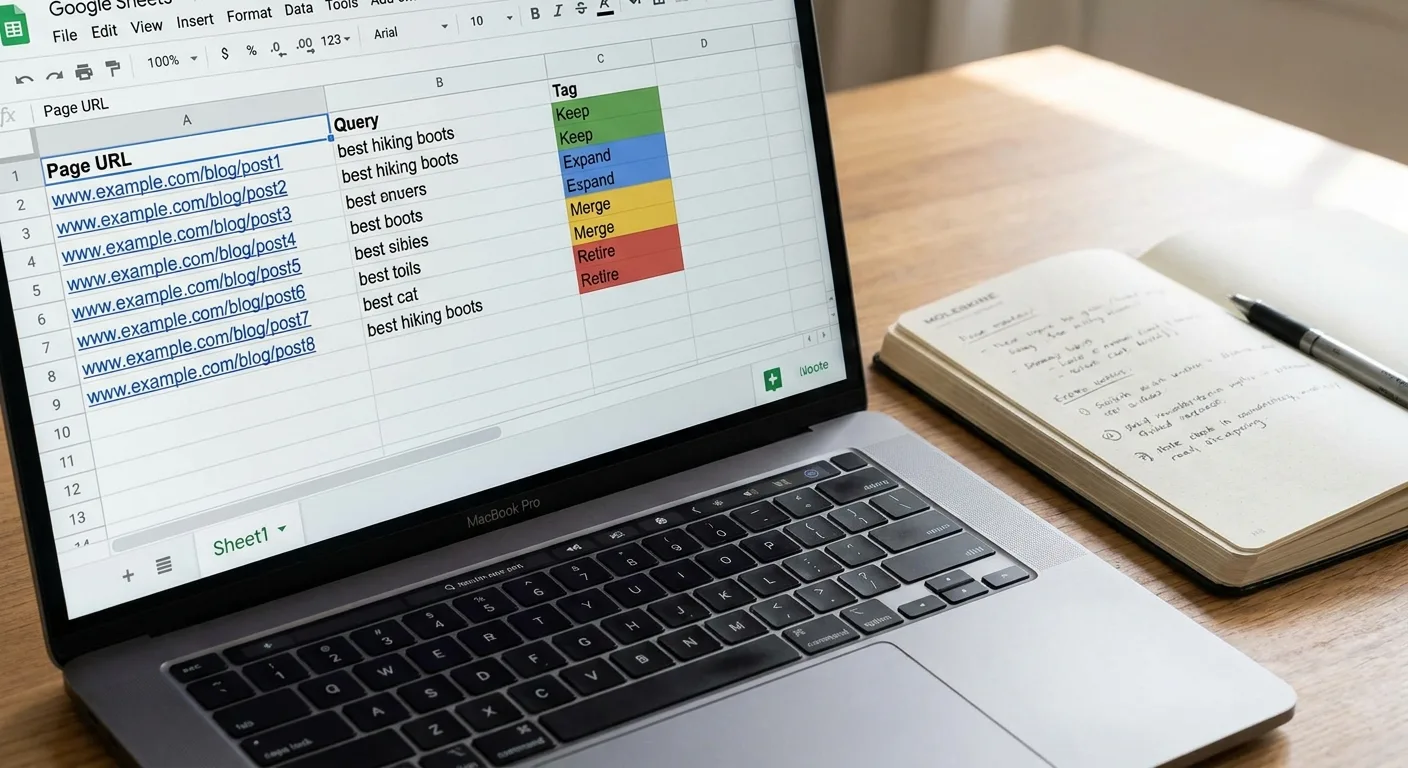
Template: Page inventory worksheet
| Page URL | Queries with impressions | Average position | Matches page intent? | Action |
|---|---|---|---|---|
| [/page-url/] | [query 1], [query 2], [query 3] | [position per query] | [Yes / No / Partly] | [Keep / Expand / Merge / Retire] |
| [/page-url/] | [query 1], [query 2] | [position per query] | [Yes / No / Partly] | [Keep / Expand / Merge / Retire] |
- Keep: Queries match the page’s intent and positions hold steady.
- Expand: Page-two queries match the intent and a new section could answer them.
- Merge: Another URL earns impressions for the same queries.
- Retire: The page has no search intent and no user purpose.
For pages showing no keywords at all, work through this diagnostic in order:
Checklist: Diagnosing a page with zero impressions
- Ask whether the page exists only for users, such as support or legal pages. Leave it alone when the answer is yes, since it doesn’t need keywords.
- Confirm the URL is indexed with the URL Inspection tool in Search Console.
- Look for at least one editorial internal link. Navigation, footer and sidebar links can make a page look well linked when no editorial link points to it.
- Check whether the content goes beyond a thin answer of a few lines.
- Search your own site for another URL covering the same topic, which signals a duplicate.
- Compare the page format with what ranks for its target query to spot an intent mismatch.
How many of your published pages have you checked this year?
Two Pages, One Query, Zero Winners {#two-pages-one-query}
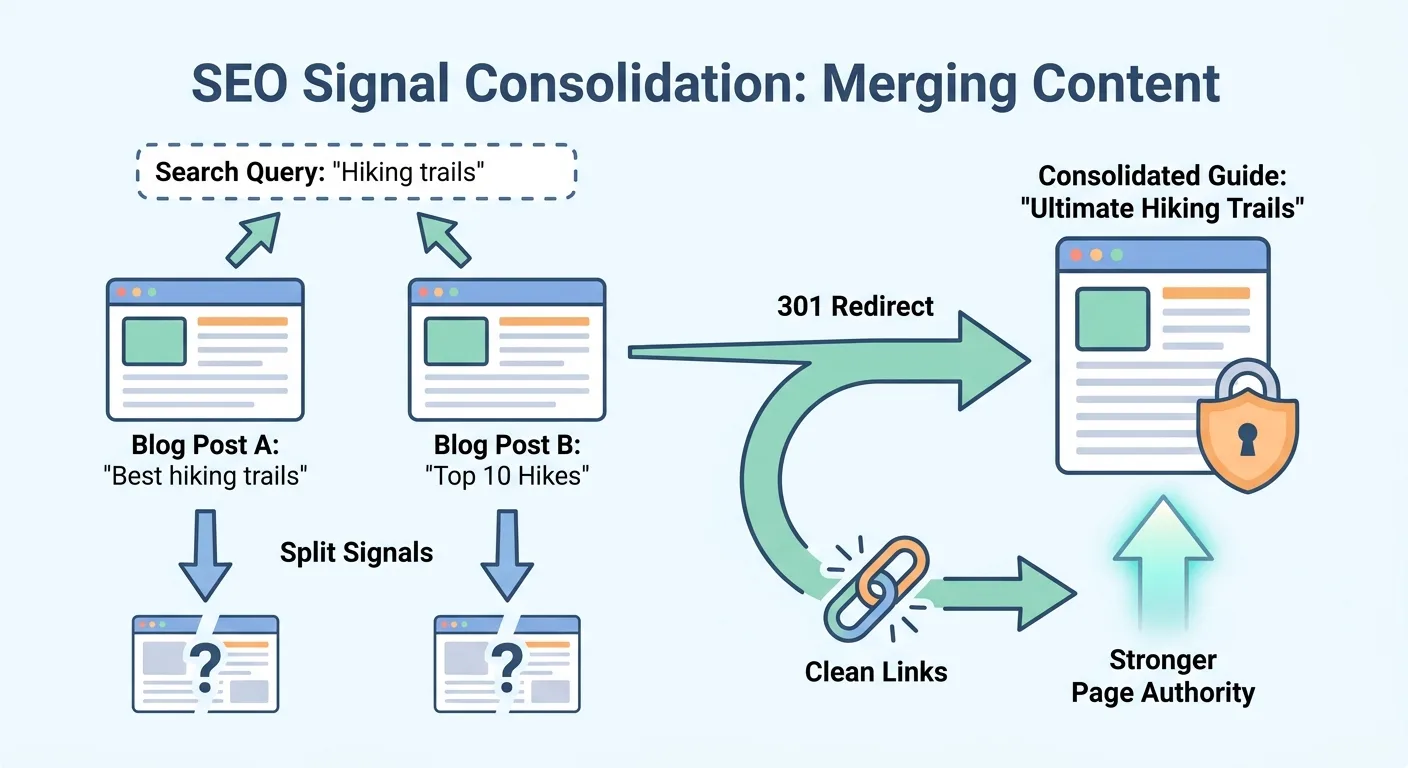
Your inventory will often surface pairs of URLs competing for the same query. Pause before touching either page: run a cannibalization check and match each signal to the move in the table below.
| Signal | Likely cause | Move to make |
|---|---|---|
| The ranking URL flips between two pages in Search Console | Both pages answer the same intent | Merge into the stronger page and 301 redirect the other |
| Both pages stall on page two for the same query | Relevance is split across near-duplicates | Merge them, or rewrite one around a distinct intent |
| Internal links point at both pages with the same anchor text | Your own links send mixed signals | Re-point those links to the preferred URL |
| Both pages hold strong positions and serve different intents | Healthy overlap | Leave both pages as they are |
Don’t merge two pages that already rank for different intents.
To see the first row in action, imagine a hypothetical blog that publishes a short tips post on a topic and later adds a longer guide on the same topic. If Search Console showed the ranking URL for the shared query switching between the two, one reasonable fix would be to fold the tips into the guide, redirect the older post and update internal links that used the same anchor.
If both URLs must stay live, a canonical tag can help, but it doesn’t guarantee Google consolidates the two.
Collisions become rarer when you cluster phrases by shared results and assign every cluster to a single URL. Good keywords research for SEO ends in clusters, because a flat list leaves you guessing where each phrase belongs.
Tightness is a judgment call: tight clusters create more pages, while broad ones create fewer, deeper pages. Let the SERPs guide you when tools flag phrases as related: distinct results suggest separate pages, and near-identical results suggest one.
Researching Keywords for SEO Against the Ten Sites Already Ranking {#researching-keywords-for-seo}
New research belongs only to the gaps your inventory and clusters exposed. Building lists with no endpoint seldom leads to a page that actually gets published. Research keywords with a specific page in mind, and stop when you have enough to plan it.
Metrics make a solid first filter. Use a single pass to check volume, difficulty and potential, then let the live top ten make the final call.
| Check | What it tells you | Where it can mislead | How to confirm |
|---|---|---|---|
| Search volume | Rough monthly demand for the phrase | Tool figures are estimates, and low or zero volume can understate long-tail demand | Compare with Search Console impressions on related pages before dismissing the phrase |
| Keyword difficulty | Estimated strength needed to reach page one | Says nothing about whether your page fits the intent | Read the actual domains in the live top ten |
| Traffic potential | Clicks the top page may earn across related variants | Also an estimate | Check whether the ranking pages share a format you can produce |
| Live top ten | Winning format, real rivals and the weakest domain | Shifts by location, device and date | Search in a clean session and record the date you checked |
When you read the SERP, ask:
- Which page formats rank: guide, list, product page or tool?
- Who ranks?
- Which domain in the top ten looks weakest?

Rank your real rivals by how much search overlap they share with you. Large storefronts and wikis often appear for game keywords, for instance, and you can set those aside as practical competitors. Tools you use to search keywords for SEO tend to list those giants first. Your job is spotting the smaller site you can outdo.
Would your page be the most useful result on that list?
A Keywords Example From a Gaming Blog, Start to Finish
This is an illustrative scenario for a small gaming site, not a case study with results.
- The inventory shows an existing review page earning impressions for build-guide game keywords it doesn’t answer.
- Group the related gaming keywords by shared SERP into one cluster.
- Confirm the cluster doesn’t collide with the existing review page.
- Read the top ten. Guides win the format for these queries, and a small community site appears among the results.
- Decide whether to publish a dedicated guide linked from the review page. If the answer is yes, turn the cluster into a brief before drafting the dedicated build guide.

The call rests on intent and a beatable result in the SERP, not on volume alone.
Rank Checks That Tell You Something You Can Act On {#rank-checks}
Typing your own phrase into a browser is an unreliable way to check ranking for keywords, because location, personalization and device all shape what you see.
Picture a bakery owner who searches “custom birthday cakes” from her shop’s computer. She might find her site at the top, while a tracker set to a neighborhood across town could show the same page lower. Her location and browsing history would shape the manual result, while the tracker’s fixed setting gives a consistent view of one market.

Skip your own browser and track rankings from fixed locations, so every check reflects the same market and device. A keywords position checker set this way builds a history you can compare over weeks.
Search Console’s average position needs context too. It’s weighted across queries and impressions. A page-level number therefore blends strong and weak phrases together, so open the queries tab for a single page and read position per query.
Choose a keywords ranking checker tool that organizes positions by cluster or page and ties them back to the clicks and conversions in your analytics. A bare list of positions seldom tells you what to do next.
AI answers now need a place in routine tracking. In a May 20, 2026 post, WP SEO AI argued that Google has changed Search and that keywords are no longer the starting point; we read that as opinion.
For each cluster’s core questions, it can help to see which AI answers cite you and note any competitor cited instead, along with cases where no clear source appears. Because these experiences still start from what people ask, your page inventory is likely to remain a useful reference.
What would you change if this page dropped three spots tomorrow? Decide now, and the drop becomes a task instead of a panic.
Running the Whole Keyword Loop in One Workspace {#one-workspace}
Juggling exports between a crawler, a research tool, a clustering spreadsheet and a rank tracker wears anyone down, especially when URLs never match and you’re re-keying keywords by hand.
We built Vee3.ai as SEO automation from crawl to rank, with each step of this guide in one place:
- The SEO Crawler maps your existing pages.
- The Keyword Clustering Tool groups related searches into clusters.
- The Keyword Analyzer supports the research step: volume, keyword difficulty and traffic potential.
- Cannibalization checks catch collisions.
- The AI Visibility Tool shows where AI answers cite you, or cite a competitor.

Every decision still sits with you, because our data informs the call without making it. Put your own domain in and see your existing pages mapped: Start building.
Frequently Asked Questions {#faq}
How many keywords should one page target?
There’s no set number of keywords per page. Target one primary intent, then cover the variants inside its cluster. A single guide can earn impressions for many related queries it never named. Forcing a quota such as 10 keywords per page tends to cause stuffing or blend separate intents. Search Console shows the real spread after publishing.
Do I need the exact keyword phrase on the page?
You don’t need the exact keyword phrase everywhere on the page. Use it where it reads naturally, ideally in the title or opening lines. Close variants, such as “keywords” and “key words,” can rank the same page when their results match. An awkward exact match repeated throughout hurts readability more than it helps. Covering the subtopics the top ten all address matters more than density.
How often should I redo keyword research?
It usually helps to treat keyword research as something you revisit periodically rather than a one-time project. How often depends on your site, and your publishing pace is a sensible guide for setting the rhythm. Revisit sooner when a page drops out of the top ten, a new competitor enters your clusters or AI answers start citing a rival. Refreshing the inventory usually beats starting from scratch.

Final Thoughts {#final-thoughts}
Pull the queries for your five oldest published pages this week and run each through the inventory worksheet. Five is small enough to finish in one sitting and large enough that it will likely surface a quick win or collision.
The practical answer to what are keywords for your site is already sitting in your own data, waiting to be sorted. Open Search Console and start there.