
Your browser holds a dozen tabs of downloaded templates, and none of them matches what your client or boss needs to see.

Most samples show what an auditor found. Very few show the evidence and decision fields that get the work approved. Those fields are called receipts, and they’re what this guide is about.
Your audit work is probably solid. The report is where it gets lost, usually at the exact moment someone with a budget has to say yes.
TL;DR: Five Principles Before You Copy a Sample
That first principle is where many free templates fall apart.
Why Free Samples Look Complete and Still Stall at Sign-Off
Dozens of checks, color-coded severity, polished charts: it all looks thorough, and that polish suggests the job is done.
Plenty of free SEO audit report sample files are organized by tool category: meta tags, headings, page speed, links. That order mirrors how an on-page SEO checker groups its rules. It showcases the software and leaves the approver digging for the point.
The person holding the budget needs three answers from page one: what’s broken, what it costs, and what happens first. Who signs off on this, and what do they need to see before they turn the page?
A free SEO audit report PDF often handles the checklist well; the weakness is structure and framing, and both are fixable.
Severity labels deserve scrutiny too. Tool flags such as “critical” or “warning” reflect rule violations and carry zero business context. A missing meta description that a tool flags as “critical” on paginated archive pages may barely touch revenue, while a “warning” on a product template can quietly affect every product you sell.
Picture a hypothetical report sorted alphabetically by issue type. The template issue hitting every product page lands deep in the back half, somewhere after “Alt text” and “Canonical tags,” right around where the approver stopped reading.

Treat an SEO audit report template free download as a skeleton. Keep its checklist, then rebuild the order around decisions.
The Anatomy of a Report That Earns a Yes
Approvers usually read top to bottom and stop early, so the order below matters more than the page count.
| Report section | Question it answers | Primary reader |
|---|---|---|
| Executive summary | What are the top risks, top opportunities, and first three actions? | Client or executive who reads nothing else |
| Scope and method | What was checked, when, and with which tools? | Anyone questioning a finding later |
| Prioritized findings | What’s broken, what does it cost, and who fixes it? | Dev, content, and marketing leads |
| Roadmap | What happens first, next, and later? | Project owner |
| Measurement plan | How will we know each fix worked? | Client and analytics lead |
| Appendix | Where is the raw data? | Specialists verifying details |
Hold the executive summary to one page. The scope and method section lists the crawl date, the number of URLs crawled, the tools used, and any exclusions such as staging subdomains, parameter URLs, or gated areas. That record quietly defends you when someone challenges a result three weeks later.
Some website audit report sample PDF files cover only technical health. If your audit sticks to technical SEO health checks and content quality or search demand sits outside scope, say so explicitly so nobody assumes those were checked.
Parking raw exports in the appendix keeps the findings section readable.
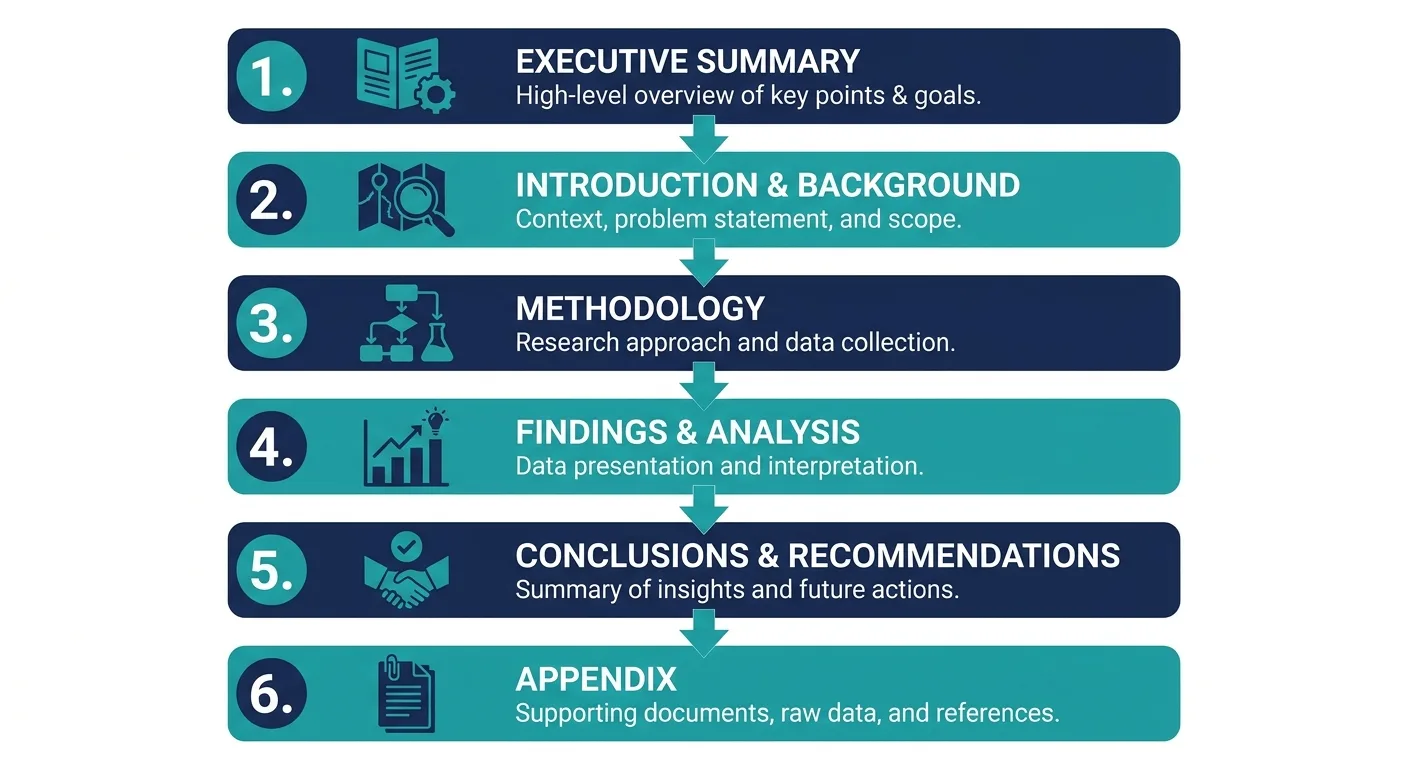
Build your SEO audit report template around this order and every future audit lands in the same shape, so reviewers stop relearning the layout and start reading findings.
The Finding Card: Five Fields Per Issue
Build the report so every finding has context, priority, and a clear fix that stakeholders can act on (crawlraven.com). Most samples name the issue and stop; the card adds the decision fields. Each field is a receipt: proof the approver can check.
- Evidence: source, date range, example URLs.
- Impact: the SEO KPIs it affects and a hedged estimate.
- Effort: a rough size and the people needed.
- Owner: a named role.
- Status: where the fix stands.
Here’s one filled out for orphaned category pages, which no editorial internal link points to:
Finding: Orphaned category pages
Evidence: Crawl export listing category URLs with zero editorial internal links, plus Search Console impressions for those URLs over the same date range
Impact: Category visibility and the products beneath them; estimated as a range, assuming new links come from relevant, indexed pages
Effort: Small to medium; content team adds contextual links
Owner: Content lead
Status: Open

Write impact as a range and spell out the assumption behind it, because false precision erodes trust the moment real results arrive. From month two onward, the status field becomes the column readers check first.
Proof Before Priority: Tracing Each Finding to Its Data
Every claim needs its source, the date pulled, and the date range covered, because each source proves something different and carries a limitation worth stating.
| Source | What it can prove | Limitation to state in the report |
|---|---|---|
| Crawler export | Status codes, internal links, and on-page elements as of the crawl date | A snapshot only; crawl limits and exclusions apply |
| Search Console | Impressions, clicks, and queries per URL in Google Search | Counts differ from GA4 by design |
| GA4 | Organic sessions and conversions on the site | Depends on tracking setup and consent settings |
| Backlink data | Referring domains and anchor text | — |
| Manual SERP check | What a results page showed on a given date | Varies by location, device, and session |
State which source each finding relies on, and resist the urge to reconcile Search Console and GA4 into one figure.
Take a service landing page whose Search Console clicks and GA4 organic sessions disagree for the same month. The finding cites Search Console for the visibility claim and GA4 for the conversion claim, labels each number with its source, and never averages them.

Internal link totals trip up a lot of audits, since menu, footer, and sidebar links repeat across most templates and inflate the count. Report editorial, in-content links on their own and list template links as a separate line.
A free audit works as a first diagnosis, with a full crawl handling ongoing monitoring, and starting with one page is fine (SEOmator). Deciding which flags matter for this site still takes a person. In the scope section, note the crawl limits and data gaps of the SEO tools you use so readers know the boundaries.
Apply the basics of fact-checking to SEO data: a second person rerunning the check should land on the same result. A skeptical developer should also be able to verify the finding in about five minutes.

Matching the File Format to the Person Opening It
Findings can land or flop depending on the file they arrive in. Three formats cover most situations:
| Format | Reader and moment | Build notes |
|---|---|---|
| Clients and executives who read once, for sign-off and archiving | Fixed layout; an SEO audit report sample PDF keeps the summary on page one | |
| Doc | Dev and content leads during collaborative review | Comments and tracked changes; an SEO audit report sample doc keeps feedback attached to each finding |
| Slides | Stakeholders in a live walkthrough | An SEO audit report sample PPT puts one finding on each slide, with evidence on appendix slides |
One scenario deserves planning: an executive opens the PDF on a phone between meetings, so the summary page has to make sense without any scrolling into the findings.

Plenty of audits need two formats. Write once in a single source document and export each format from it, so numbers never diverge between versions; dedicated SEO reporting guides cover that workflow in more depth.
Turning the Audit Into a Monthly Report Without Rebuilding It
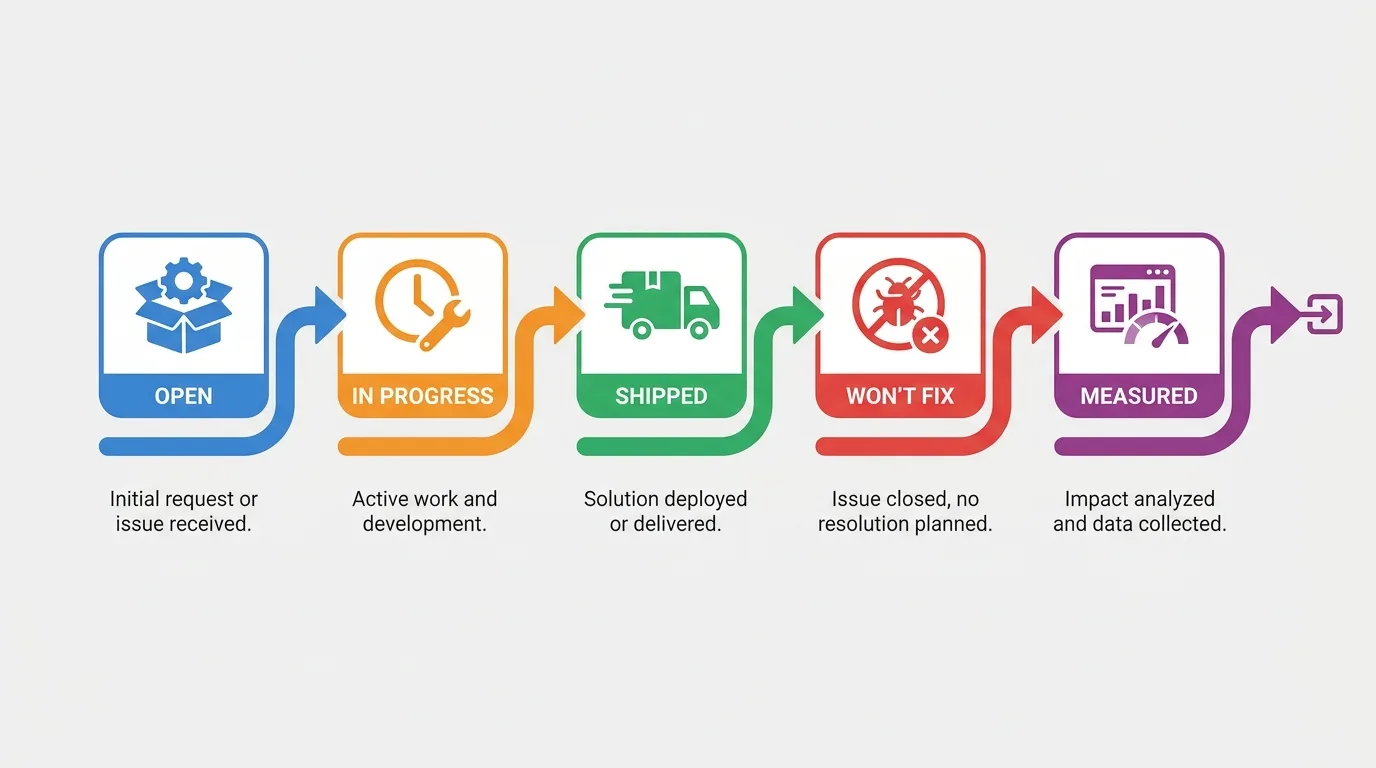
Many teams treat the audit and the monthly report as separate documents, then rebuild context from scratch every month. The status column ends that cycle, because each finding moves through five states: Open, In progress, Shipped, Won’t fix, Measured.
A monthly SEO report template needs four core blocks: what shipped, what moved, what’s next, and blockers. A won’t-fix log can be added on top. The fill-in version:
- Period and report date: month covered, date sent
- What shipped: finding ID, fix, ship date, status moved to Shipped
- What moved: metric, data source, date range, linked finding ID, measurement window
- What’s next: finding IDs moving to In progress, owner for each
- Blockers: finding ID, what’s blocking it, who can unblock it
- Won’t fix log: finding ID, one-line reason
For live monthly reviews, the same blocks map to an SEO report template PPT, one block per slide.
Linking each metric to its audit finding is what makes an SEO report template useful month to month: figures arrive with context attached.
Reuse the same monthly SEO report template each cycle; a consistent template makes months comparable, with the same KPIs, trend and movement tables so the client sees a story unfold (analyzedata.io). Teams that automate recurring SEO reporting still keep the dated export as the record copy.
A redirect chain on a legacy subdomain already scheduled for retirement is a fair call, as long as the report says why.
Search changes take time to surface, and attribution gets messy. State the expected measurement window for each shipped fix, and flag movement you can’t tie to a single change. Rewritten title tags on a set of service pages might ship late in the month. The report marks them Shipped, sets a measurement window that compares equivalent periods after launch against a period before it, and leaves “what moved” empty until that window closes.
An SEO report template free download is only worth adopting if it leaves room for status and annotations; without them, each report starts from a blank page again.
Where the Copy-Paste Hours Pile Up
Everything above works by hand, and the hand part is the trouble: four or five exports, mismatched date ranges, and a screenshot deck rebuilt every month. That manual assembly is where weekends disappear.

The Vee3.ai SEO workspace handles that assembly. It brings crawl, research, planning, writing, fact-checking, publishing and measurement into one workspace, so audit evidence and monthly reporting draw on the same data.
Spend your time on the decisions and let the workspace assemble the evidence: start your first Vee3.ai crawl and begin building your next report.
Frequently Asked Questions About Audit Report Samples
How long should an SEO audit report be?
Length should follow scope and audience, with no fixed page count. Keep the executive summary to one page regardless of total size. The findings section scales with the number of prioritized issues, and a longer SEO audit report sample is fine when the extra length sits in the appendix. A short report that skips evidence only creates follow-up questions.
Should an audit report cover AI search visibility now?
Include AI search visibility as a scoped section when priority queries already trigger AI answers. Log the AI surface checked, the exact prompt, and the date, then note whether the site, a competitor, or no source is cited. Date every check, since answers shift between sessions (see how AI visibility works). If it’s out of scope, say so in the scope and method section.

Can I share a real client report as my own sample?
Share a real client report only with written permission, and anonymize it even then. Check the contract’s confidentiality terms first. Remove the domain, URLs, and brand names. Round or alter traffic and revenue figures too, since real ratios can identify a client in a niche market. Keep the structure, finding cards, and status column; that’s what makes a public SEO audit report sample useful.
Next Step: Rebuild One Finding and Test It on Your Approver
Pick the single highest-impact finding from your current or most recent audit. Rewrite it with all five fields filled, show it to the person who signs off, and watch which field they read first.
That reaction shows how to shape the rest of the report; no downloaded template can tell you that. The best SEO audit report sample is the one you test against a real approver.