
You probably set those regional numbers carefully: the market math checks out, the margins hold, and finance signed off weeks ago.
Crawlers and AI answer engines read your pricing pages too, yet the snippets and summaries they produce don’t always say which region a number belongs to.
Picture a shopper who asks a chatbot what your plan costs, gets one figure, then meets a different one at checkout. The surprise bothers them more than the price.

So if someone in another country asked a chatbot about your price today, what figure would they hear? To find out, start with what geo pricing actually covers, since the label applies to several quite different setups.
TL;DR: Five Things to Know Before Your Prices Go Regional
What Geo Pricing Means and How Sites Detect Location
A working geo pricing definition has to include the detection signal, because the way a site decides where you are shapes every price it shows. Most setups fall into three groups:
- Country or regional price lists, usually tied to a currency and a dedicated storefront.
- Geo targeted pricing, which reads an IP address, account country or billing address to serve a regional price online.
- Geo fencing pricing, which triggers an offer once a phone enters a defined radius, usually through an app with location permission, such as a store perimeter or a concert venue.
Geo pricing enables three useful moves: matching local purchasing power, absorbing regional shipping and tax costs, and testing demand market by market. That way, each regional price serves your broader competitive strategy rather than simply echoing a currency converter.
The catch is that detection signals disagree. IP location, billing country and device GPS can each point somewhere different for the same person. Travelers and remote workers feel this most, since the price they see depends on where the site thinks they are.
Consider a hypothetical case. A remote worker whose billing address is back home browses a software pricing page over hotel Wi-Fi abroad. The page displays the price in the hotel country’s currency. At checkout, the system switches to the billing country, so the total shifts within two clicks.

Deciding What Each Region Pays
Start by pinning down what “region” means for you, because one business uses it for a continent and another for a postcode. Next, find your floor: the lowest regional price that still makes commercial sense.
Cost-plus pricing answers that first. Take the landed cost per region (shipping, duties, local fees, support) and add a target margin. That gives you a starting point, but it ignores what local buyers will pay. Pair the cost floor with competitor analysis for marketing to see what buyers in each region already pay, and roll out one market at a time.

Polycentric pricing hands the decision to local teams or partners, who set prices for their own market. You gain local relevance, but you also risk five teams describing the same plan five different ways in public, and that inconsistency becomes visible once crawlers read it.
Transfer pricing is the price one entity of a company charges another entity in a different country for goods, services or intellectual property. It shapes the internal cost each regional entity carries before it sets a public price. This internal charge also brings tax and compliance obligations that vary by country, so involve a finance or tax advisor early.
International pricing stacks these inputs in sequence. The hypothetical international pricing example below follows one software plan across three regions. It assumes a single comparison currency, tax-exclusive prices and monthly billing.
| Region | Inputs Applied | Resulting List Price |
|---|---|---|
| Region A (home market) | Base cost plus target margin; no internal charge, since the parent entity sells directly | Reference price for the plan (illustrative) |
| Region B (high landed cost) | Base cost plus target margin, plus local support staffing and payment fees, plus an internal charge from the parent entity for IP use | Reference price plus a regional uplift (illustrative) |
| Region C (lower purchasing power) | Base cost plus a reduced margin set by the local team, plus the same internal charge for IP use | Reference price minus a purchasing-power adjustment, kept above the cost floor (illustrative) |
Hypothetical example. Inputs and outcomes are illustrative, not market data.
Inside the company, each row has a clear rationale. Shoppers, however, see only the final figure, which can seem arbitrary without that background.
How Crawlers, Search Snippets and AI Answers Read Regional Prices
Geo pricing turns every published price into data, and machines that never touch your cart are reading it all the time.
Four exposure points matter most:
- Crawlers receive whichever version your server returns to their IP location, and that version feeds search snippets.
- Structured data for products and offers states a price and currency. Markup that differs from the visible price sends conflicting signals.
- AI answer engines summarize pages and may state “it costs X” with the region stripped out. That’s why tracking your AI visibility deserves a spot next to checkout testing.
- Third-party pages such as reviews, forums and roundups quote whatever price their author saw. They can stay indexed long after the price changes.
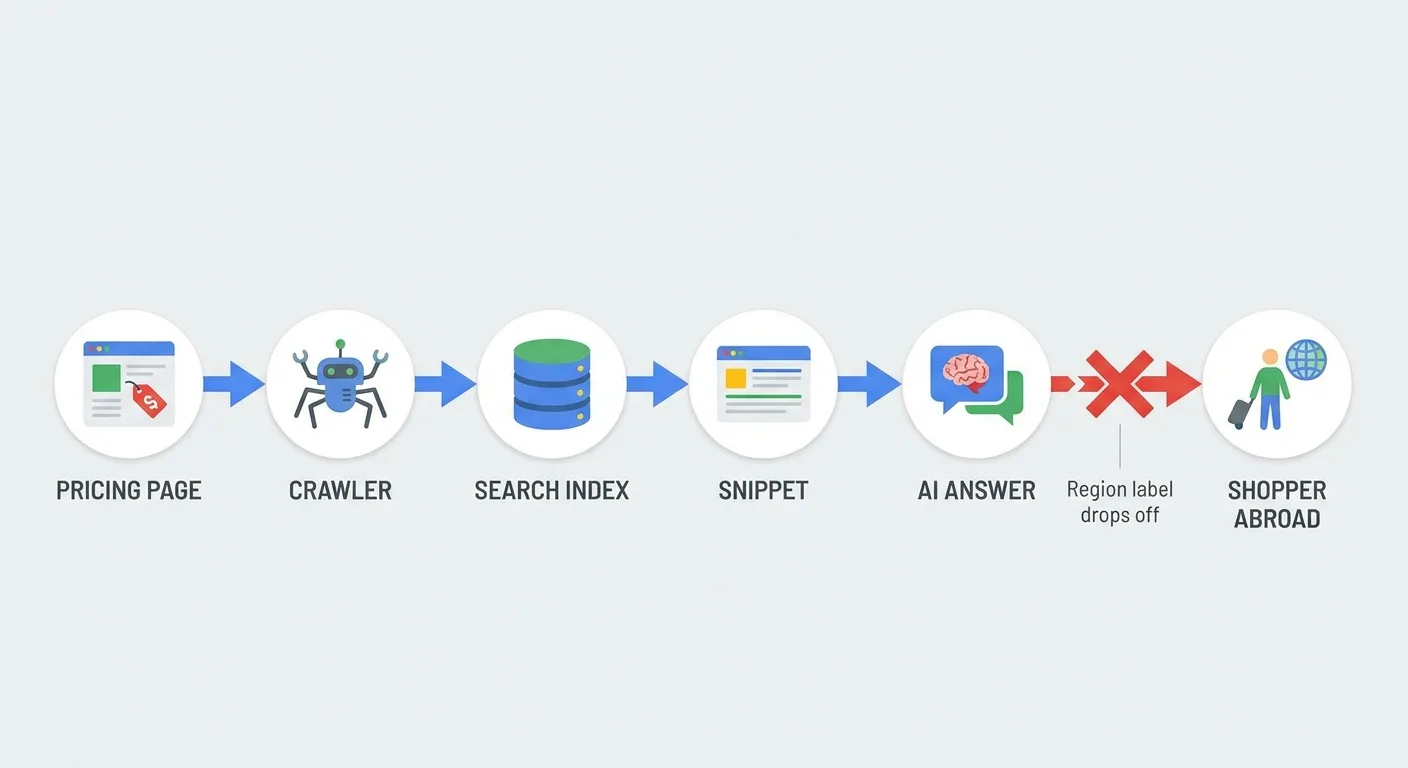
Here’s how that plays out in a hypothetical case. A subscription business serves one /pricing URL that swaps prices by IP. The crawler’s fetch captures one region’s figure, and searchers elsewhere see it in the snippet. An AI answer later repeats it as “the price.” Shoppers who relied on that answer then hit a different number at checkout. The support team handles the complaints.
No business controls every surface. Your goal is narrower and achievable: make your own pages unambiguous, so machines have a clean source to quote.
There’s an upside as well. Intentional regional pages can answer local-intent searches about what your product costs in a specific country, which can make geo pricing pages a visibility asset. (B2B quote pages and app store listings face the same exposure.)
Where Regional Prices Get Misquoted
Six pricing patterns are especially easy to misquote, and the geographical pricing examples in this table are hypothetical. In the first two rows, you can see dual pricing examples: a single page carrying two separate rates.
| Pricing Pattern | Hypothetical Scenario | How It Gets Misquoted | Prevention |
|---|---|---|---|
| Dual pricing | An attraction charges residents one rate and visitors another | An AI answer quotes one figure with no eligibility condition | State who qualifies for each rate in the sentence beside each price |
| Dual pricing menu | A restaurant menu PDF lists a cash rate and a card rate | A snippet or listing pulls only one of the two figures | Label both rates in plain text and keep the PDF matched to the web menu |
| Time pricing | An off-peak rate applies during set local hours | An answer engine repeats the rate with no time zone | Write the hours and time zone next to the rate |
| Promotional pricing | A regional sale ends on its stated date | A cached page or AI summary keeps quoting the sale price | Show start and end dates, then remove or update the offer once it expires |
| Dynamic pricing example | A fare rises during peak demand | — | Publishing a stable “from” price and describing what typically triggers changes can help |
| Psychological pricing examples | A 19.99 price in the home currency converts automatically into an odd figure such as 18.37 in another currency | The odd figure looks careless and gets quoted verbatim | Pick clean price endings for each currency instead of publishing whatever the converter produces |
All scenarios are hypothetical.
Every row loses a condition: who qualifies, when the rate applies or where it holds. A simple fact-checking habit catches that loss when you trace each quoted figure back to the page and the condition it came from.

Which of these rows describes a page you published this year?
Making Regional Prices Readable to Machines (and People)
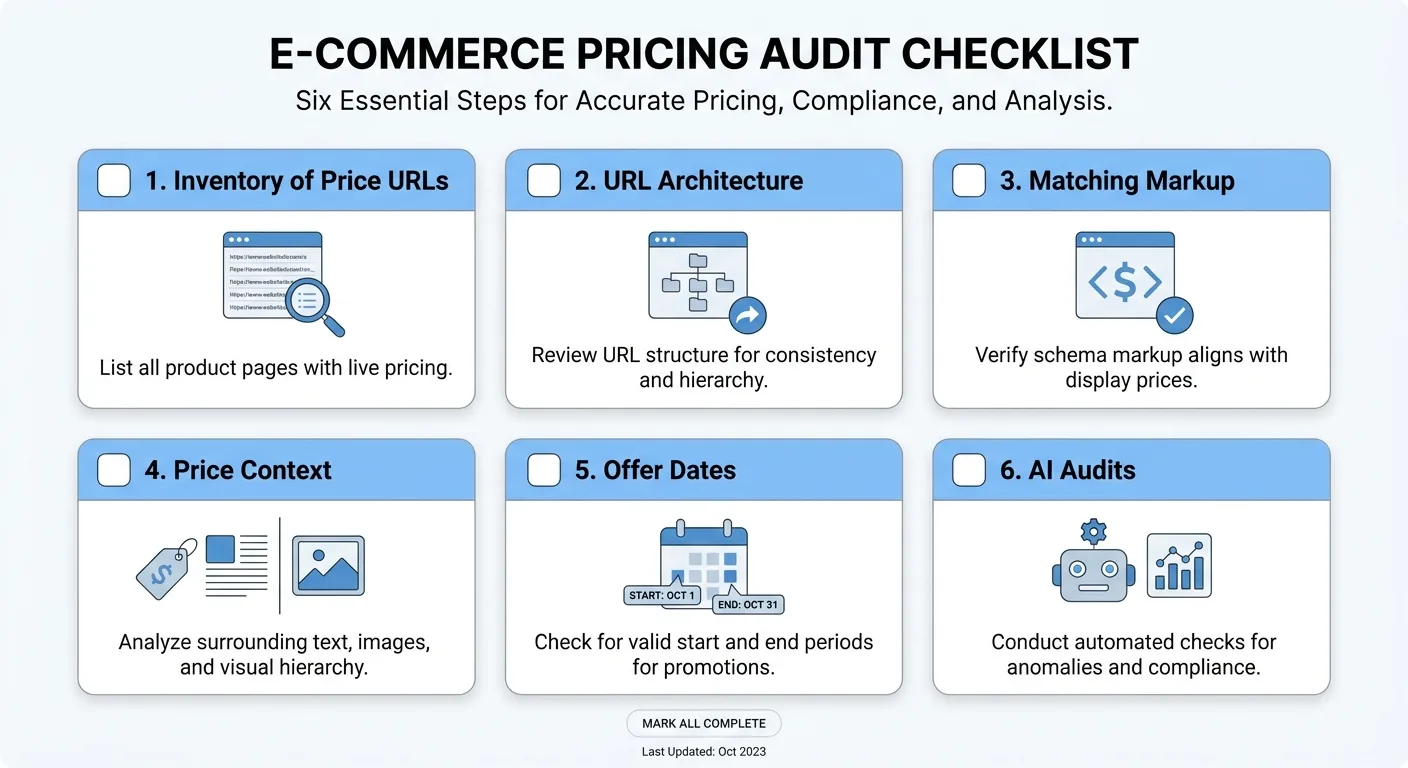
Six steps keep geo pricing readable to machines and people.
- Inventory every URL that mentions a price. Pricing pages, product pages, help docs, blog posts, comparison pages, PDFs, partner slide decks and menus all count. Downloaded files stay in circulation long after a price moves, and older blog posts tend to slip through, so give them special attention.
- Choose an architecture. One URL that swaps prices by location keeps the site simple, but crawlers see a single version. Regional URLs in subfolders or subdomains with hreflang (an HTML attribute that tells search engines which language and region a URL targets) give each region an indexable home, though they add upkeep. Avoid forced IP redirects, which can keep crawlers from reaching regional versions.
- Match structured data to the visible price. Each regional URL’s markup should state the same price and currency the page shows. Teams new to markup can start with how schema markup works before editing the price and currency fields on each regional URL.
- Write context into the copy. Put the region, the currency and the tax status in plain text next to the price. Context in the same sentence as the price is harder for a paraphrasing engine to drop.
- Time-stamp offers. List the start date, end date and time zone, then remove or update expired promotions instead of leaving them live.
Price line template (covers steps 4 and 5):
Price: [amount] [currency code]
Applies to: buyers in [region or country]
Tax: [included / excluded]
Billing: [monthly / annual / one-time]
Offer window (promotions only): [start date] to [end date], [time zone]

- Check after every price change. Search your brand plus “price” and the region, then ask the major AI answer tools what you charge. Note each mismatch and trace it to the page it came from.
AI answer audit log (one entry per check):
Date checked:
Region and query used (for example, brand + "price" + country):
Surface checked (search snippet or named AI answer tool):
Price and currency quoted:
Matches the live regional price? (yes / no)
Source page cited or traced:
Fix applied and date:
Consider a hypothetical team to see how steps one and six depend on each other. They raise one region’s price and update the pricing page the same day. A follow-up check finds an AI answer still quoting the old figure, which they trace to a two-year-old comparison post nobody added to the inventory.
Consumer protection and price display rules vary by country, so check with counsel before launching regional prices.
Monitoring Price Mentions Across Pages and AI Answers
A single geo pricing update can touch pricing pages, product pages, old posts and help docs. As the number of regional prices grows, checking every mention by hand quickly stops being reliable. Comparing AI visibility tools can help you choose monitoring support.
Vee3.ai is one SEO workspace built for AI search, designed to lighten the inventory and monitoring load:
- The Vee3.ai crawl workflow crawls your site, which helps surface pages that state a price.
- The Vee3.ai measurement stage tracks results, inside a workspace designed around AI search.
- The Vee3.ai fact-check stage adds a fact-check step before publishing.
- Pages built in Vee3.ai move through planning, writing and publishing in one workspace.

Crawl your site for every page that mentions a price, then start building on Vee3.ai.
Frequently Asked Questions About Regional Prices
Does geo pricing hurt SEO?
Geo pricing doesn’t hurt SEO on its own; problems start when the setup hides regional prices from crawlers or contradicts them. A single URL that swaps prices by location shows crawlers one version and leaves other regions without an indexable page, as guidance on SEO for SaaS pricing pages explains. Forced IP redirects can block regional pages, and markup that contradicts the visible price weakens trust signals. Each of these three issues is addressed by the architecture and structured data steps covered earlier.

Can I run regional and dynamic prices on the same product?
You can run both by treating geo-pricing as the stable regional base and demand-based changes as a variable layer on top. Publish the regional base price as the reference figure on each regional page. Then describe the variable part by stating that prices can change, explaining what drives the changes, and giving the range of prices that might apply, such as minimum and maximum amounts (Macfarlanes). Some markets restrict how variable prices get displayed, so check with counsel.
What happens when shoppers use a VPN to get a cheaper regional price?
A VPN changes the IP signal, so IP-based geo pricing reads the VPN’s location and shows the price tied to it. You can confirm eligibility at checkout through billing country, payment method country or account region, and state that rule on the pricing page. Some businesses accept a little leakage as the cost of serving lower-priced markets. Give honest travelers a clear route to support. Involve counsel too, since rules on refusing sales differ by country.

Next Step: Inventory Your Price Mentions
A regional price should carry the same figure and conditions wherever someone meets it, whether that’s your checkout, a search snippet or a chatbot reply.
Starting out with geo pricing is straightforward: list every page that mentions a price. Borrow the structure of a sample SEO audit report so the findings are easy to hand to whoever owns each page. Then pick the region where a misquote would hurt most and fix that one first.
From then on, run step 6 again whenever a price changes and record each check in the audit template, so it becomes a routine part of your international pricing strategy.